BASIC OPERATION
200
BASIC OPERATION
QUICK REFERENCE
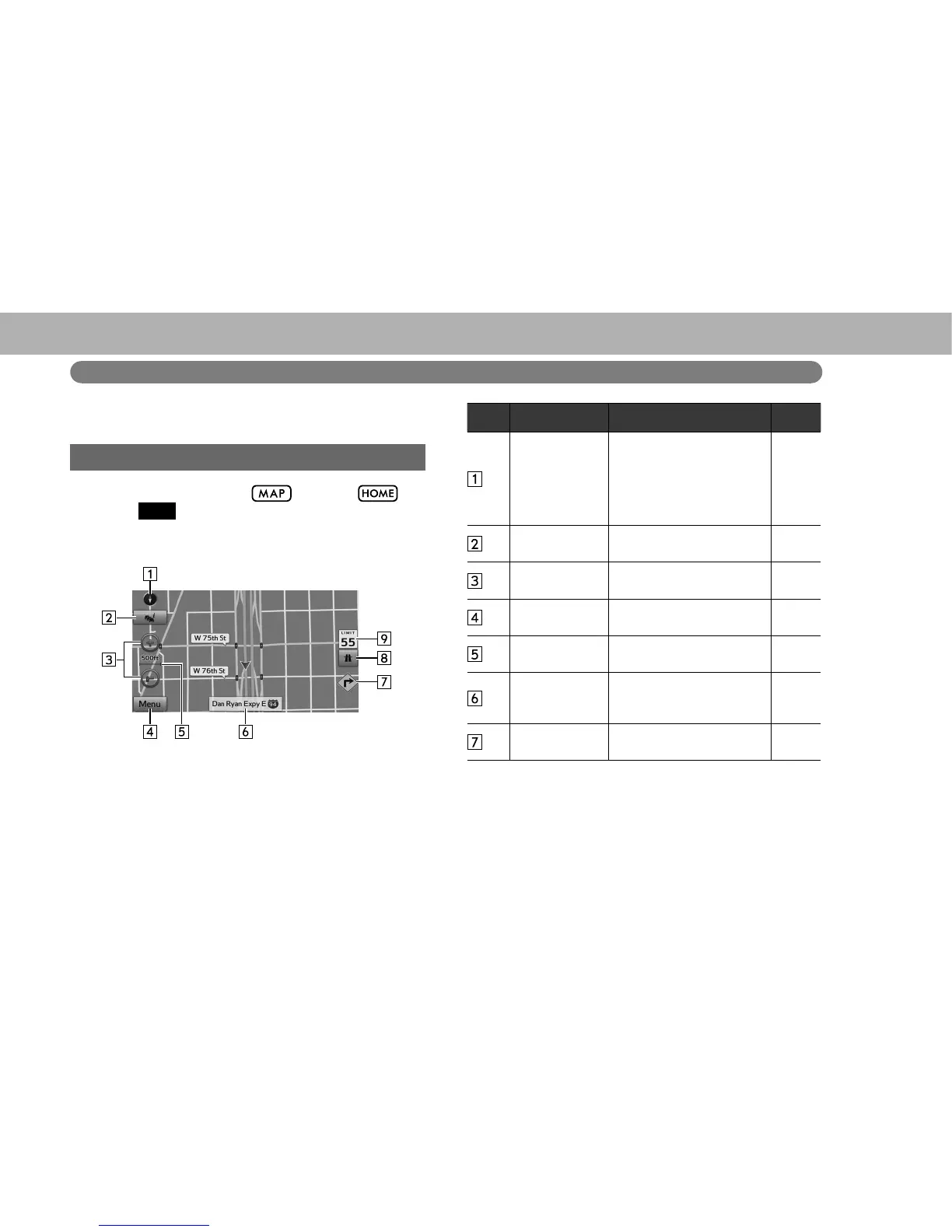
MAP SCREEN
To display this screen, select , or select and
then select
MAP
(MAP).
No. Name Information/Function Page
2D North-up, 2D
heading-up or
3D symbol
Select to change the map
display mode between 2D
north-up, 2D heading-up
or 3D. In 3D map, only
a heading-up view is
available.
207
*
7UDI¿FEXWWRQ
6HOHFWWRFKHFNWKHWUDI¿F
detailed conditions.
208
Zoom in/out
button
Select to magnify or reduce
the map scale.
206
Menu button
Select to display the menu
screen.
203
Scale indicator
7KLV¿JXUHLQGLFDWHVWKH
map scale.
206
Current street
Select to display the “Where
Am I? (Where Am I?)”
screen.
204
*
Drive Alert
Indicator
Display the drive alert
indicator.
-















 To Next Page