ROUTE GUIDANCE
230
EDITING ROUTE
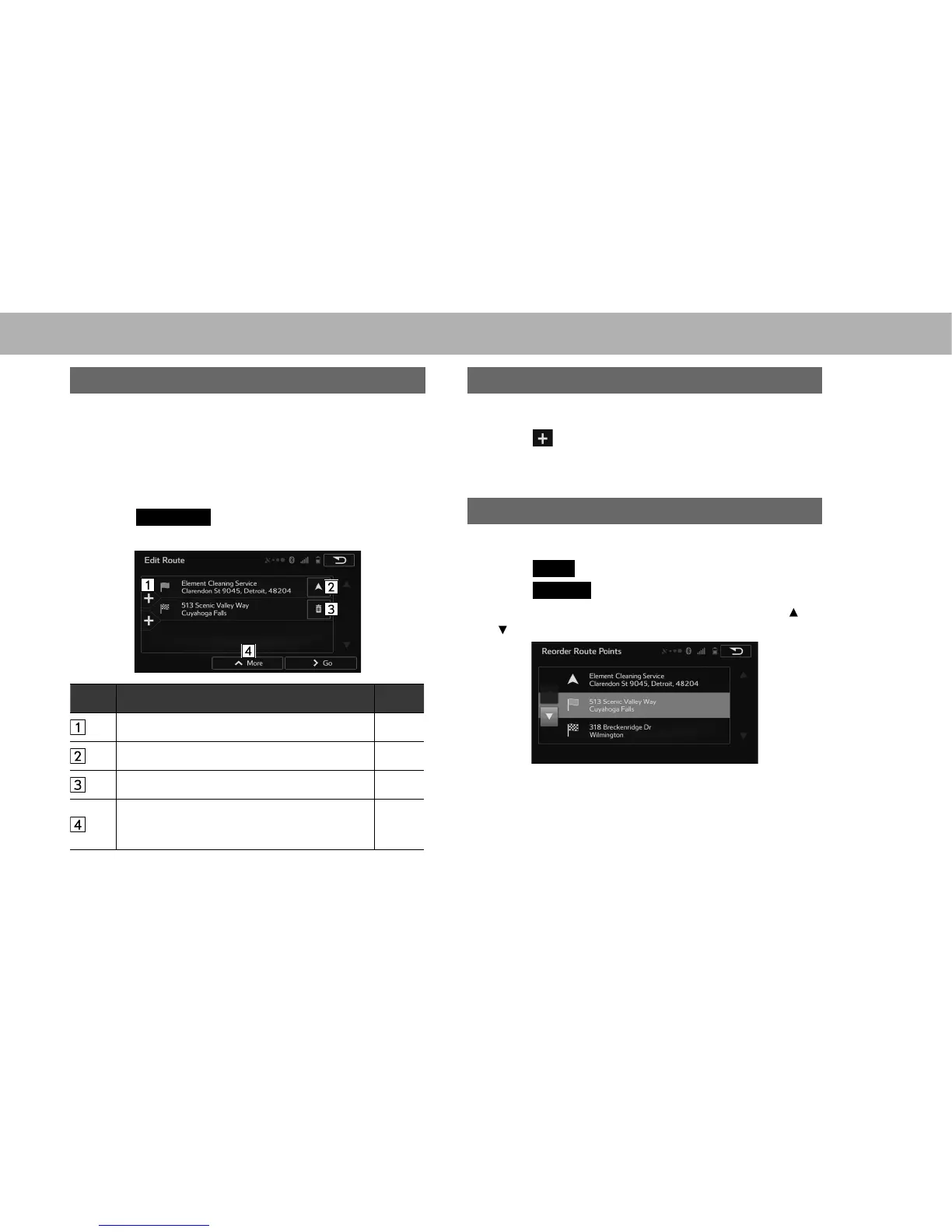
You can change the destination list and edit the route. You
can add or delete destinations, change the start point, or
change the order of the list.
1. Display the “Change Route (Change Route)” screen.
ĺ3
2. Select
Edit Route
(Edit Route).
3. Select the desired item.
No. Function Page
Select to add a destination. 230
Select to change the start point of the route. 234
Select to delete a destination. 231
Select to change the display order of the list.
You can also manually select the optimum
route in the application.
230
ADDING DESTINATIONS
1. 'LVSOD\WKH³(GLW5RXWH(GLW5RXWH´VFUHHQĺ3
2. Select .
3. Search for an additional destination in the same way as
DGHVWLQDWLRQVHDUFKĺ3
REORDERING DESTINATIONS
1. 'LVSOD\WKH³(GLW5RXWH(GLW5RXWH´VFUHHQĺ3
2. Select
More
(More).
3. Select
Reorder
(Reorder).
4. Select the desired destination and then select or
of left side on the screen to change the arrival order.















 To Next Page