MirrorLink™
151
APPS
5
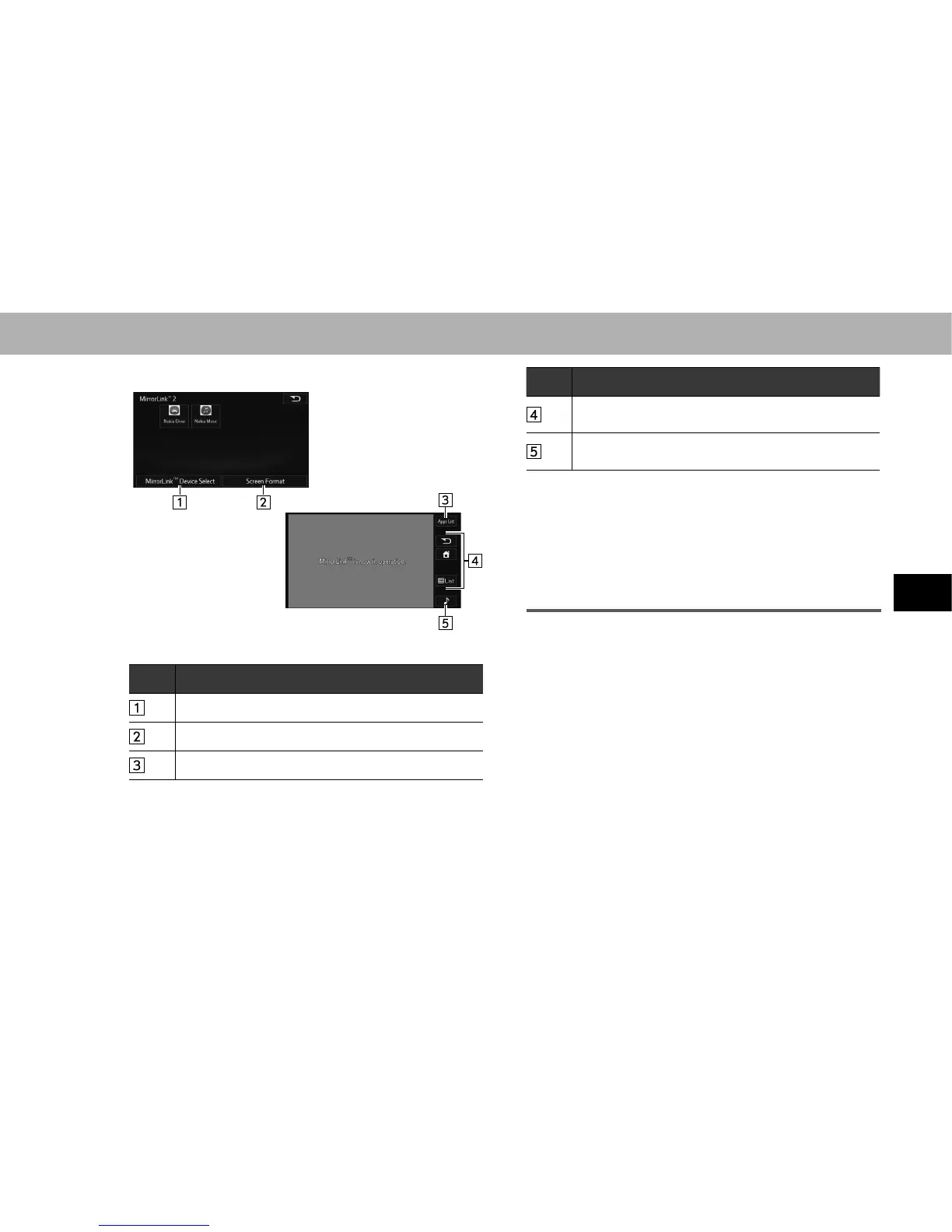
XControl screen
<Application list screen>
<Operation screen*>
*: The displayed screen will differ depending on the connected smartphone.
No. Function
Select to choose a MirrorLink™ device.
6HOHFWWRFKDQJHWKHVFUHHQVL]Hĺ3
Select to return the application list screen.
No. Function
Displays software buttons that function as the buttons
on the smartphone.
Select to change the other audio source (Radio, Disc
etc.).
NOTE
O This function cannot be used while USB audio, video or photo is
in use.
O The video displayed on the screen may differ from that displayed
on the smartphone.
O It may not be possible to use certain applications while driving.
ABOUT THE SUPPORTED DEVICES
Ɣ Your smartphone must support the MirrorLink
TM
function.
Ɣ Available operations will differ depending on your
smartphone. Refer to your smartphone owner's
manual, or consult the manufacturer.















 To Next Page