USEFUL INFORMATION
164
XWith navigation function
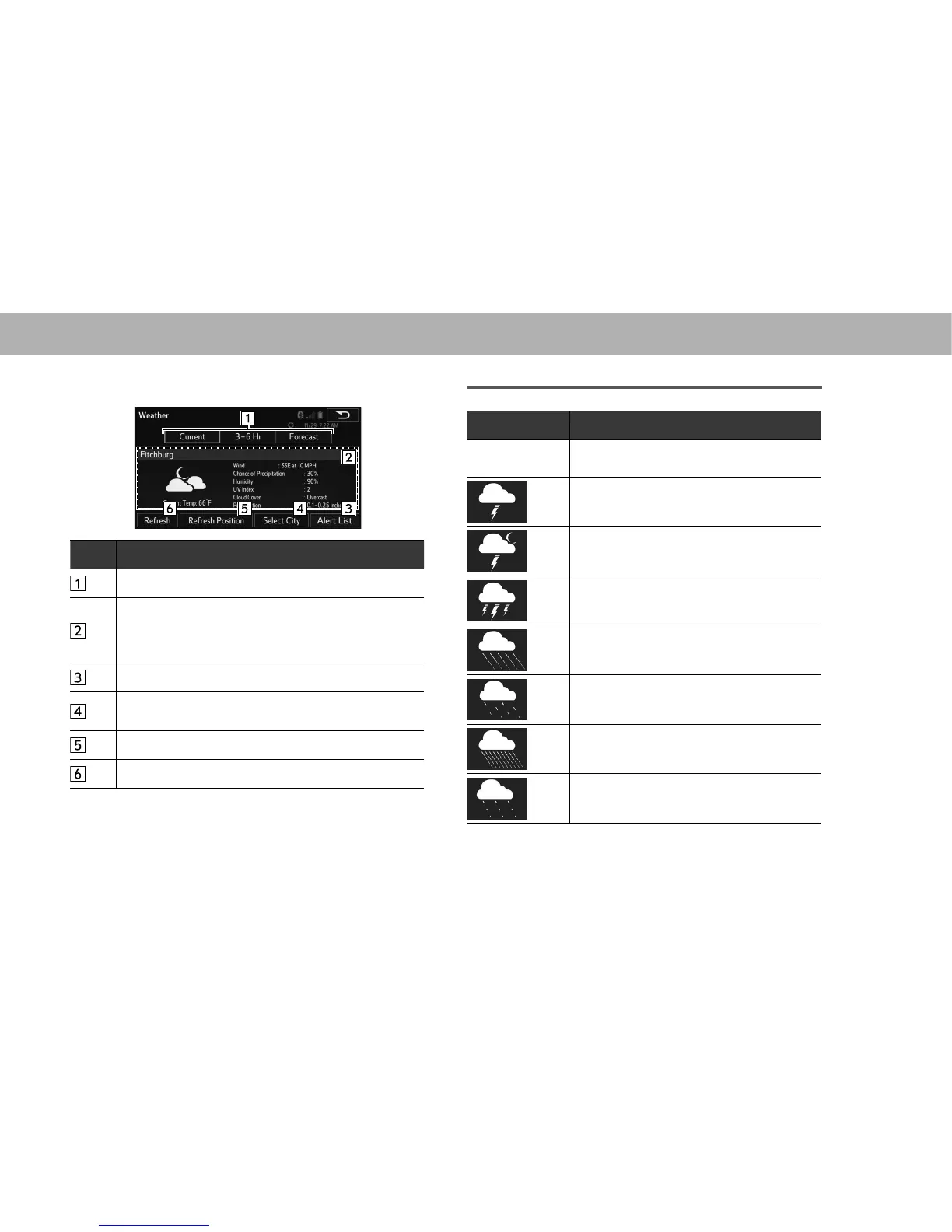
3. Check that weather information is displayed.
No. Function
Select to switch the timing of the displayed forecast.
Items such as the weather forecast, forecast
temperature or highest temperature (orange)/lowest
temperature (blue), and chance of precipitation are
displayed.
Select to display alert list.
Select to set the forecast region. Follow the steps in
“XWithout navigation function” from “STEP 4”.
Select to update the forecast location.
Select to update with the latest information.
Weather forecast icons
Display Information
none
No Data Available
Unknown Precip
Isolated Thunderstorms
Scattered Thunderstorms
Scattered Thunderstorms (night)
Severe Thunderstorms
Thunderstorms
Rain
Light Rain
Heavy Rain
Scattered Showers
Showers















 To Next Page