MEDIA OPERATION
89
AUDIO
3
No. Function
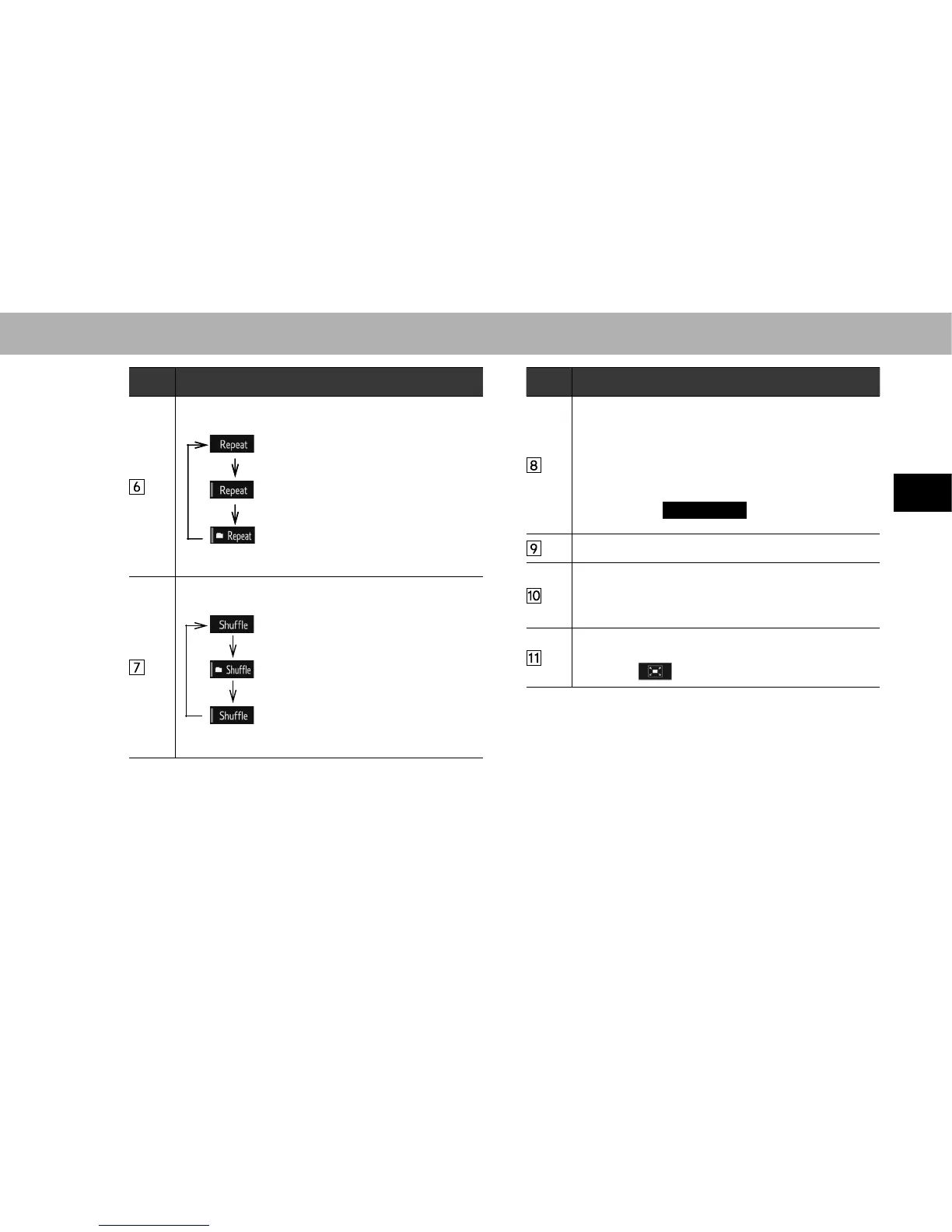
The repeat method changes as shown below each time
the repeat button is selected.
: Repeat playback is disabled.
: The file/track currently playing will be
repeated.
: The files/tracks contained within the
folder/album currently playing will be
repeated.
The random playback method changes as shown below
HDFKWLPHWKHVKXIÀHEXWWRQLVVHOHFWHG
: Random playback is disabled.
: The files/tracks contained on the SD
card currently playing will be played in
random order.
: The files/tracks contained within the
folder/album currently playing will be
played in random order.
No. Function
Select to display the play mode selection screen.
“Artists (Artists)”/“Albums (Albums)”/“Songs
(Songs)”/“Genres (Genres)”/“Composers
(Composers)”/“Folder (Folder)”/“Videos (Videos)” are
on the play mode selection screen.
Switching between SD audio and SD video is possible
on the play mode selection screen. To return to the top
screen, select
Now Playing
(Now Playing) on the
list screen.
Select to choose the folder.
Select to display the options screen.
The following can be done on the options screen.
6HOHFWWRFKDQJHWKHVFUHHQVL]Hĺ3
6HOHFWWRGLVSOD\WKHDXGLRVHWWLQJVVFUHHQĺ3
Displays video.
Select to display full screen video.
Selecting will also change to full screen.















 To Next Page