874 Appendix A: Functions and Instructions
Shade CATALOG
Shade
expr1
,
expr2
, [
xlow
], [
xhigh
], [
pattern
], [
patRes
]
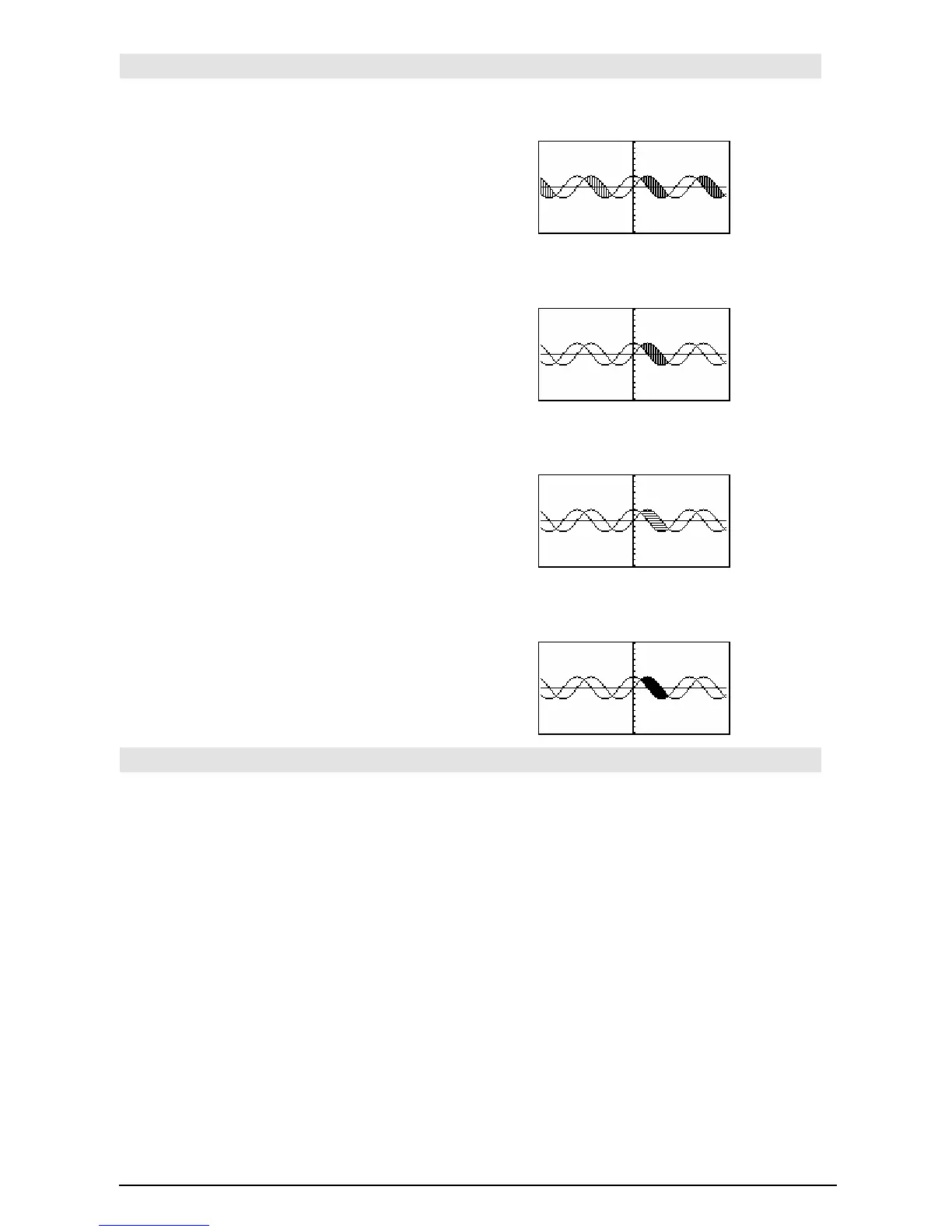
Displays the Graph screen, graphs
expr1
and
expr2
, and shades areas in which
expr1
is less than
expr2
. (
expr1
and
expr2
must be expressions that
use
x as the independent variable.)
xlow
and
xhigh
, if included, specify left and right
boundaries for the shading. Valid inputs are
between
xmin and xmax. Defaults are xmin and
xmax.
pattern
specifies one of four shading patterns:
1 = vertical (default)
2 = horizontal
3 = negative-slope 45¡
4 = positive-slope 45¡
patRes
specifies the resolution of the shading
patterns:
1= solid shading
2= 1 pixel spacing (default)
3= 2 pixels spacing
©
10= 9 pixels spacing
Note: Interactive shading is available on the
Graph screen through the
Shade instruction.
Automatic shading of a specific function is
available through the
Style instruction. Shade is
not valid in 3D graphing mode.
In the
ZoomTrig viewing window:
Shade cos(x),sin(x) ¸
"
ClrDraw
¸ Done
Shade cos(x),sin(x),0,5
¸
"
ClrDraw
¸ Done
Shade cos(x),sin(x),0,5,2
¸
"
ClrDraw
¸ Done
Shade cos(x),sin(x),0,5,2,1
¸
shift() CATALOG
shift(
integer1
[,
#ofShifts
]) ⇒
⇒⇒
⇒
integer
Shifts the bits in a binary integer. You can enter
integer1
in any number base; it is converted
automatically to a signed, 32-bit binary form. If
the magnitude of
integer1
is too large for this
form, a symmetric modulo operation brings it
within the range.
If
#ofShifts
is positive, the shift is to the left. If
#ofShifts
is negative, the shift is to the right. The
default is ë 1 (shift right one bit).
In a right shift, the rightmost bit is dropped and 0
or 1 is inserted to match the leftmost bit. In a left
shift, the leftmost bit is dropped and 0 is inserted
as the rightmost bit.
For example, in a right shift:
In Bin base mode:
shift(0b1111010110000110101) ¸
0b111101011000011010
shift(256,1)
¸
0b1000000000
In Hex base mode:
shift(0h78E)
¸ 0h3C7
shift(0h78E,
ë2) ¸ 0h1E3
shift(0h78E,2)
¸ 0h1E38
Important: To enter a binary or hexadecimal
number, always use the 0b or 0h prefix (zero,
not the letter O).













 To Next Page