© Copyright 2020 TRENDnet. All Rights Reserved.
Configure IP Source Guard
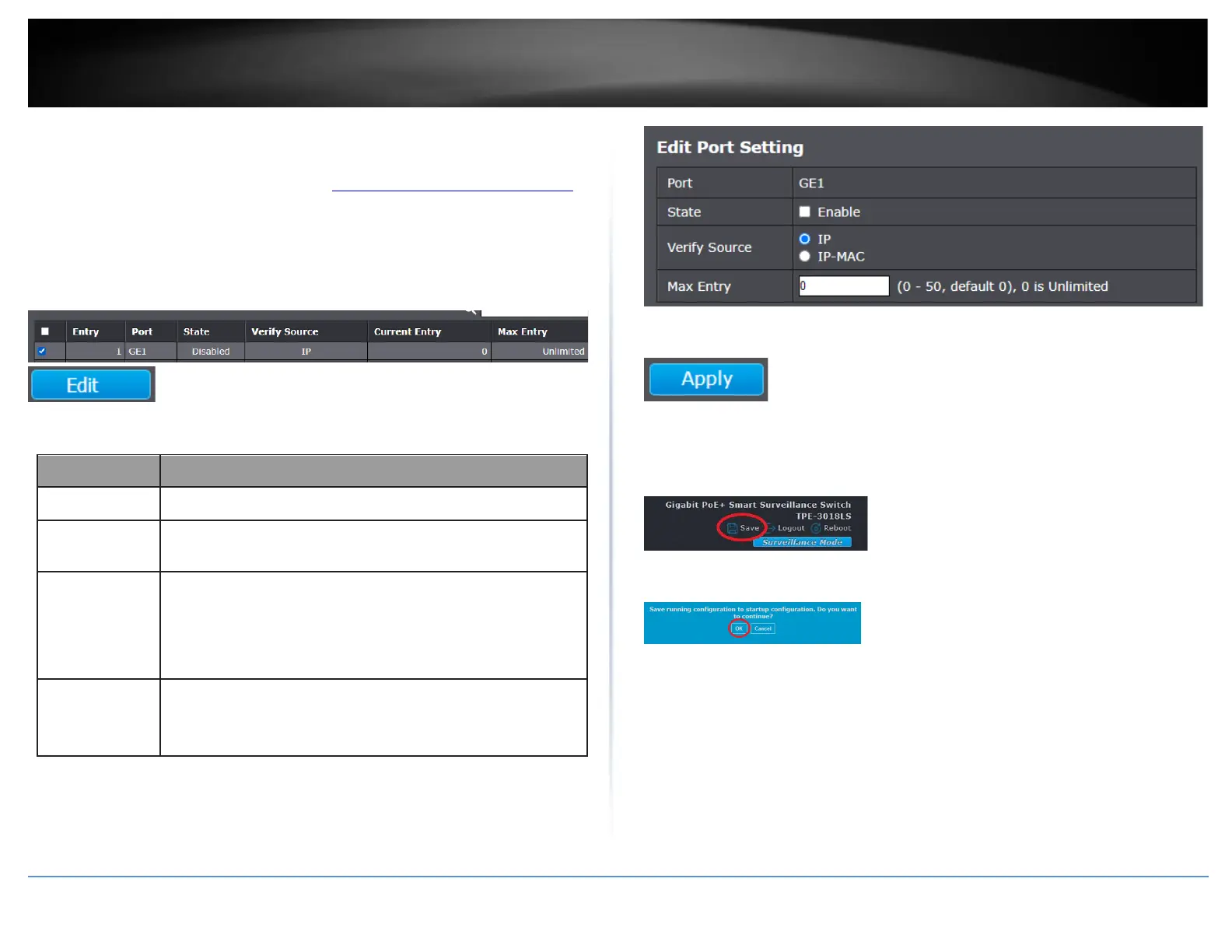
Security > IP Source Guard > Port Setting
1. Log into your switch management page (see “Access your switch management page”
on page 11).
2. Click on Security, click on IP Source Guard, and click on Port Setting.
3. In the table, select the ports to configure for IP Source Guard and click Edit.
4. Review the setting below.
Display selected port to be edited.
Set checkbox to enable or disable IP Source Guard function.
Default is disabled.
Select the mode of IP Source Guard verification
•
IP: Only verify source IP address of packet.
•
IP-MAC: Verify source IP and source MAC address of packet.
Input the maximum number of entries that a port can be
bounded.Default is un-limited on all ports. No entry will be
bound if limitation reached.
5. Click Apply.
6. In the top right, click Save to save the configuration settings to NV-RAM/startup
configuration.
7. Click OK.













 To Next Page