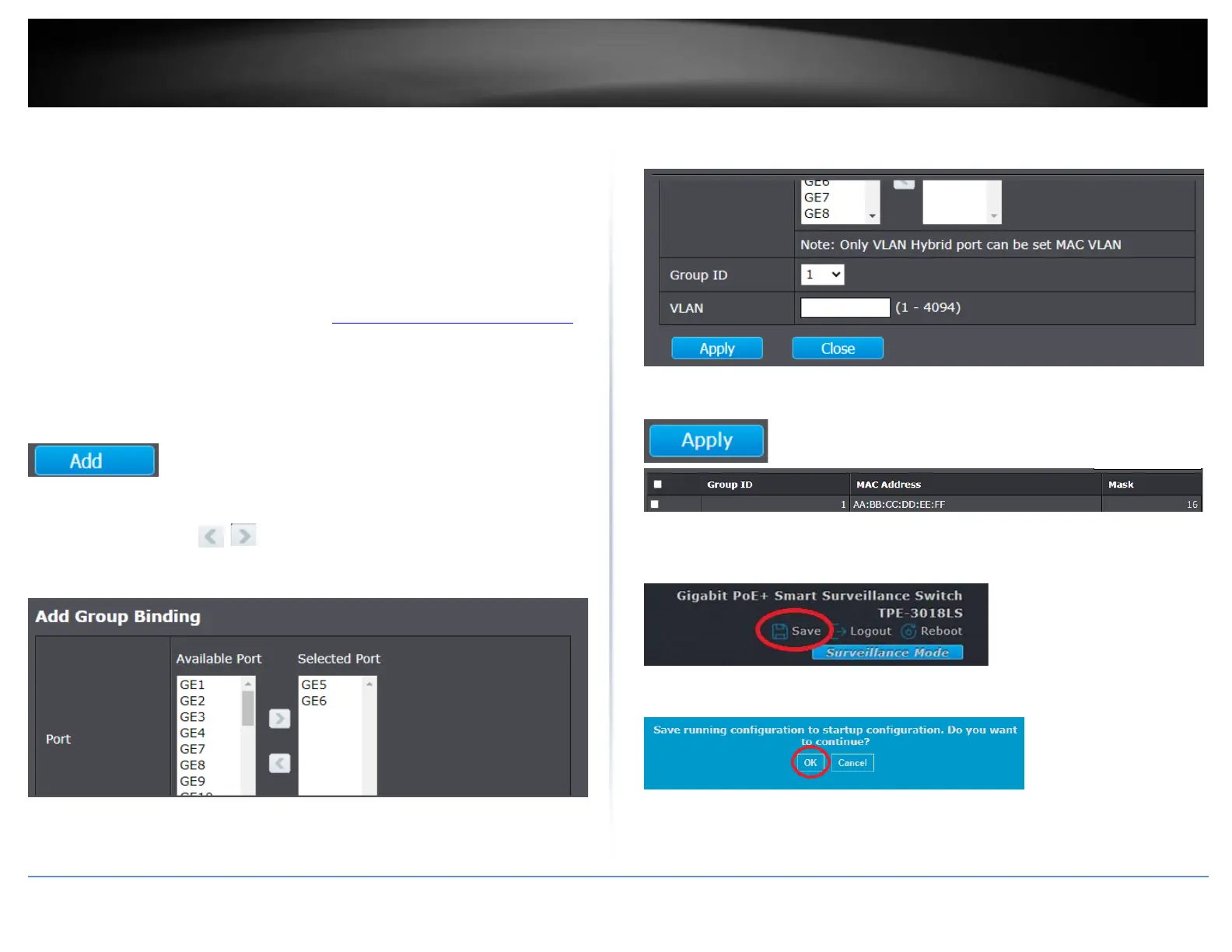
Configure MAC VLAN group binding
VLAN > MAC VLAN > Group Binding
After you have created the MAC VLAN group with MAC address and filter mask, you will
need to bind the MAC VLAN group to the specific ports and VLAN.
Note: The MAC VLAN feature can only be used if switch ports are set to Hybrid mode
under VLAN > Port Setting.
1. Log into your switch management page (see “Access your switch management page”
on page 11).
2. Click on VLAN, click on MAC VLAN, and click on Group Binding.
3. Click Add to add a new MAC VLAN group.
4. In the Port section, in the Available Port list, select the port to bind to the MAC-based
VLAN group and use the buttons to move the port to and from the Select
Port list.
Note: You can select multiple ports by hold shift or ctrl.
5. Click the Group ID drop-down list to select MAC VLAN group to bind and enter the
VLAN ID to move the devices that match the MAC VLAN group filter.
6 Click Apply save the new MAC VLAN group.
7. In the top right, click Save to save the configuration settings to NV-RAM/startup
configuration.
8. Click OK.













 To Next Page