Applying IP address settings to ONVIF authorized devices
ONVIF > Discovery > IP Camera
After ONVIF compliant devices have been discovered and successfully authorized, you
can apply IP address configuration settings to these devices from the surveillance switch
interface.
1. Log into your switch management page (see “Access your switch management page”
on page 11).
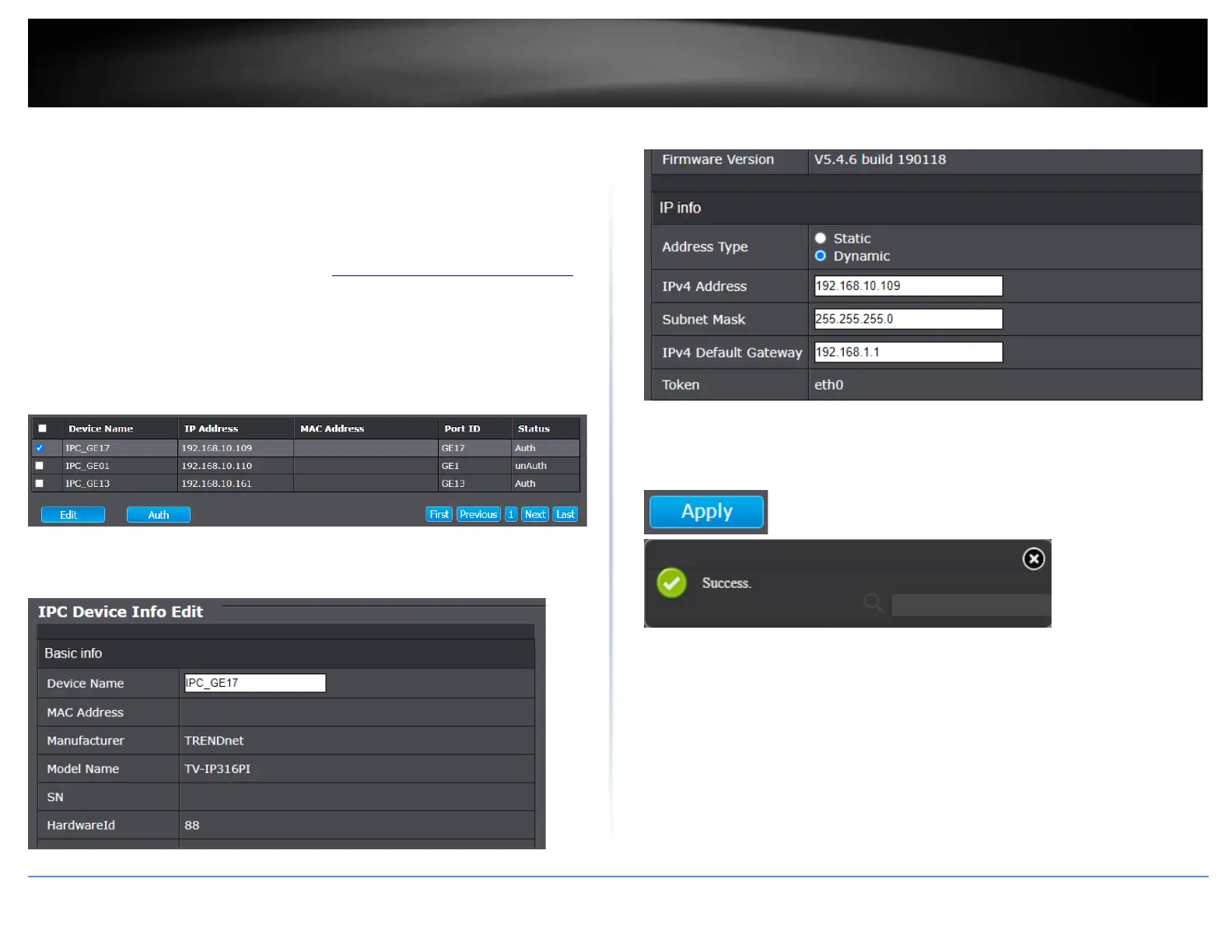
2. Click on ONVIF, click on Discovery, and click on IP Camera.
3. For the ONVIF devices that have been successfully authorized, check the device in the
list and click Edit.
4. Under the IPC Device Info Edit section, you can view additional device information,
modify the Device Name and IP address configuration.
5. Scroll down the window to view or modify the device IP address configuration.
6. After you have applied configuration changes, scroll to the bottom of the window and
click Apply. A success message will appear if the configuration changes were
successfully applied.
Note: After the configuration changes have been successfully applied, the device will
appear in the list with the updated information.













 To Next Page