© Copyright 2020 TRENDnet. All Rights Reserved.
Ping Watchdog
Diagnostics > Ping Watchdog
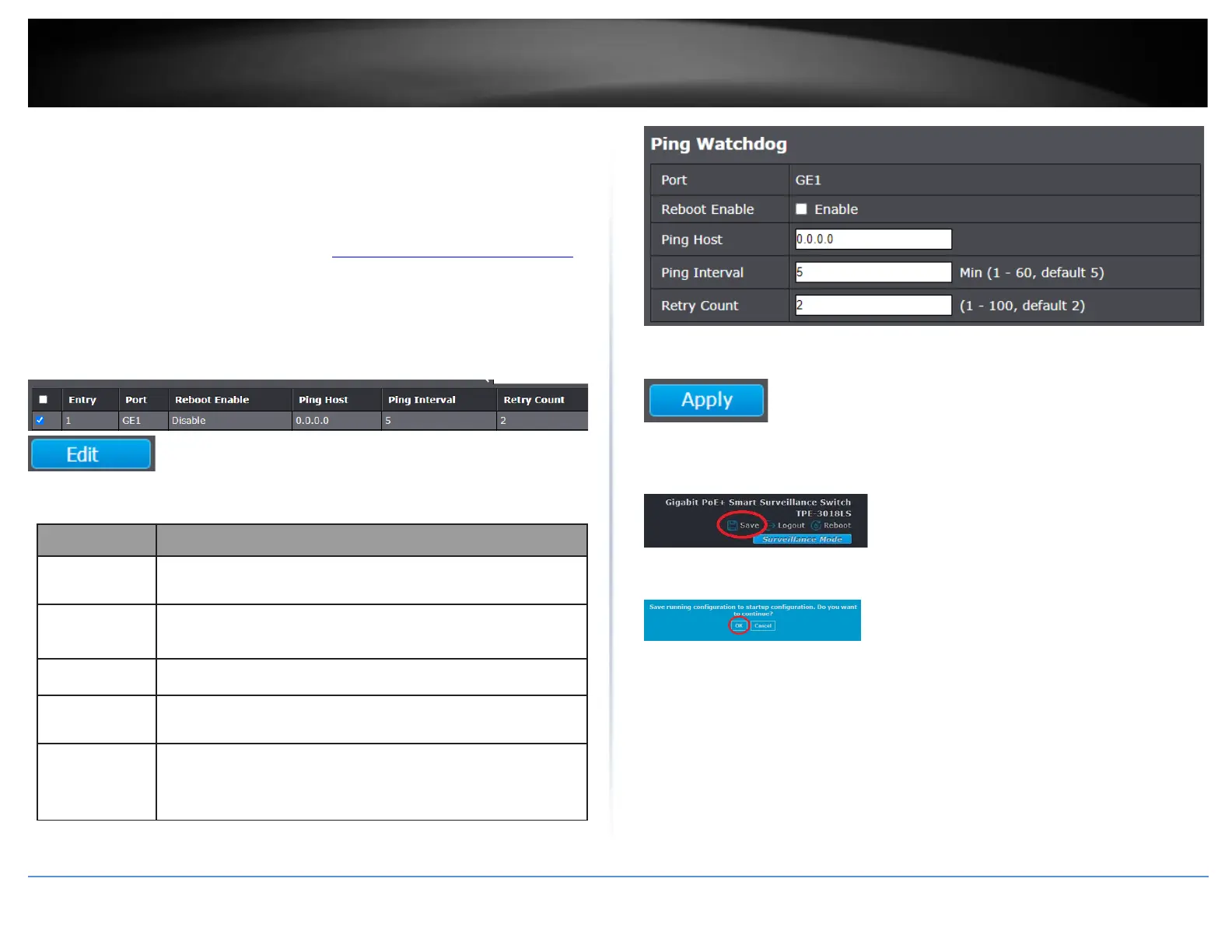
This section allows users to configure a connectivity test to remote host. If connectivity
is lost to the remote host, the switch will reboot automatically.
1. Log into your switch management page (see “Access your switch management page”
on page 11).
2. Click on Diagnostics and click on Ping Watchdog.
3. In the table, select the port to configure for ping watchdog and click Edit.
4. Review the settings below.
Displays the port or ports currently selected to configure for
ping watchdog.
Checking the Enable option will automatically reboot the
switch on ping failure to the remote host.
Enter the IPv4 address of the remote host to ping.
Enter the time period between each ping send to the host in
minutes.
Enter the number of retries allowed if ping fails to the host.
After the retry count is reached, the switch will automatically
reboot.
5. Click Apply.
6. In the top right, click Save to save the configuration settings to NV-RAM/startup
configuration.
7. Click OK.













 To Next Page