© Copyright 2020 TRENDnet. All Rights Reserved.
Configure IP Source Guard IMPV Binding
Security > IP Source Guard > IMPV Binding
1. Log into your switch management page (see “Access your switch management page”
on page 11).
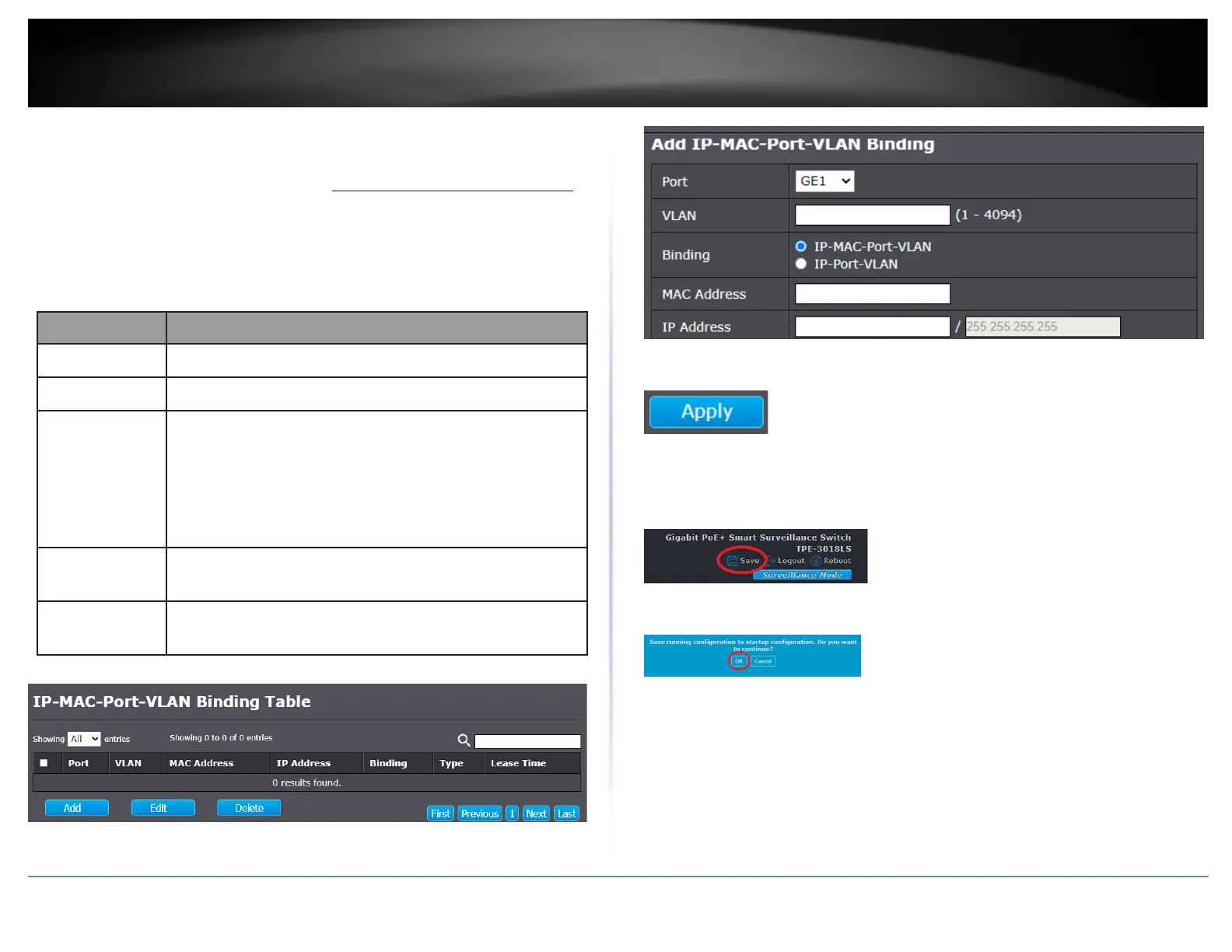
2. Click on Security, click on IP Source Guard, and click on IMPV Binding.
3. Click Add and review the settings below.
Select port from list of a binding entry.
Specify a VLAN ID of a binding entry.
Select matching mode of binding entry
•
IP-MAC-Port-VLAN: packet must match IP
address、MAC address、Port and VLAN ID.
•
IP-Port-VLAN: packet must match IP address or
subnet、Port and VLAN ID.
Input MAC address. Only available on IP-MAC-
Port-VLAN mode.
Input IP address and mask. Mask only available
on IP-MAC-Port mode.
4. Click Apply.
5. In the top right, click Save to save the configuration settings to NV-RAM/startup
configuration.
6. Click OK.













 To Next Page