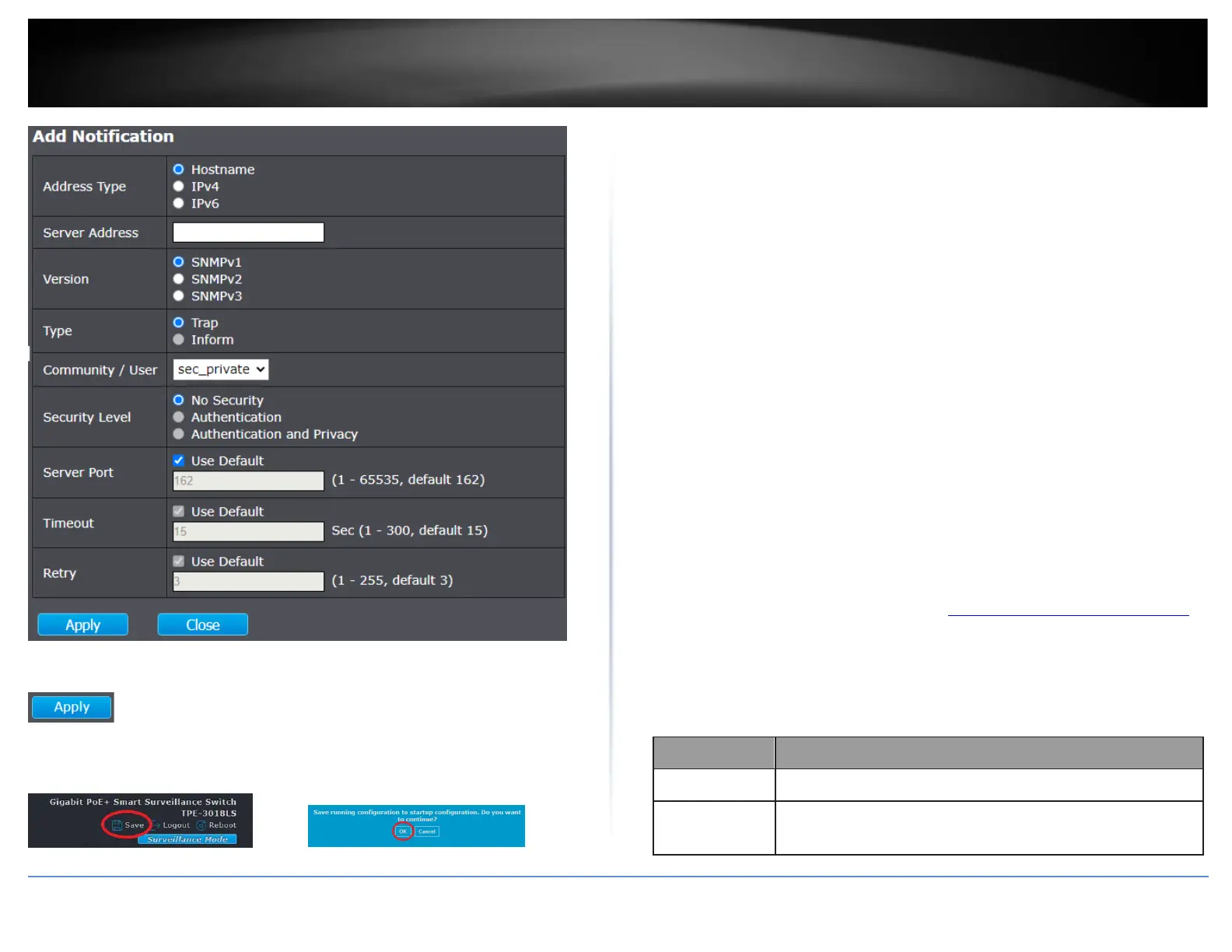
4. Click Apply.
5. In the top right, click Save to save the configuration settings to NV-RAM/startup
configuration. Click OK.
RMON
The RMON (Remote MONitoring) MIB is used with SNMP applications to monitor the
operations of network devices. The Switch supports the four RMON MIB groups listed
here:
• Statistic group— This group is used to view port statistics remotely with SNMP
programs.
• History group— This group is used to collect histories of port statistics to
identify traffic trends or patterns.
• Event group— This group is used with alarms to define the actions of the
switch when packet statistic thresholds are crossed.
• Alarm group—This group is used to create alarms that trigger event log
messages or SNMP traps when statistics thresholds are exceeded.
You can use your SNMP Network Management System (NMS) software and the RMON
section of the MIB tree to view the RMON statistics, history and alarms associated with
specific ports. Since RMON uses the SNMP agent for communicating with your NMS
software, the SNMP Agent must be enabled and the SNMP feature must be configured
on your switch. Since RMON works in conjunction with the SNMP agent, the SNMP
agent must be enabled for the RMON feature to be active.
View RMON Statstics
Management > RMON > Statistic
1. Log into your switch management page (see “Access your switch management page”
on page 11).
2. Click on Management, click on RMON, and click on Statistic.
3. Review the settings.













 To Next Page