© Copyright 2020 TRENDnet. All Rights Reserved.
Save DHCP Snooping Database
Security > IP Source Guard > Save Database
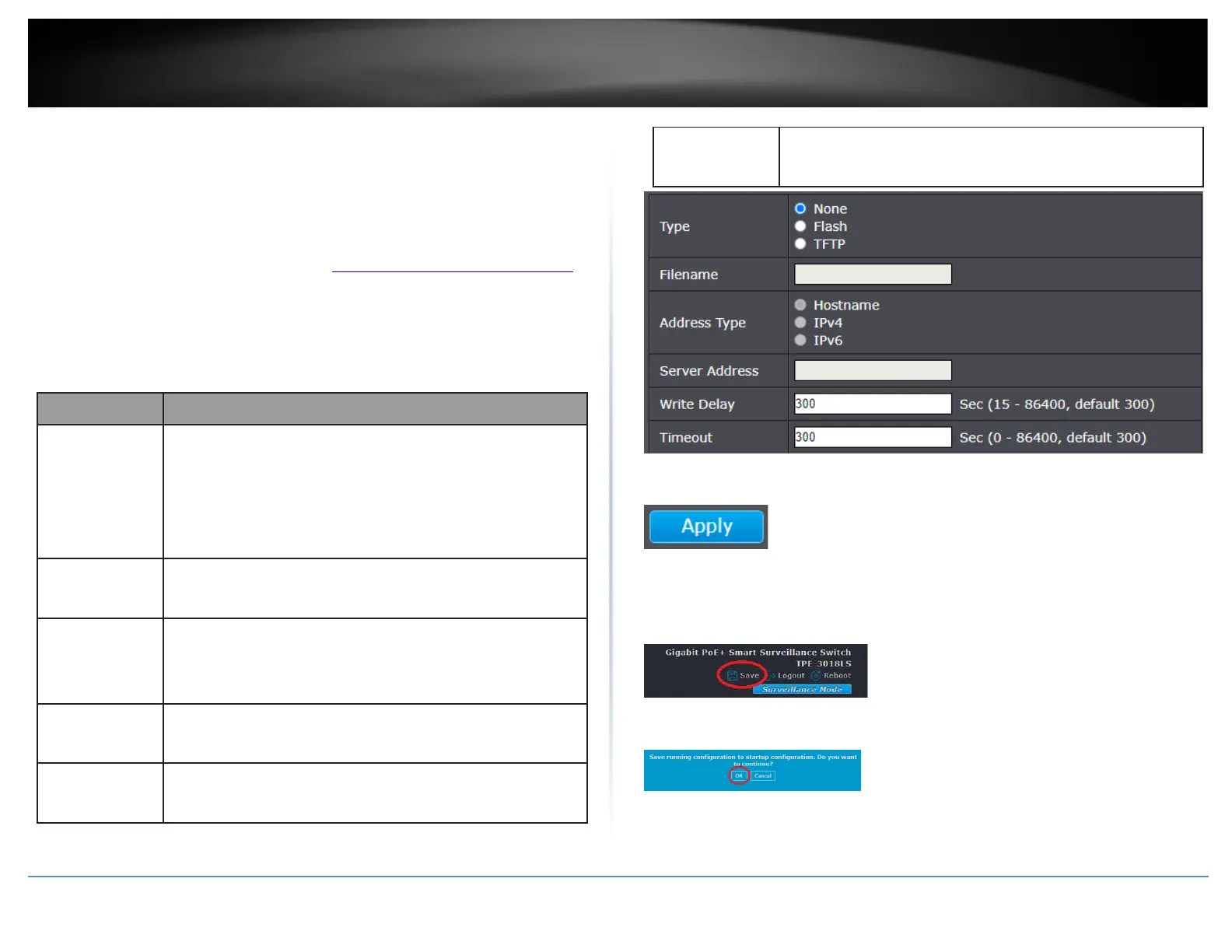
This page allow user to configure DHCP snooping database which can backup and
restore dynamic DHCP snooping entries.
1. Log into your switch management page (see “Access your switch management page”
on page 11).
2. Click on Security, click on IP Source Guard, and click on Save Database.
3. Review the settings below.
Select the type of database agent.
•
None: Disable database agent service.
•
Flash: Save DHCP dynamic binding entries to flash.
•
TFTP: Save DHCP dynamic binding entries to remote TFTP
server.
Input filename for backup file. Only available when
selecting type “flash” and “TFTP”.
Select the type of TFTP server.
•
Hostname: TFTP server address is hostname.
•
IPv4: TFTP server address is IPv4 address
Input remote TFTP server hostname or IP address. Only
available when selecting type “TFTP”
Input delay timer for doing backup after change happened.
Default is 300 seconds.
Input aborts timeout for doing backup failure. Default is
300 seconds.
4. Click Apply.
5. In the top right, click Save to save the configuration settings to NV-RAM/startup
configuration.
6. Click OK.













 To Next Page