© Copyright 2020 TRENDnet. All Rights Reserved.
Configure Remote Logging/Syslog Server
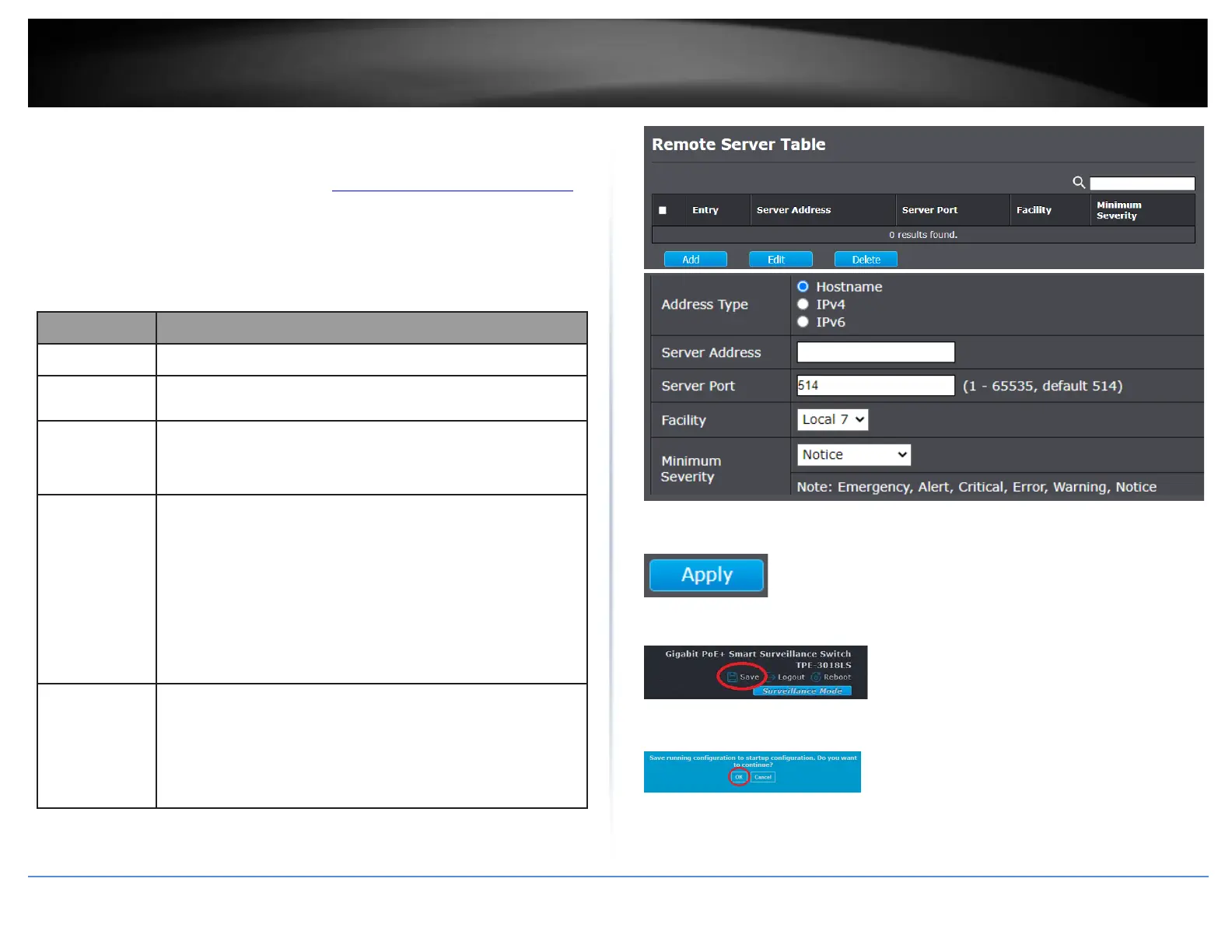
Diagnostics > Logging > Remote Server
1. Log into your switch management page (see “Access your switch management page”
on page 11).
2. Click on Diagnostics, click on Logging, and click on Remote Server.
3. Click Add and review the settings below.
The IP address of the remote logging server.
The port number of the remote logging server.
The facility of the logging messages. It can be one of the
following values: local0,local1, local2, local3, local4, local5,
local6, and local7.
The minimum severity.
•
Emergence: System is not usable.
•
Alert: Immediate action is needed.
•
Critical: System is in the critical condition.
•
Error: System is in error condition
•
Warning: System warning has occurred
•
Notice: System is functioning properly, but a system notice
has occurred.
•
Informational: Device information.
•
Debug: Provides detailed information about an event.
4. Click Apply.
5. In the top right, click Save to save the configuration settings to NV-RAM/startup
configuration.
6. Click OK.













 To Next Page