3-18 Electromagnetic Field (EMF) Measurements (Option 444) Spectrum Analyzer Measurements
3-90 PN: 10580-00447 Rev. H Spectrum Analyzer MG
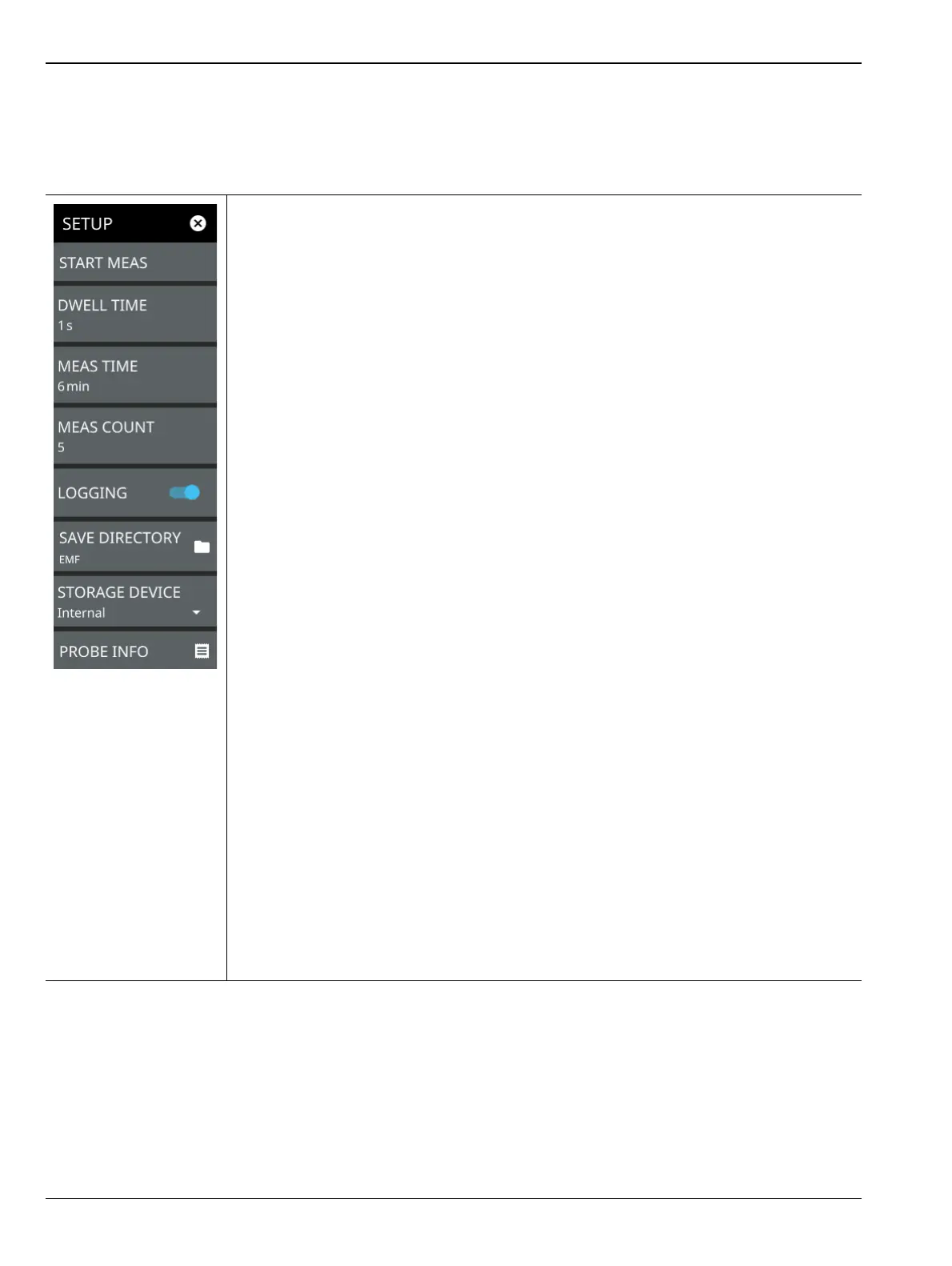
SETUP Menu (EMF Measurement)
The EMF measurement SETUP menu is available in MEASURE > MEASUREMENT > EMF Measurement >
SETUP. Once the EMF measurement is selected, the SETUP menu can be quickly accessed by tapping on the
summary display area below the spectrum window.
START MEAS: Initiates an EMF measurement. Once the measurement is started, all UI
interface is locked until the measurement is complete. A pop-up control appears that
allows you to immediately stop the measurement. Note that a valid antenna must be
connected and a supported frequency range must be set before a measurement can be
started. Note that the START MEAS button also appears on the MEASURE menu and
provides the same functionality.
DWELL TIME: Specifies the time to sweep on each of the three isotropic antenna axis
(X, Y, and Z). The sweeps are then averaged and saved for further computation. Note that
if the sweep time is longer than the dwell time setting, the sweep time will determine the
time spent on each axis (a complete sweep must be completed before moving to the next
axis).
MEAS TIME: Sets the duration of each EMF measurement from one minute up to
30 minutes. The default is 6 minutes. The measurement time includes all of the sweeps
for each axis, which repeats until the total measurement time is completed. For example,
if the axis dwell time is set to 1 second (and the sweep time is 1 second or less) and the
measurement time is set to 1 minute, you will get one complete isotropic result after
3 seconds, and approximately 20 isotropic results at the end of the one-minute
measurement.
The CURRENT row in the summary table at the bottom of the screen displays a running
average of the isotropic results, and the max and min of the computed total integrated
power of the isotropic results every 3 s. The displayed values are computed from all
measurements completed thus far within the measurement time. At the end of the
measurement time, the CURRENT row is cleared and the TOTAL row is updated with the
max, min, and running average of all isotropic results (20 in this example).
MEAS COUNT: Sets the number of EMF measurements (set in MEAS TIME) to
complete from 1 up to 10,000. The EMF test is fully executed when the specified number
of measurements have completed.
LOGGING: Logging is toggled on by default. This must be selected prior to starting the
EMF measurement for the results to be logged. Each log file can hold 21 measurements
for a maximum of 10,000 measurements total. All files for a measurement run will be
stored in the same folder with the year, month, day, measurement time and number.
SAVE DIRECTORY: Sets the directory of where the log folders are created.
STORAGE DEVICE: Sets the storage location of either Internal memory or an externally
connected storage device.
PROBE INFO: Displays the details of the connected isotropic antenna, for e.g. frequency
range, hardware revision etc.
Figure 3-74. SETUP Menu (EMF Measurement)













 To Next Page