3-13 Channel Power Spectrum Analyzer Measurements
3-68 PN: 10580-00447 Rev. H Spectrum Analyzer MG
3-13 Channel Power
To select channel power measurement go to main menu and press MEASURE > MEASUREMENT >Channel
Power. The channel power measurements are set up using the “SETUP Menu (Channel Power)” on page 3-70.
Channel power measurement is one of most common measurements for a radio transmitter. This test measures
the output power, or channel power, of a transmitter over the frequency range. Out-of-specification power
measurements indicate system faults, which can be in the power amplifiers or in filter circuits. Channel Power
measurements can be used to validate transmitter performance, comply with government regulations, or to
keep overall system interference at a minimum.
Frequency and span settings for many signal standards can be set as follows:
1. Select MEASURE on the main menu.
2. Select Channel Power from the MEASUREMENT button.
3. Select SETUP and then do the following:
• Set the channel INTEGRATION BW (bandwidth).
• Select PSD UNITS (Hz or MHz).
• Toggle and set the POWER LIMIT and PSD limit testing if you wish to see pass/fail test results.
Channel Power is a constant measurement; after it is turned on, it remains on until a different measurement is
selected or the sweep is paused. Channel Power is calculated at the end of each sweep.
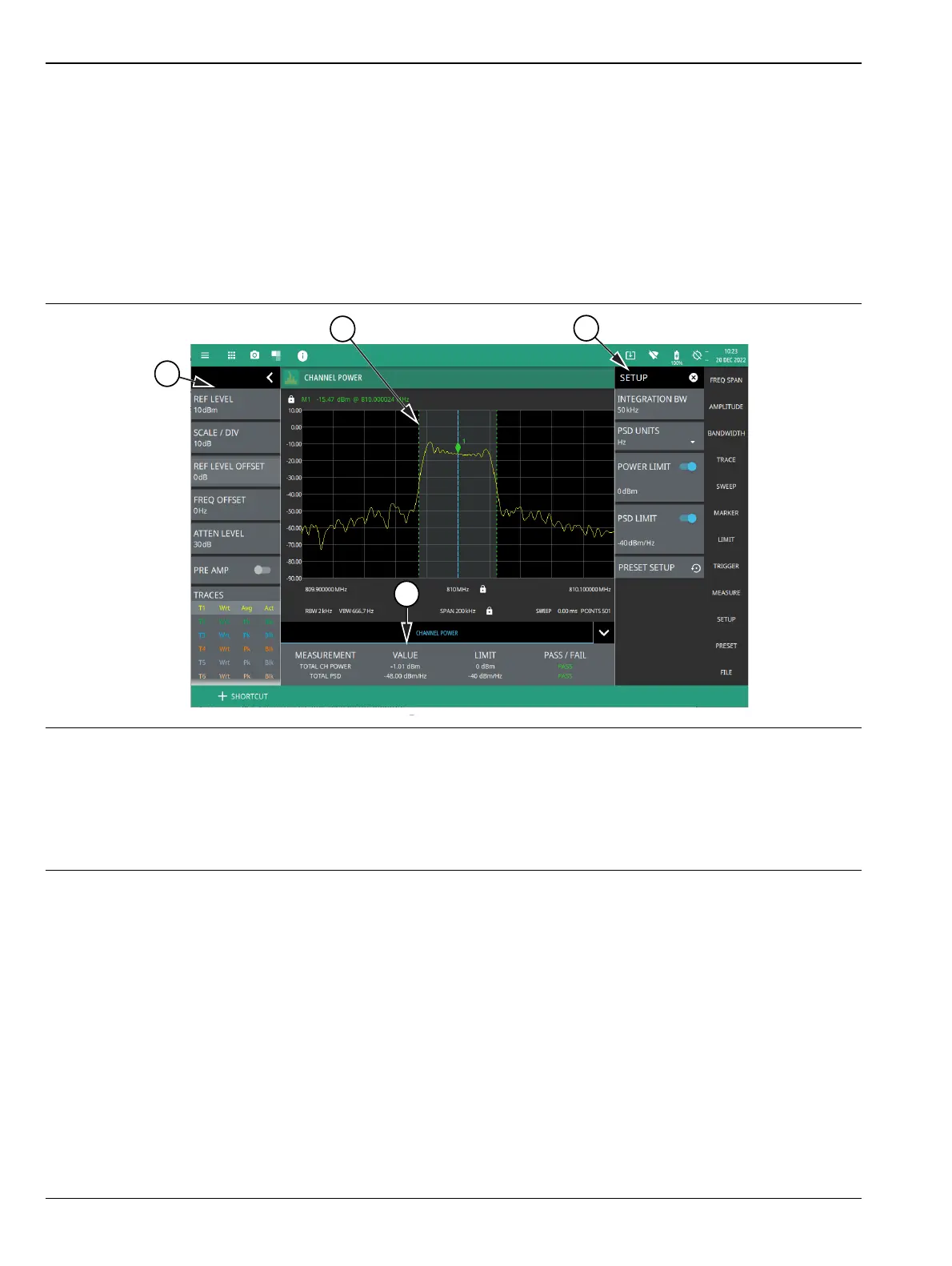
1. The status panel provides quick access to common spectrum analyzer settings. See “STATUS PANEL (Channel
Power)” on page 3-69.
2. Dashed vertical lines and a shaded region define the main channel integration bandwidth.
1. All channel power measurement parameters are set via the SETUP menu. See “SETUP Menu (Channel
Power)” on page 3-70.
2. Channel power measurement results are shown in a table at the bottom of the display.
Figure 3-56. Channel Power Measurement













 To Next Page