3-4 Setting Amplitude Parameters Spectrum Analyzer Measurements
3-10 PN: 10580-00447 Rev. H Spectrum Analyzer MG
Preamplifier
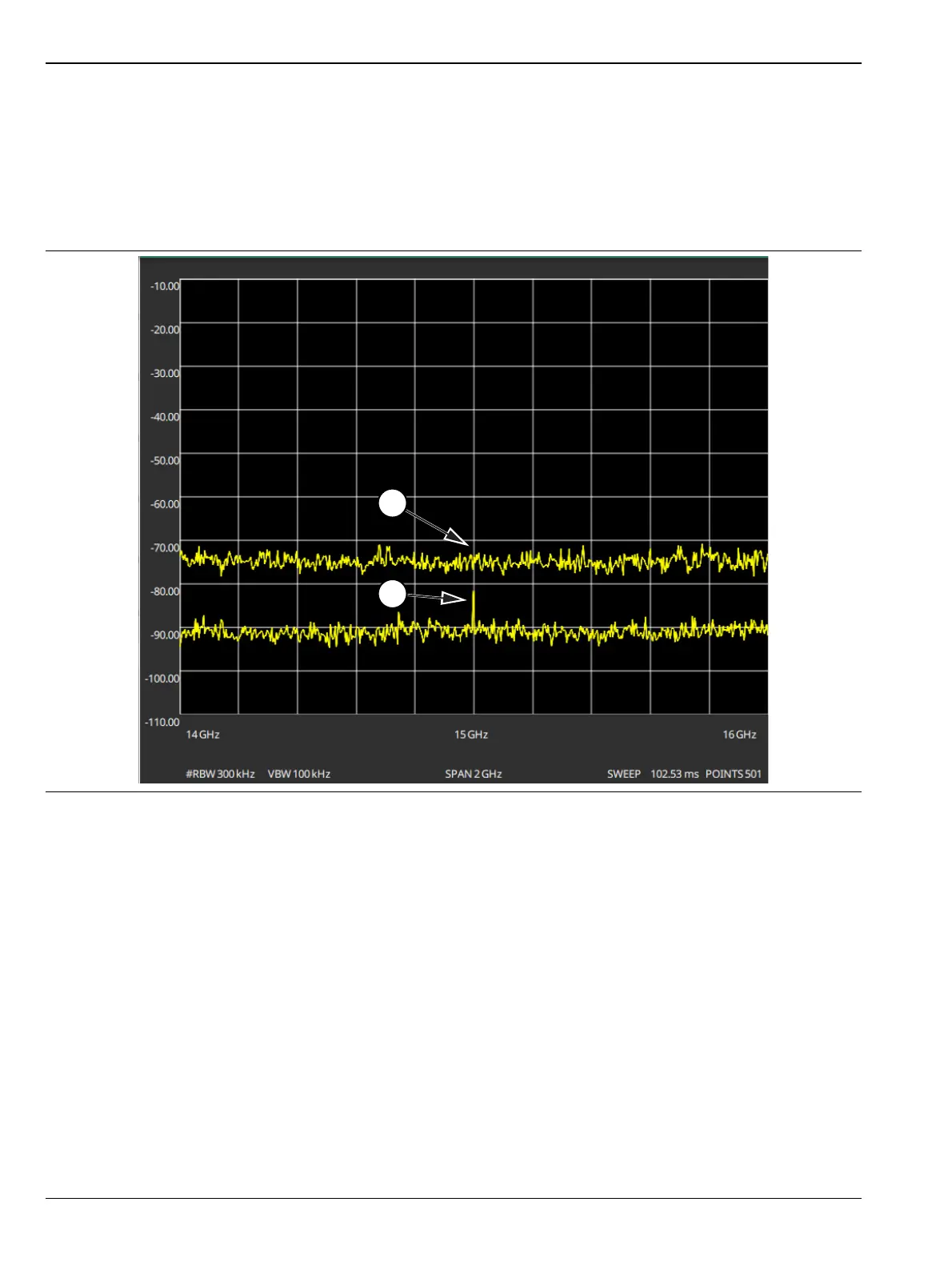
The preamplifier can be turned on and off by toggling PRE AMP via the status panel or the AMPLITUDE
menu. Figure 3-5 shows the noise floor with the preamplifier off (1) and on (2). Note that when the preamplifier
is turned on, the noise floor drops significantly and a low-level signal is exposed. In order to use the
preamplifier, the attenuation must be lower than 20 dB. If the preamplifier is turned on when the attenuation
is greater than or equal to 20 dB, the attenuation will automatically drop to 10 dB. When AUTO ATTEN is
toggled on, the REF LEVEL must be set to –40 dBm or lower to enable the preamplifier.
Figure 3-5. 1. Preamplifier Off
2. Preamplifier On













 To Next Page