Spectrum Analyzer Measurements 3-8 Setting Sweep Parameters
Spectrum Analyzer MG PN: 10580-00447 Rev. H 3-43
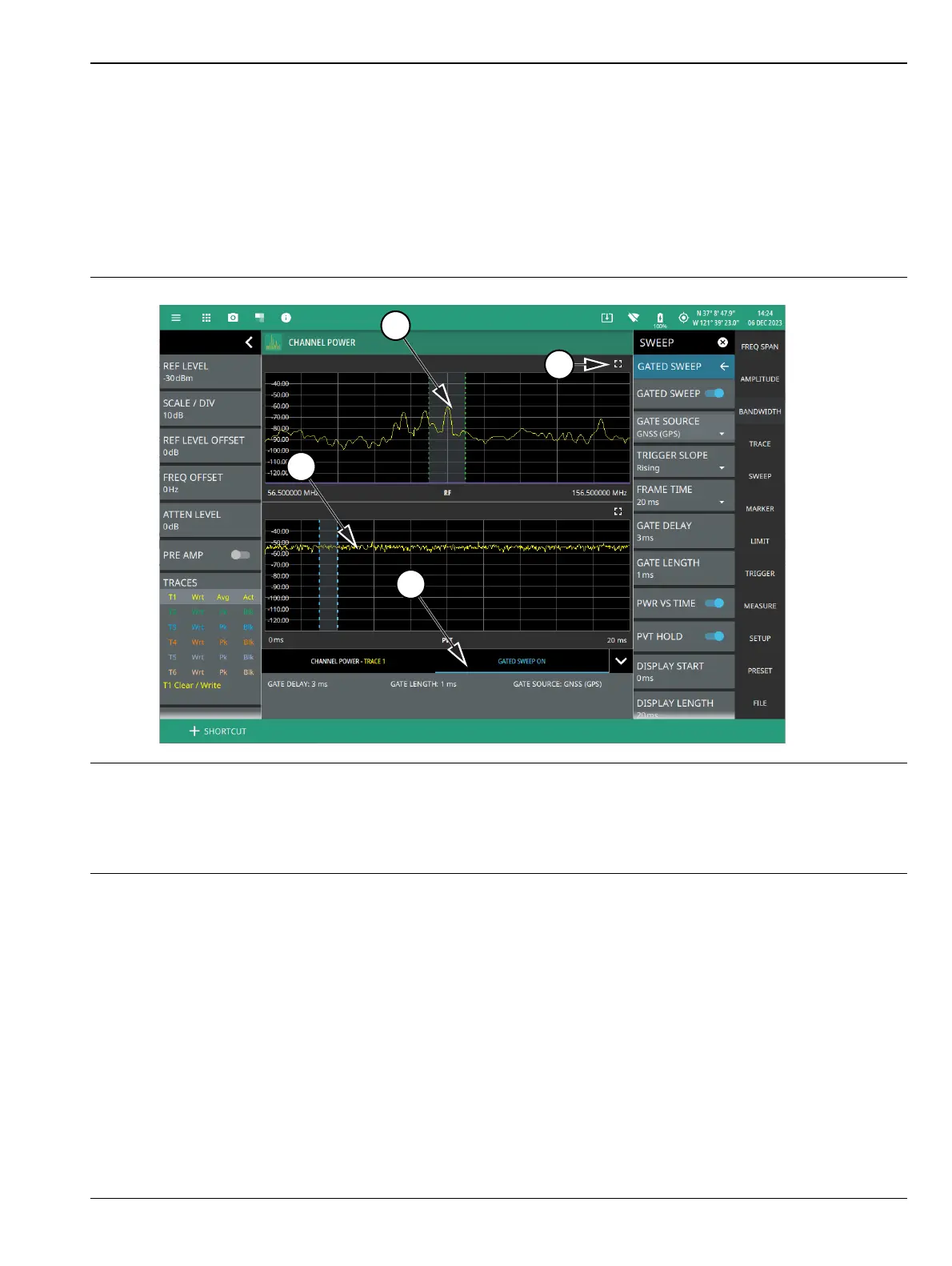
GATED SWEEP ON Display
When gated sweep toggle in turned ON, a time-domain graph is displayed on the bottom and frequency domain
graph is shown on top of it, as shown in Figure 3-32. Note that enabling PWR VS TIME toggle will refresh the
PVT trace, while disabling it will refresh the spectrum trace. The gate parameters (delay and length) can be
configured with PVT enabled, and the impact on the spectrum can be observed by disabling PVT. You can also
fine-tune the gate parameters without toggling PVT on and off, as it's expected that the gate period maintains
a fixed relationship with the trigger event.
1. Frequency domain graph.
2. Use maximize/minimize icon to toggle between full screen and split screen.
3. Time domain graph.
4. Tabbed table displays the selected measurement and the gated sweep details.
Figure 3-32. GATED SWEEP On Display













 To Next Page