Spectrum Analyzer Measurements 3-14 Occupied Bandwidth
Spectrum Analyzer MG PN: 10580-00447 Rev. H 3-71
3-14 Occupied Bandwidth
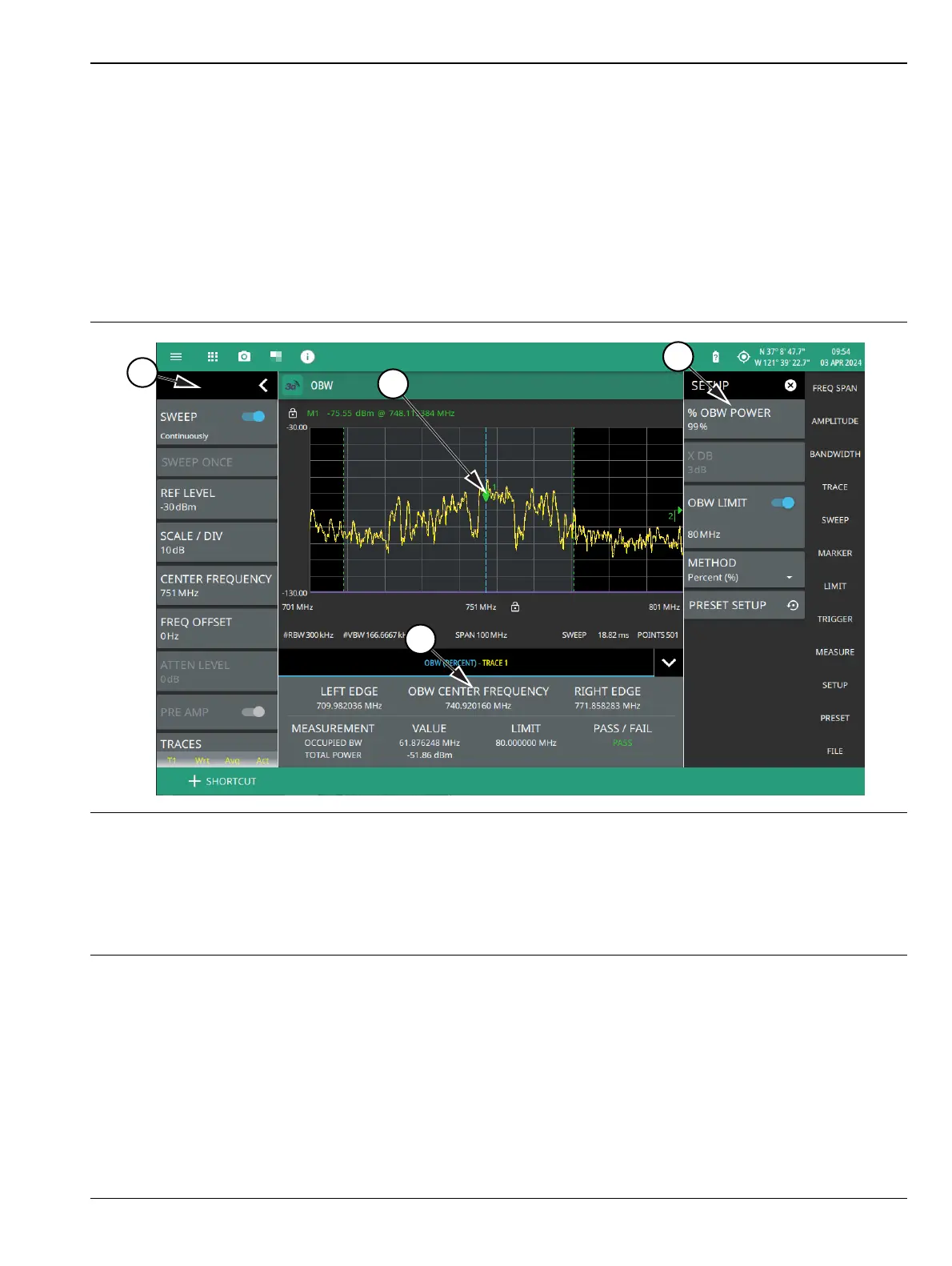
To select OBW measurement go to main menu and press MEASURE > MEASUREMENT >OBW. Occupied
bandwidth measurements are set up using the “SETUP Menu (Occupied BW)” on page 3-73. Occupied
Bandwidth (OBW) is a common measurement performed on radio transmitters. This measurement calculates
the bandwidth containing the total integrated power occupied in a given signal bandwidth. There are two
different methods of calculation depending on the technique used to modulate the carrier.
• % Integrated Power Method: The occupied frequency bandwidth is calculated as the bandwidth
containing the specified percentage of the transmitted power.
•>dBc Method: The occupied frequency bandwidth is defined as the bandwidth between the upper and
lower frequency points at which the signal level is a desired number of dB below the peak carrier level.
Frequency and span settings for many signal standards can be set as follows:
1. Select MEASURE on the main menu.
2. Select OBW from the MEASUREMENT button.
3. Select SETUP and then do the following:
• Set the % OBW power or set X DB (dBc) power value
• Select the METHOD (Percent (%) or dBc (X DB)
• Toggle OBW limit testing if you wish to see pass/fail test results
1. The status panel provides quick access to common spectrum analyzer settings. See “STATUS PANEL
(Occupied BW)” on page 3-72.
2. Dashed vertical lines and a shaded region define the main channel.
1. All occupied bandwidth measurement parameters are set via the SETUP menu. See “SETUP Menu (Occupied
BW)” on page 3-73.
2. Occupied bandwidth measurement results are shown in a table at the bottom of the display.
Figure 3-59. Occupied Bandwidth Measurement













 To Next Page