Spectrum Analyzer Measurements 3-9 Setting Up Markers
Spectrum Analyzer MG PN: 10580-00447 Rev. H 3-47
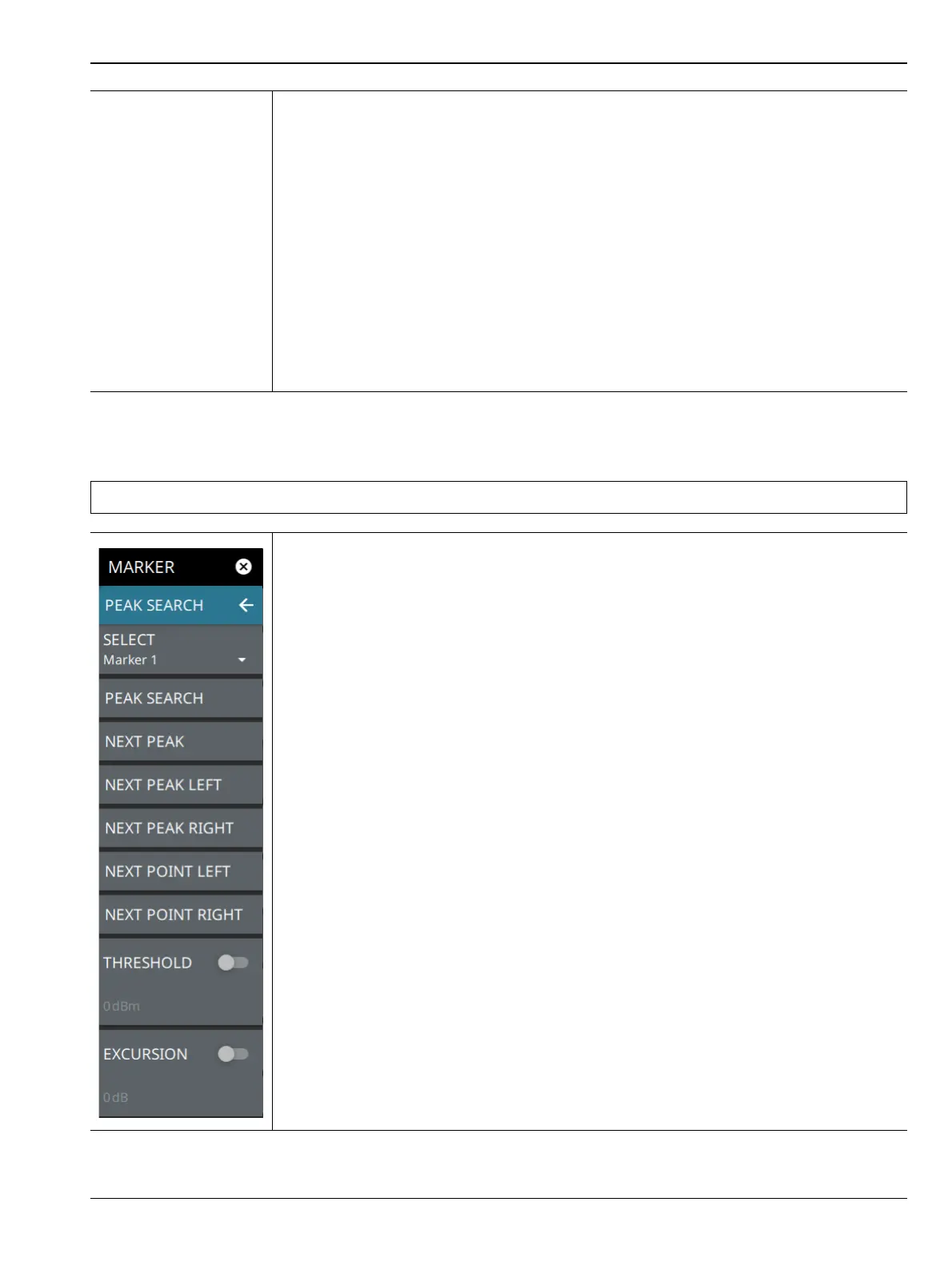
MARKER PEAK SEARCH Menu
DELTA REFERENCE: Selects the Reference marker for a Delta marker. A Delta marker
cannot be its own reference. Only Fixed and Normal markers may be used as a reference
for Delta markers.
TRACE: Selects the trace number to which the marker is currently attached.
MARKER TABLE: Toggle on or off the marker table displayed below the screen. Refer to
“Marker Table” on page 3-50.
CENTER ON MARKER: Sets the center frequency to the currently active marker’s
frequency value.
REF LVL TO MARKER: Sets the reference level to the currently active marker’s
amplitude value.
ALL MARKERS OFF: Turns all markers off, but markers will retain their last frequency
position once re-enabled.
PRESET MARKERS: Presets marker selections to default values.
Note Double tapping a marker opens a quick peak search menu with some of the below features.
PEAK SEARCH: Returns to the main MARKER menu.
SELECT: If the selected marker is off, it will be turned on and the selected marker
positioned at the peak of Trace 1. If the selected marker is on, then it will become the
active marker and any subsequent actions in the PEAK SEARCH menu will apply to the
selected marker. If no markers are on, pressing the PEAK SEARCH button on the control
panel will turn on Marker 1 at the peak of Trace 1.
PEAK SEARCH: Moves the selected marker to the highest peak.
NEXT PEAK: Moves the selected marker to the next highest peak regardless of location.
NEXT PEAK LEFT: Moves the selected marker to the next peak left of its current
position.
NEXT PEAK RIGHT: Moves the selected marker to the next peak right of its current
position.
NEXT POINT LEFT: Moves the selected marker one display point to the left of its current
position. Useful for fine tuning the position of a marker.
NEXT POINT RIGHT: Moves the selected marker one display point to the right of its
current position. Useful for fine tuning the position of a marker.
THRESHOLD: If turned on, sets the threshold that a peak has to achieve to be
considered a peak.
EXCURSION: If turned on, sets the excursion value that a peak amplitude must rise and
fall over the peak threshold to qualify as peak.
Figure 3-35. PEAK SEARCH Menu
Figure 3-34. MARKER Menu (2 of 2)













 To Next Page