3-21 AM/FM Modulation Measurement (Option 509) Spectrum Analyzer Measurements
3-110 PN: 10580-00447 Rev. H Spectrum Analyzer MG
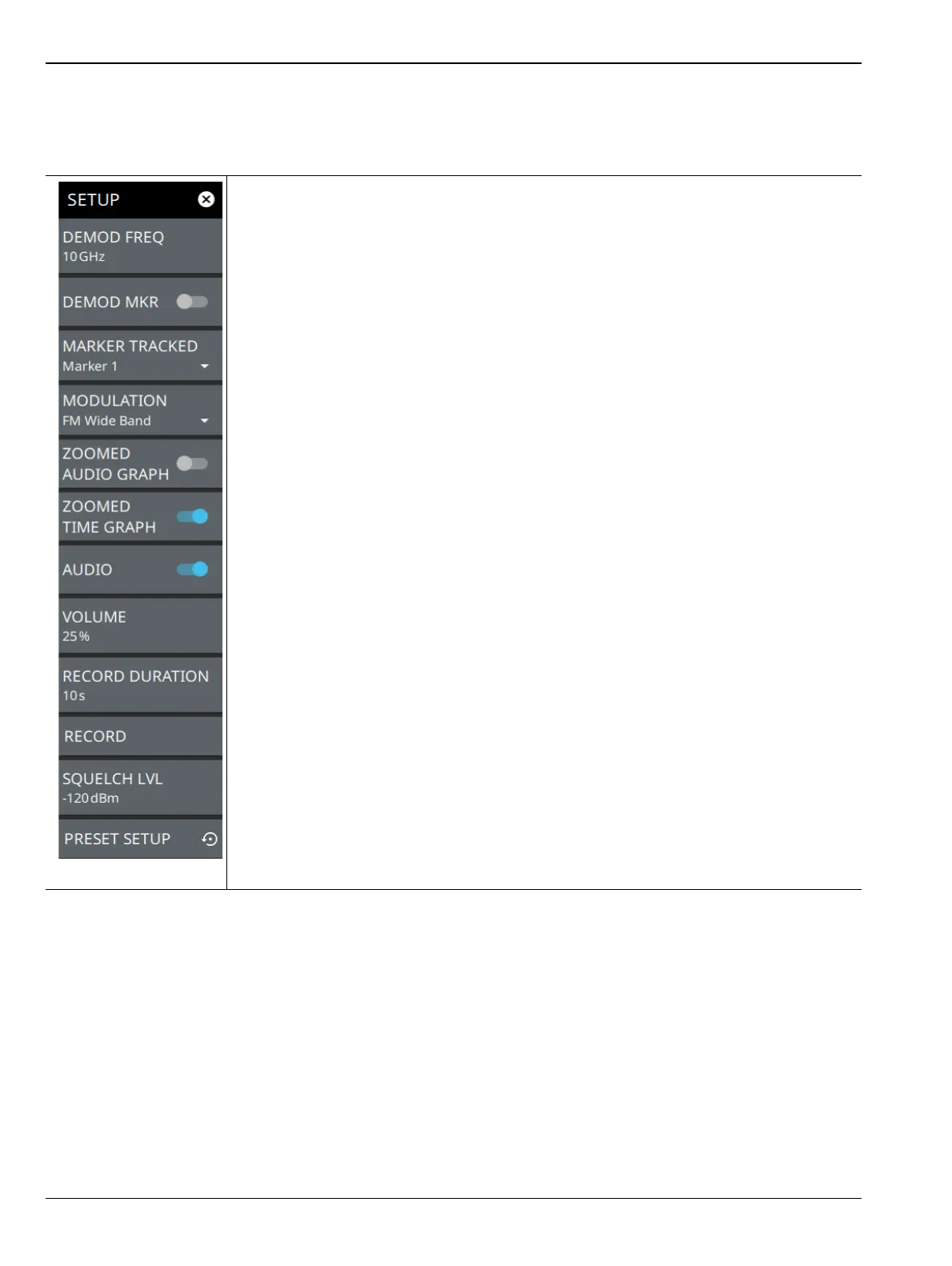
SETUP Menu (AM/FM Audio – All Measurements View)
The AM/FM audio demodulation SETUP menu is available in MEASURE > MEASUREMENT > AM/FM Audio
> SETUP.
DEMOD FREQ: Sets the audio demodulation frequency.
DEMOD MKR: Toggles the tracked marker on and sets the demod frequency to track the
marker frequency. Use the “MARKER Menu” on page 3-46 to adjust the marker
parameters.
MARKER TRACKED: Selects which marker to track. When DEMOD MKR is enabled,
the demodulated frequency tracks the indicated marker.
MODULATION: Selects the modulation type to demodulate the RF signal. Available
modulation types are AM, US Band (upper sideband), LS Band (lower sideband), FM
Narrowband (6.25 12.5 and 25 kHz), and FM Wideband.
ZOOMED AUDIO GRAPH: Displays zoomed audio spectrum graph when toggled on,
only available in FM modulation. Only available in Wideband FM mode. The full span
Audio Spectrum shows 96 kHz of spectrum to include the mono audio, 19 kHz sub carrier,
left and right stereo channels. The zoomed graph shows 20 kHz audio spectrum for
closer analysis of the combined left/right channels.
ZOOMED TIME GRAPH: Displays zoomed audio time domain graph when toggled on.
Zoomed time domain audio graph is used to view a signal modulated with an ideal sine
wave to detect distortion.
AUDIO: Toggles the demodulated audio output (sound) on or off. The demodulation
frequency must be within the current sweep for audio demodulation. Note that AM/FM
audio demodulation cannot be used in conjunction with IQ Streaming or when the IQ
streaming output port is set to Data Out.
VOLUME: Sets the percentage of audio output volume or mutes the audio.
RECORD DURATION: Sets the audio recording time. The maximum recording time is
approximately 27 hours, depending on available storage.
RECORD: Starts audio recording. Recorded audio files (.wav) are saved to the Waves
folder. Audio will be recorded for the recording duration or will stop when AUDIO is
toggled off.
SQUELCH LVL: Sets the RF threshold level for audio playback. This is typically used
with weak or intermittent signals to mute the static sound when the signal is below the
squelch threshold.
PRESET SETUP: Presets all the AM/FM audio setup parameters.
Figure 3-89. SETUP Menu (AM/FM Audio – ALL MEASUREMENTS)













 To Next Page