5-61
Chapter 5. Functions
Operation type Setting Direct action Reverse action
Alarm
(status)
23
ON when an alarm (alarm code AL01 to AL96)
occurs, OFF otherwise
OFF when an alarm (alarm code AL01 to AL96)
occurs, ON otherwise
READY
(status)
24 ON in READY mode
OFF in RUN mode
OFF in READY mode
ON in RUN mode
MANUAL
(status)
25 ON in MANUAL mode
OFF in AUTO mode
OFF in MANUAL mode
ON in AUTO mode
Invalid 26 Always OFF Always ON
AT in execution
(status)
27 ON when AT is running
OFF when AT stopped
OFF when AT is running
ON when AT stopped
During SP ramp 28 ON during SP ramp
OFF when there is no SP ramp or it is
completed
OFF during SP ramp
ON when there is no SP ramp or it is
completed
Control action
(status)
29 ON during direct action (cooling)
OFF during reverse action (heating)
OFF during direct action (cooling)
ON during reverse action (heating)
Invalid 30 Always OFF Always ON
Invalid 31 Always OFF Always ON
Timer
(status)
32 The direct and reverse action settings are disabled for timer events.
To use timer events, set the operation type to “timer stop/start” in the DI assignment bank.
Multiple timer events can be controlled by a single internal contact (DI) by setting “internal
event No. assignment” in the DI assignment bank.
zSettings
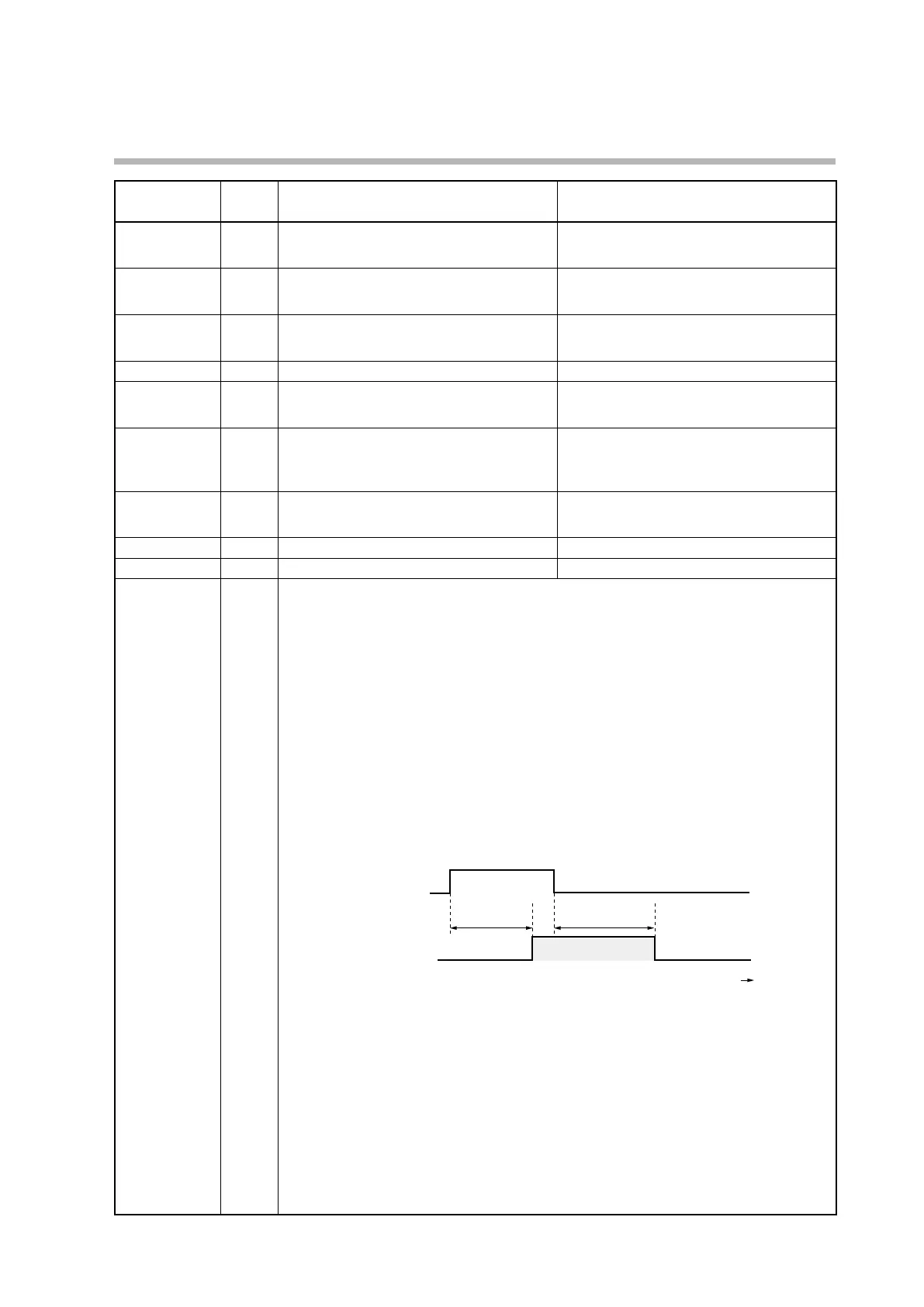
• ON delay time: Time until the event changes from OFF to ON after the DI changes from
OFF to ON
• OFF delay time: Time until the event changes from ON to OFF after the DI changes from
ON to OFF
zOperation specifications
• Turns ON when DI ON continues for the ON delay time or longer.
• Turns OFF when DI OFF continues for the OFF delay time or longer.
• In other cases, the current status is retained.
ON
Internal event
ON
OFF delay timeON delay time
zNote
To set the ON and OFF delay times, the user level (C79) should be set to “advanced
configuration.”
The ON and OFF delay times are set to 0.0 s when the product is shipped.
“Internal event No. assignment” in the DI assignment bank is set to 0 when the product
is shipped. With this setting, a timer can be started or stopped for all internal events by a
single internal contact (DI).
If the setting is changed to 1 or more, a timer can be started or stopped for one specified
internal event by one internal contact (DI).
To change the setting, the user level (C79) should be set to “advanced configuration.”



 To Next Page