9-11
Chapter 9. PLC Link Communication Function
Transfer settings
(4)
(9)
(10)
(7)
(11)
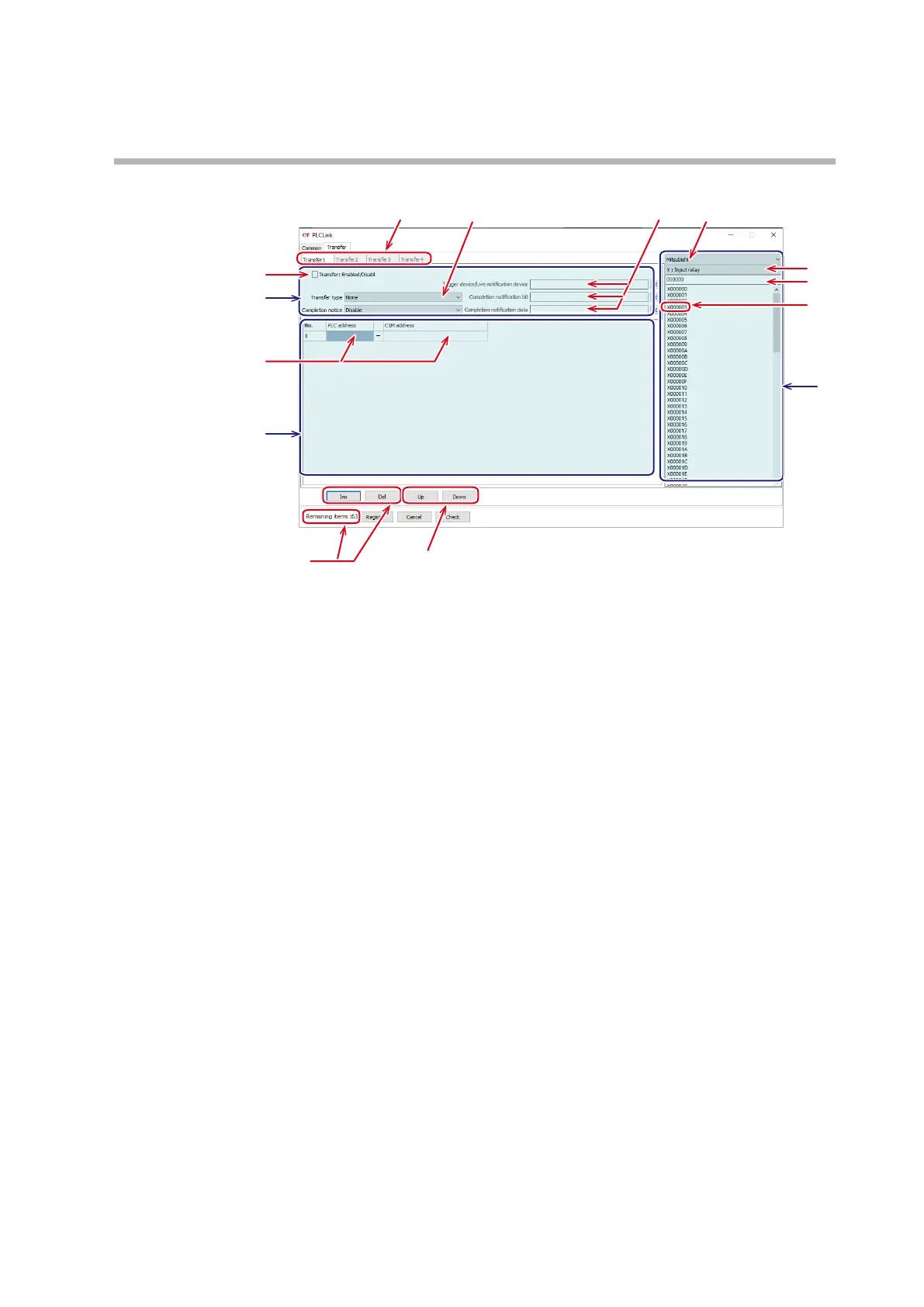
(1) Select a tab from the [Transfer 1] to [Transfer 4] tabs.
z
Section [A] Transfer operation settings
(2) After selecting a tab, first select [Transfer type].
(3) Drag and drop an address in section [C] to [Trigger device/Live notification
device], [Completion notification bit], and [Completion notification data].
(4) You can enable or disable the settings using the [Transfer: Enabled/Disabled]
checkbox.
z
Section [B] Transfer data settings
(5) The number of lines can be increased or decreased with [Ins] and [Del].
One line corresponds to one item. Up to 64 items can be specified in total
for transfer 1 to transfer 4 combined. [Remaining items] is displayed at the
bottom of the screen.
(6) Other lines can be selected by using [Up] and [Down].
(7) Set [PLC address] and [C1M address] by dragging and dropping an address in
section [C].
z
Section [C] Address list
(8) Select a device (PLC or C1M).
(9) Select a data type.
(10) Enter the first address in the list.
(11) An address can be selected from the list and dragged and dropped to sections
[A] and [B].



 To Next Page