13 Attaching your Microbeast PLUS to
the helicopter
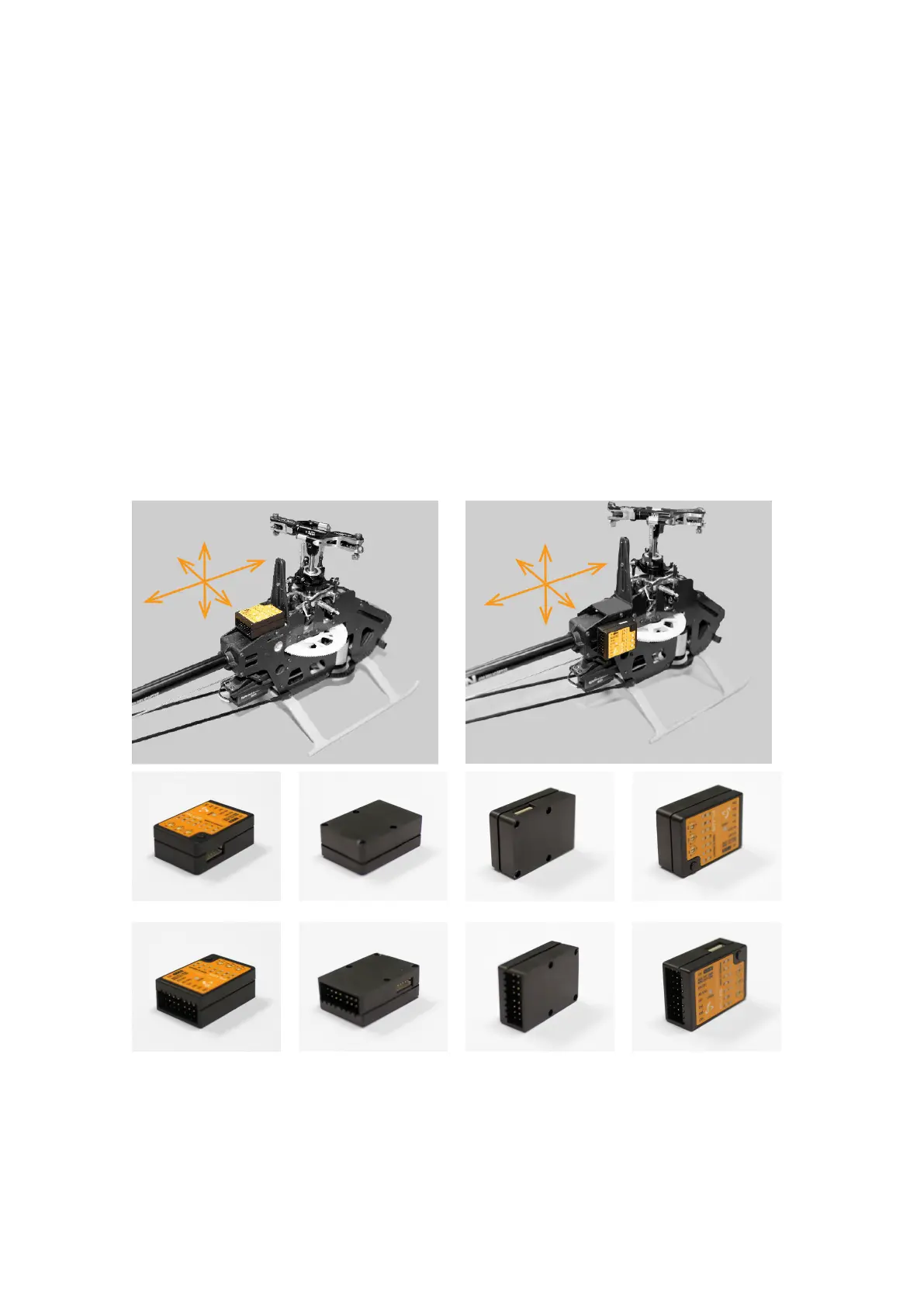
Attach the Microbeast PLUS unit by using one of the provided 3M® gyropads at a prefer-
ably low vibrating position on your helicopter such as the gyro platform or receiver platform.
You may need to choose another type of mounting pad depending on the vibration pattern
of your helicopter.
There are eight possible mounting orientations: The MICROBEAST PLUS unit either
can be attached flat or upright on the helicopter and the servo connector pins must
always point towards the front or rear of the helicopter. The small white sensor
pinboard on the side must always be inline with flight direction:
Figure 25 Figure 26
Figure 27
flat, cover on top, servo connectors showing to front
Figure 28
flat, cover showing to bottom, servo connectors showing to
front
Figure 29
upright, button on top, servo connectors showing to front
Figure 30
upright, button on bottom, servo connectors showing to front
Figure 31
flat, cover on top, servo connectors showing to rear
Figure 32
flat, cover showing to bottom, servo connectors showing to
rear
Figure 33
upright, button on bottom, servo connectors showing to rear
Figure 34
upright, button on top, servo connectors showing to rear
29



 To Next Page