19 Spektrum® SRXL2 receiver
Spektrum SRXL2 receivers are available in different forms. There exist receivers with
standard servo connectors as well as remote satellites with a special 4-wire connector. The
output signal of any of those receiver must be connected to the pin board at the side of
MICROBEAST PLUS.
Please note: MICROBEAST PLUS does not support connecting more than one SRXL2
receiver at a time!
When using a speed controller with BEC, the power will be distributed from [CH5] input
of MICROBEAST PLUS to the receiver. Alternatively or additionally you can connect a
power supply/second BEC wire/buffering battery to the [SYS] port. It is not recommended
to connect power to the receiver directly!
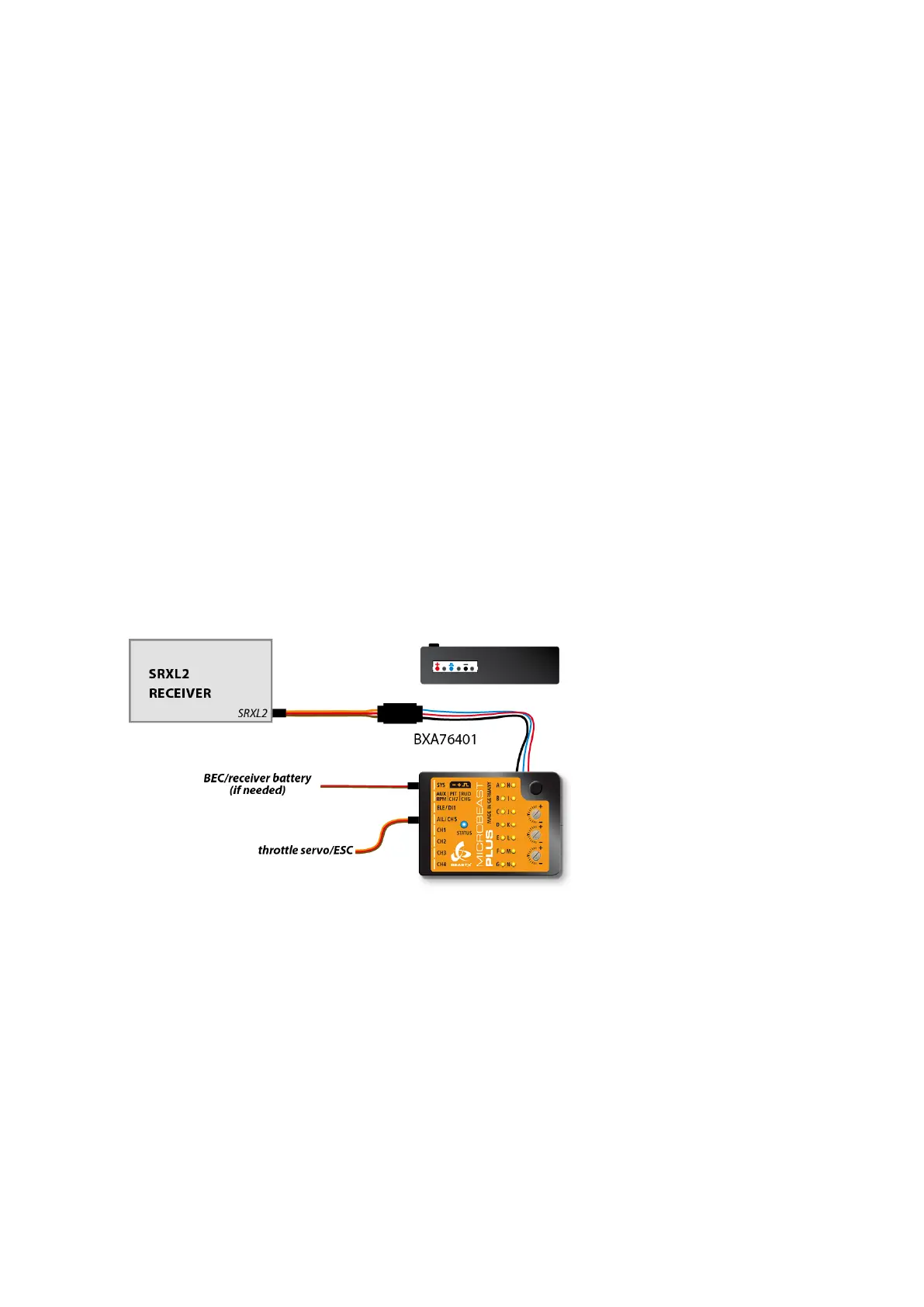
In order to connect a receiver with standard servo connectors, i.e. the AR6610T, you need
the SRXL2 receiver adapter. Also you may use the governor sensor adapter BXA76401
but this requires to modify the wiring layout as shown below!
Figure 51
SRXL2 receiver with standard servo connector and adapter
In order to connect a SRXL2 remote satellite like SPM4650 it is necessary to inter-
change the plus and minus wires (usually black&orange) of the 4-wire receiver
connector. In this configuration you can directly plug in the receiver without the need
41



 To Next Page