3
Setting the Timer (Timer Settings)
3-31
Selecting and Storing Settings to Suit your Needs
2
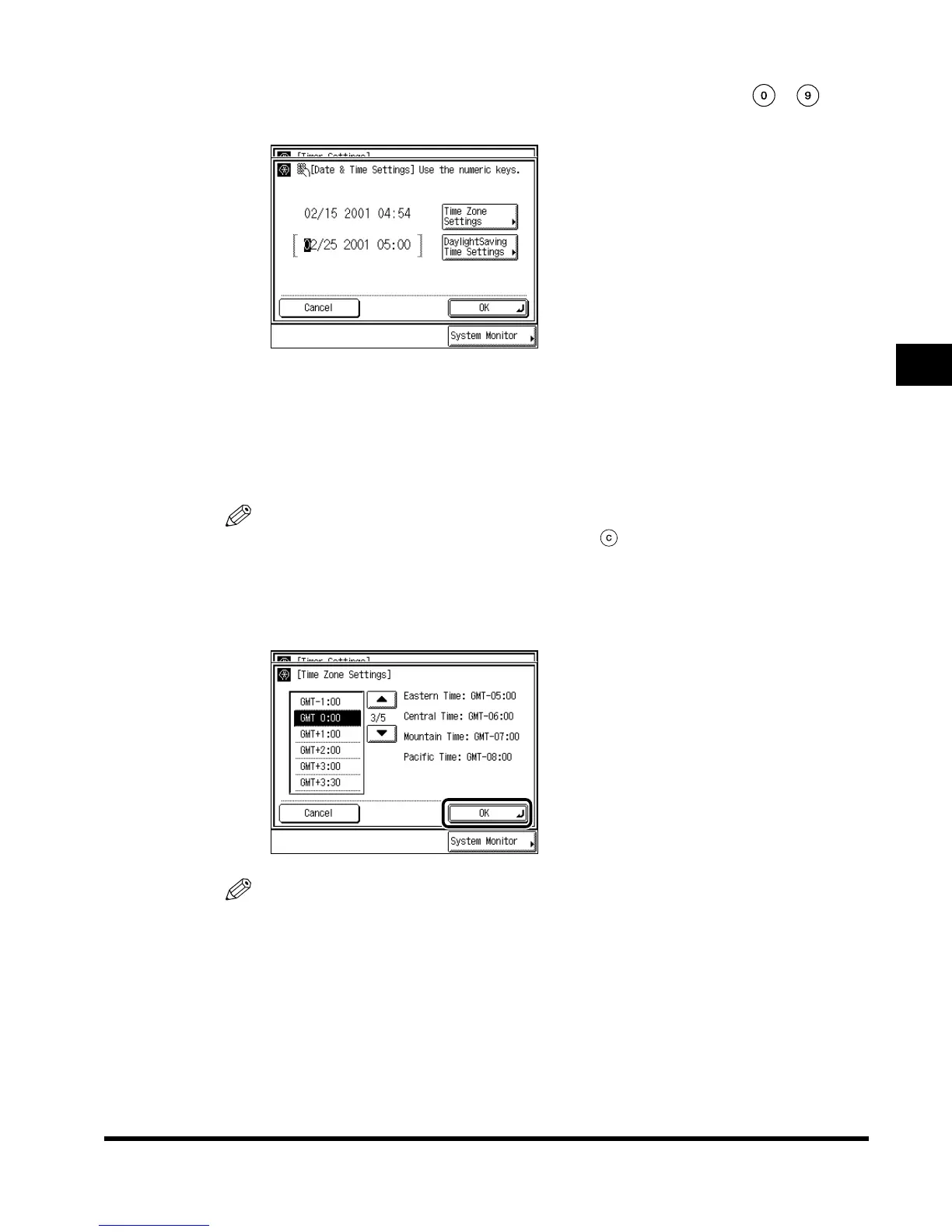
Enter the current date (month, day, year) and time with -
(numeric keys).
Enter the date, and the time in 24-hour clock as four digits without a space.
Enter all four digits for the year ranging from 2000 to 2038.
Examples: MAY 6 → 0506
7:05 a.m. → 0705
11:18 p.m. → 2318
NOTE
•
If you make a mistake when entering values, press (Clear), and enter the values again.
● When setting the Time Zone Settings:
Press “Time Zone Settings,” and select the time zone where the machine is
located, and press “OK.”
NOTE
•
The default setting is “GMT-5:00.”
Eastern time (US/Canada) : GMT-5:00
Central time (US/Canada) : GMT-6:00
Mountain time (US/Canada) : GMT-7:00
Pacific time (US/Canada) : GMT-8:00
•
Press “
▼
” or “
▲
” to scroll the list.
E1L_US_U_.book-INDEX Page 31 Wednesday, May 23, 2001 11:40 PM












 To Next Page