3
Setting the Timer (Timer Settings)
3-32
Selecting and Storing Settings to Suit your Needs
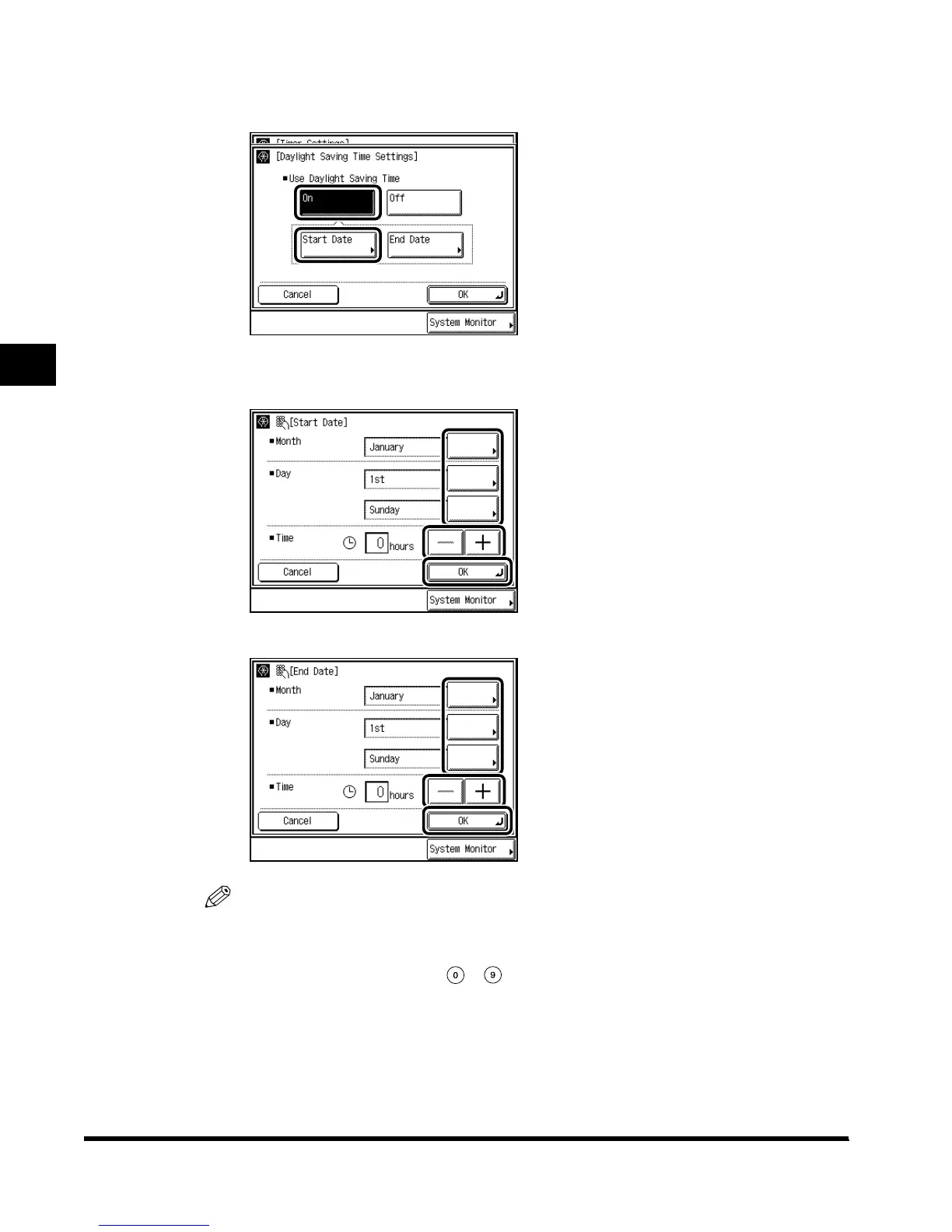
● When setting the Daylight Saving Time Settings:
Press “Daylight Saving Time Settings”
→ press “On” → press “Start Date.”
Select “Month”
→ “Week” → “Day” to specify each of them.
Enter the time using “–” and “+,” and press “OK.”
Press “End Date” and make the settings in the same way as the above.
NOTE
•
When you make the Daylight Saving Time settings, the machine automatically sets the
standard time of the machine one-hour forward at the specified date and time.
•
The default setting is “Off.”
•
You can also set the time with - (numeric keys).
•
The time can be set from 0 to 23 (in one-hour increments).
E1L_US_U_.book-INDEX Page 32 Wednesday, May 23, 2001 11:40 PM












 To Next Page