20140704#1.0 EBS Ink Jet Systeme
49
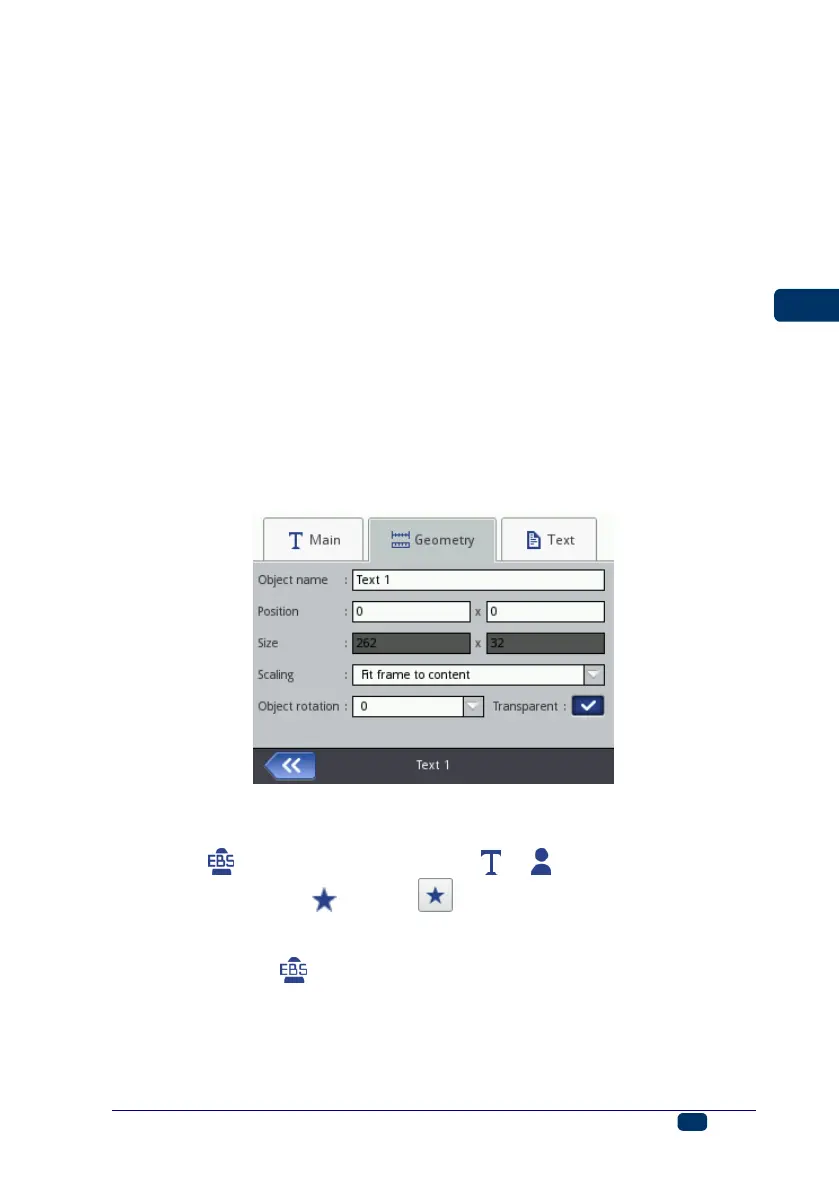
The Size of an object is displayed as a number of pixels (dots). The first
size component is the width and the second – the height. You can re-size
an object by editing the values. The resizing operation can also be
performed in the edit area – see Re-sizing an Object (p. 48).
The Position and Size parameters are particularly useful when you need
to arrange or align two or more objects precisely.
The Scaling parameter allows you to adjust the object frame size to the
size of the object. If the Scaling parameter is set to Fit frame to content,
the object frame is the same as the size of the object. If the Scaling
parameter is set to Fit content to frame, the size of the object is equal to
the size of the frame (not available to text objects where an EBS built-in
font is used and to barcode-type objects). If Without scaling is chosen, the
frame size can be modified without resizing the object.
The Object rotation parameter allows you to rotate the entire object
clockwise (the setting of 90), counterclockwise (the setting of 270) or
"upside down" (the setting of 180).
If the Transparent parameter check box is ticked, the object is transparent
and you can see an object that is 'under' it. This property is useful when a
number of objects have been placed in the edit area and there is a risk that
objects overlap each other.
In the Text sheet tab (available for text objects):
You can change the type of font by modifying the Font name parameter.
EBS built-in fonts and True Type ( or ) fonts are available. If a
font is marked with (with the button after the font name has been
highlighted), it is added to favorites and moved to the beginning of the font
list.
For the EBS built-in fonts you can modify the Row multiply and
Letter spacing parameters. The Row multiply parameter defines how
many times printing of every vertical row of text is to be repeated. The
multiplication of rows is used in order to increase intensity of prints on
porous materials, which absorb ink heavily, and on which the characters
(consisting of the same size dots) printed are not well visible due to their



 To Next Page