Software Control: Microscope Control Software
C O N F I D E N T I A L – FEI Limited Rights Data3-14
Lens Alignment (Shift + F4)
This feature activates / deactivates the final lens alignment mode for the fine alignment of the electron beam only.
The scanning conditions change to the last selected value, lens modulator turns on and the alignment cross
appears in the respective position in all imaging displays.
Clicking on & dragging within a display activates a 4-ended arrow cursor and starts the final lens alignment.
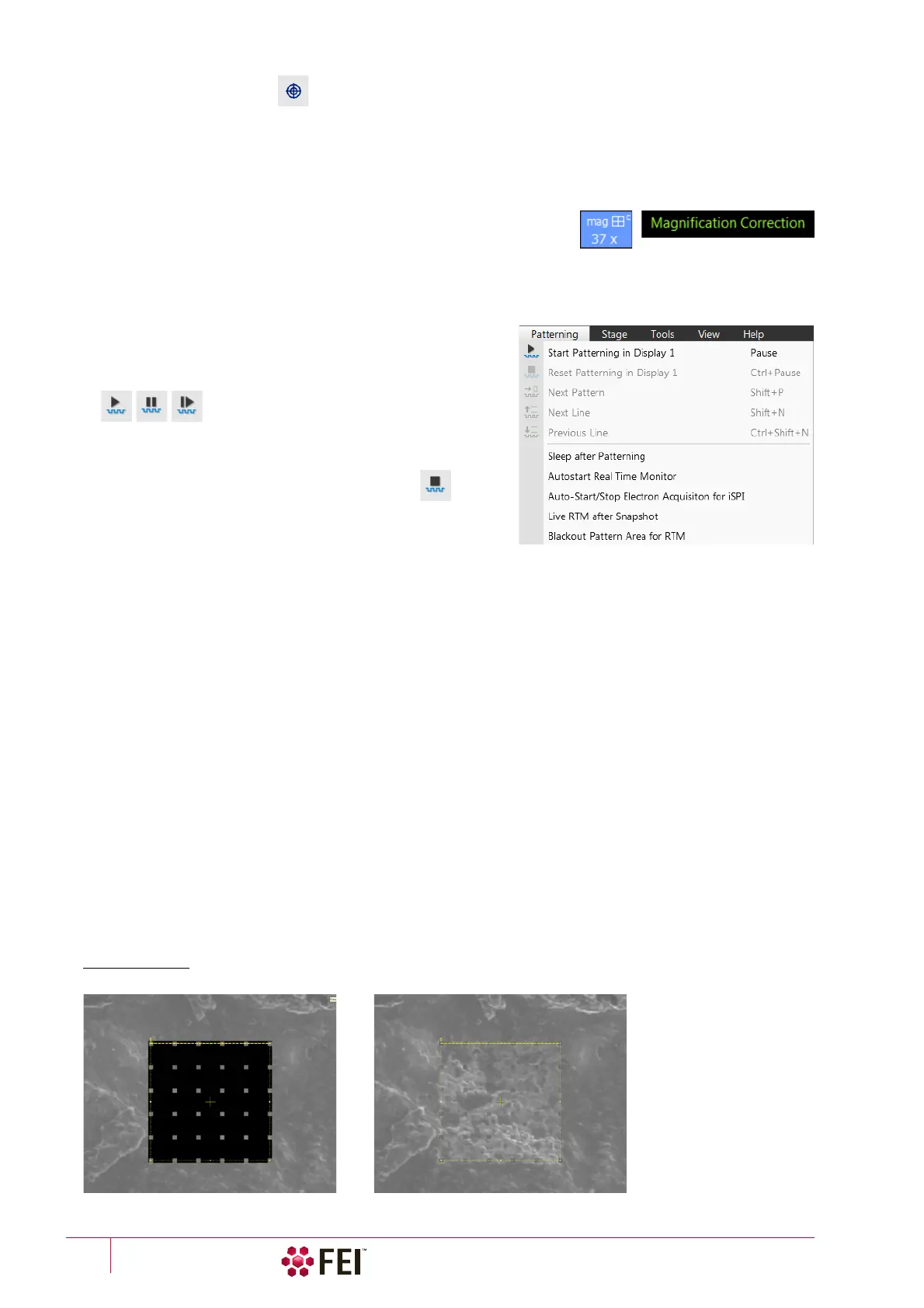
Magnification Correction
Applies the Magnification Correction alignment influences on imaging. The
letter “c” is added to the appropriate image databar fields (Mag, HFW) and
the Magnification Correction text is added to the imaging display.
Toggle E–I Beam (Ctrl + T)
Quickly toggles electron and ion beams to be used in the selected display for imaging.
Patterning Menu
opens the Patterning menu functions (see Chapter 5):
Start / Pause / Resume Patterning in Display # (Pause button)
starts / pauses patterning of the enabled pattern(s) in the active
display. The menu item and the corresponding toolbar icon
changes according to actual condition.
Reset Patterning
in Display #
(Ctrl + Pause button)
cancels the patterning procedure.
Next Pattern (Shift + P)
In the serial patterning mode the actual patterning is stopped and
the procedure continues with the next pattern (if present).
Next Line (Ctrl + N) / Previous Line (Ctrl + Shift + N)
When milling a Cleaning Cross Section pattern type, milling of the actual line is cancelled and continues with the
next one / previous one.
Sleep After Patterning
applies the System module / Sleep command when patterning process finishes.
Autostart Real Time Monitor
When selected, it releases the pause function for the display with patterns enabling automatic start of the real time
monitoring (RTM) of the milling process.
Auto-Start/Stop Electron Acquisition for iSPI
When ticked and the Advanced Patterning module / iSPI tab (intermittent Switching between Patterning and
Imaging) / On check box is ticked, the iSPI starts automatically when starting patterning. The electron beam
display is released, when paused. When not ticked, nothing happens.
Live RTM after Snapshot
After acquiring a snapshot RTM feature continues automatically.
Blackout Pattern Area for RTM
In case the Real Time Monitor is running, the area not milled is darkened to enhance the visibility of the RTM
information. The visibility of the individual patterning pixels is greatly enhanced (this is especially important for
patterns with extremely large pitch or very thin lines).
FIGURE 3-7 Imaging with / without Blackout Pattern Area



 To Next Page