Software Control: Microscope Control Software
C O N F I D E N T I A L – FEI Limited Rights Data 3-31
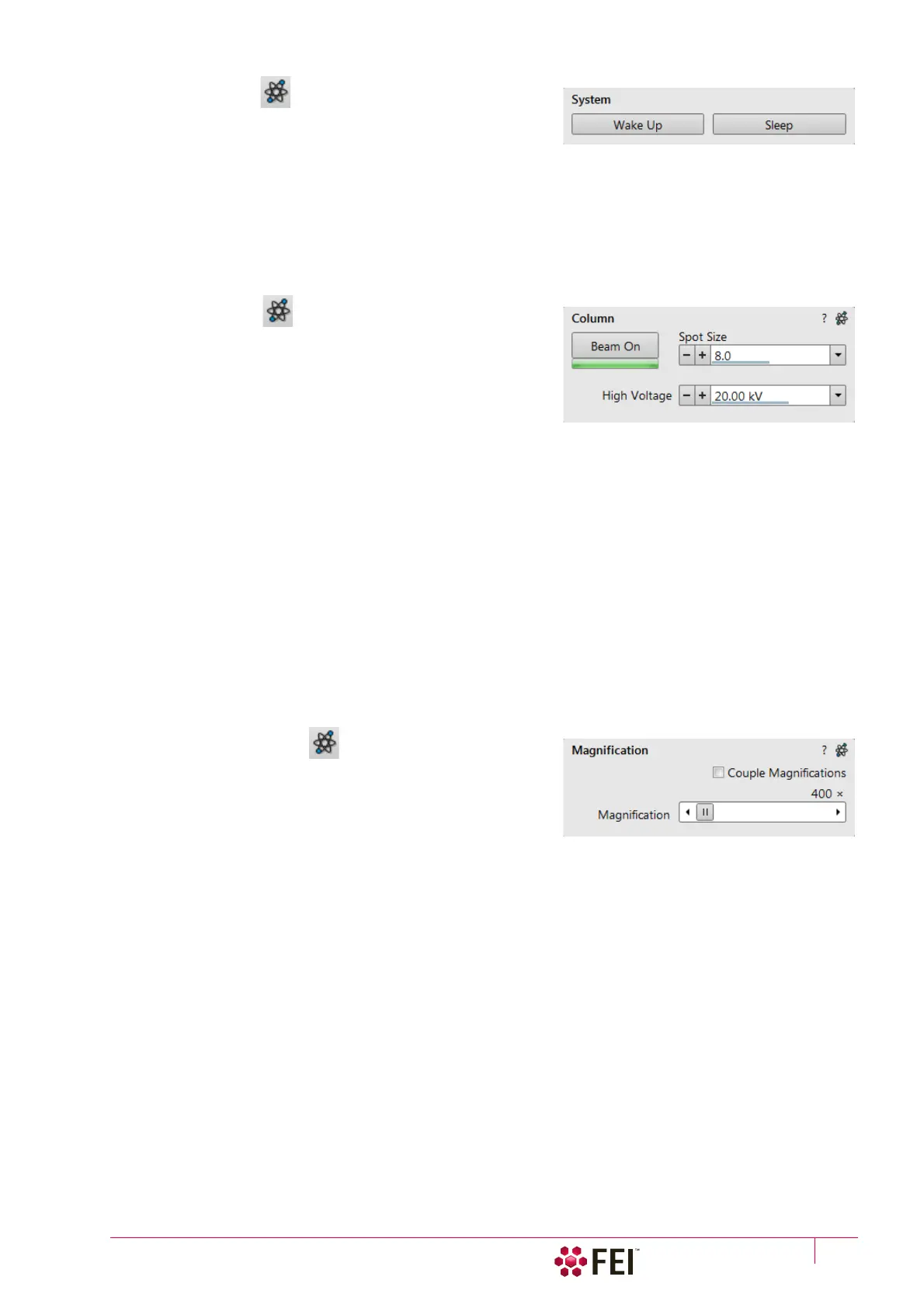
2. System Module
Here is the possibility to carry out several operations in one click
on:
Wake Up Button
• starts the Ion source
• starts the Electron source (if it is switched off)
• switches the electron and ion beam accelerating voltage on
Sleep Button
• switches the electron and ion beam accelerating voltage off
• stops the ion source
3. Column Module
contains controls for setting the electron / ion beam conditions:
Beam On Button
switches the accelerating voltage on (orange background) / off
(grey button). If the source is not started (empty progress bar),
this button starts the electron / ion source first (green progress
bar).
Note
The ion source start procedure need not be successful at the first attempt. If this happens, try it again.
Beam Current / Spot size Adjuster
enables to adjust an electron Beam current / Spot size with a selectable accuracy (see the Preferences / General
section). The actual value (from the factory preset list) is shown in the adjuster text area, toolbar and imaging
databar (if selected). Only values applicable for actual imaging conditions are shown.
Note
The Spot size influences both the focused electron beam area and the beam current. The lower is the Spot size, the lower is
the beam current.
For the ion beam there is only possible to use the Beam current.
High Voltage Adjuster
enables to adjust the overall electron / ion beam accelerating voltage (from 350 V / 500 V to 30 kV) either
continuously or using the pre-set values (see the Preferences / Presets section). The actual High Voltage value is
shown in the adjuster text area, toolbar and imaging databar (if selected).
4. Magnification Module
The adjuster offers a variety of ways to control the imaging
magnification. The magnification range changes dynamically
according to the working distance and can also be controlled with
the use of other tools.
Magnification Control
The Couple Magnification check box ensures the same magnification for electron and ion beams. If it is not
accessible, the magnification cannot be coupled for various reasons, including different limit values for the two
beams.
• Clicking on the right / left arrow increases / decreases magnification by 5%.
• Clicking on the left / right between the arrow and the button increases / decreases magnification by 20%.



 To Next Page