Software Control: Microscope Control Software
C O N F I D E N T I A L – FEI Limited Rights Data3-32
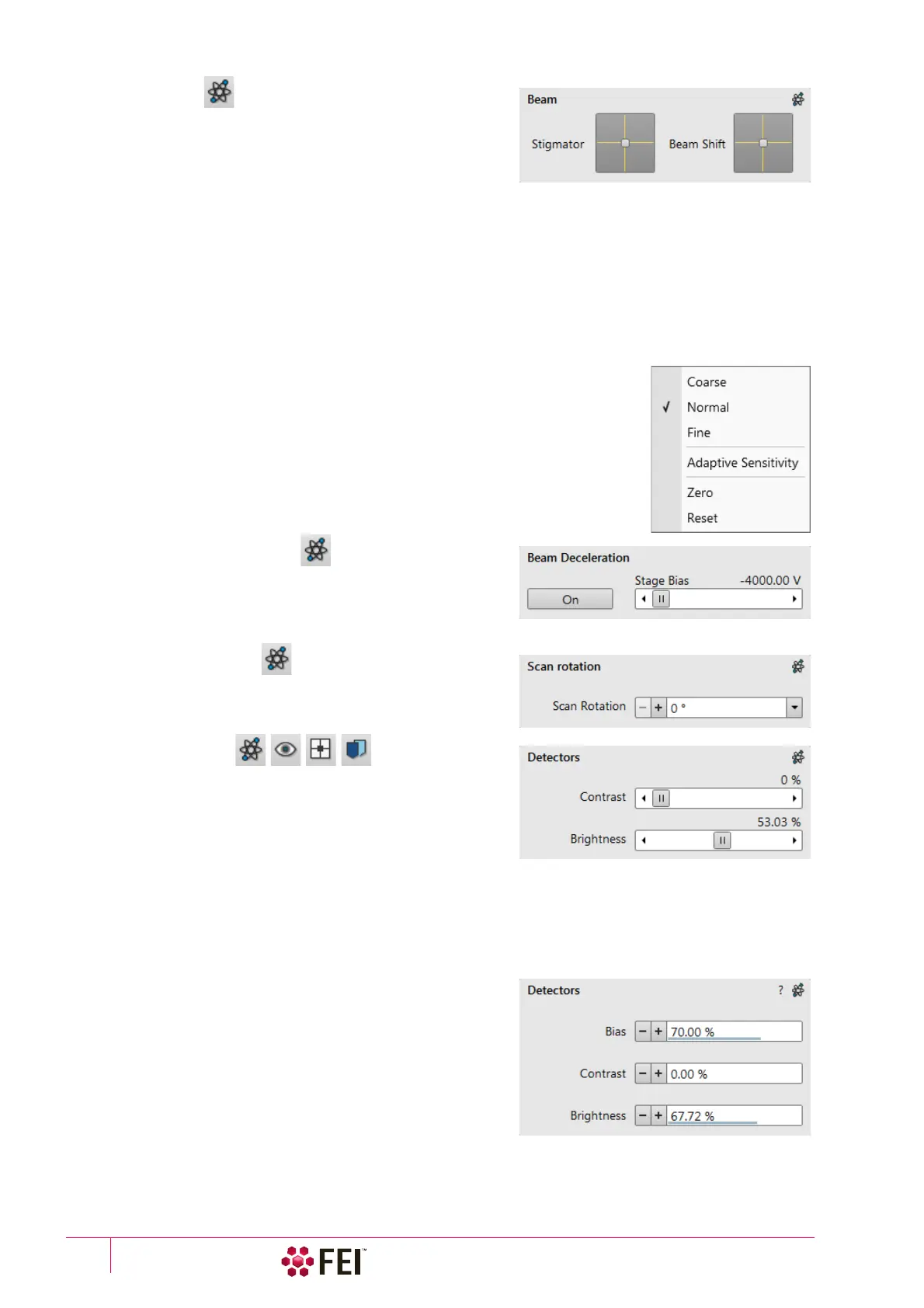
5. Beam Module
Stigmator 2D Control
enables to correct image astigmatism. The crosshair indicator
indicates the actual setting.
Shift + Right-clicking on an imaging display triggers the
astigmatism correction. Unlike the 2D box control, this is
magnification sensitive and therefore it suits for fine corrections at high magnifications, or employ the Adaptive
Sensitivity functionality.
Beam Shift 2D Control
indicates and controls the beam shift with respect to the objective lens axis. It is useful for fine imaging shifts
without stage movement.
Shift + Clicking on an imaging display triggers the Beam Shift function. The standard mouse cursor changes to the
“hand” cursor and the imaging is dragged over the screen. Because of a limited Beam Shift range, this works well
only for high magnifications, or employ the Adaptive Sensitivity functionality.
Note
Right-clicking on the 2D box opens a context menu with the following particular choices
(more see above):
• The Reset sets the Beam Shift value to zero and moves the stage to compensate the
resulting imaging shift (same as the Stage menu / Beam Shift Reset function).
6. Beam Deceleration Module
In the Beam Deceleration mode a potential (Stage Bias) is applied
on the stage, which influences both primary and detected
electrons. The Stage Bias ranges from +50 V to -50 V, optionally
to -4 000 V.
7. Scan Rotation Module
controls and shows the Scan Rotation value.
8. Detectors Module
contains adjusters to control the active detector Contrast
(electronic gain) and Brightness (voltage offset). The values are
remembered for each detector. The adjusters are disabled if the
detector is not available or cannot be controlled (e.g. CCD
camera or an External detector).
Contrast / Brightness / Enhance Adjusters
Regardless of the detector actual gain range, the Contrast & Brightness range is always 0–100% and the small /
large step size is 0.1 / 1 (the Brightness step size may differ for some detectors in order to achieve a sufficient
sensitivity). A direct value can be entered by double-clicking on the Contrast / Brightness value.
The Ctrl + clicking on & left-right / up-down dragging within an electron or ion beam display controls the Contrast
/ brightness.
The Low Vacuum detectors could have the Detectors module
with specific controls.



 To Next Page