Software Control: Preferences Dialog
C O N F I D E N T I A L – FEI Limited Rights Data 3-43
Scanning
allows a user to change the toolbar dwell-times (scanning speeds) table and to set-up the Slow scan / Fast scan /
Snapshot / Photo function. The configuration and available items differ for the beam (electron / ion) selected for
the display.
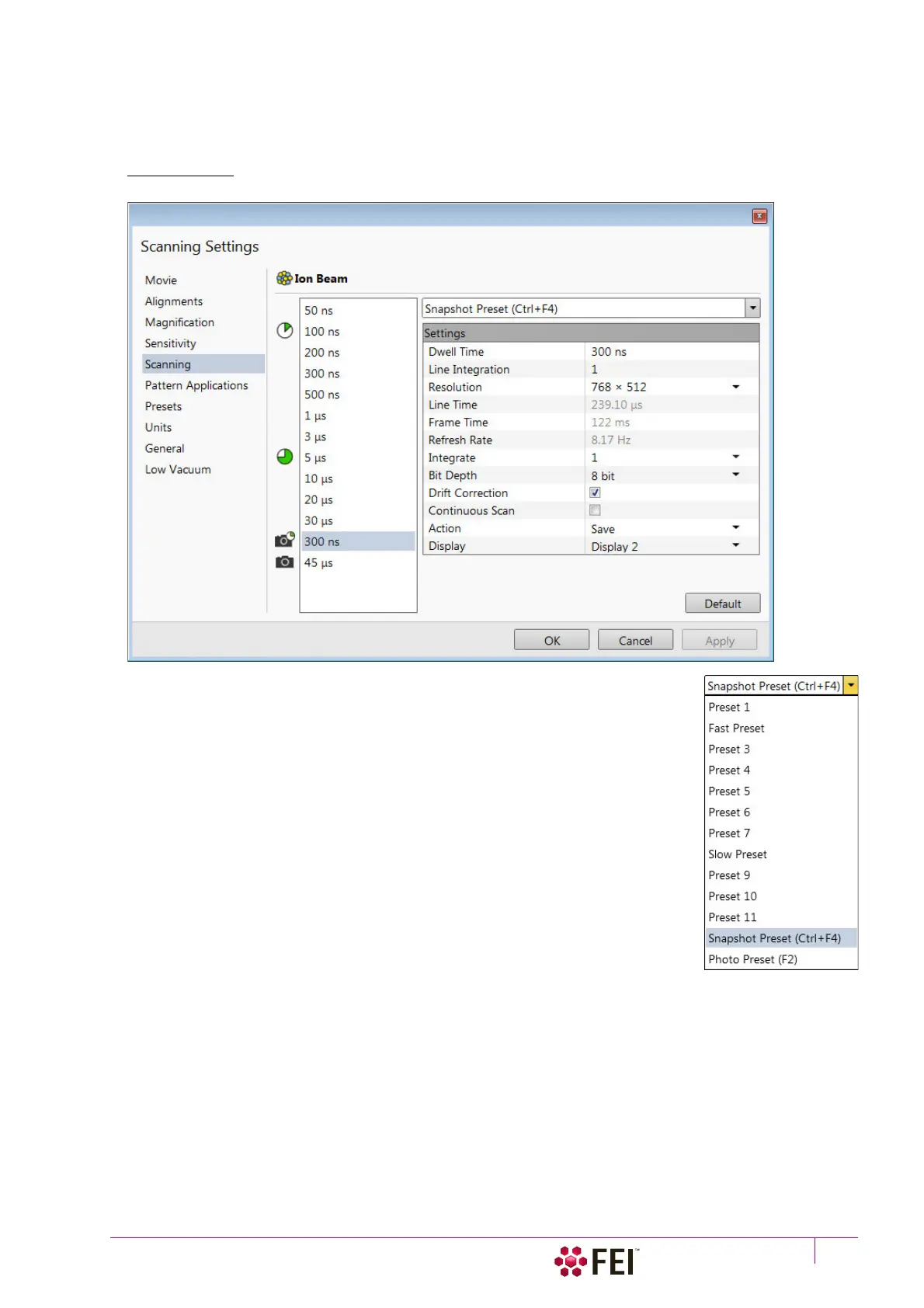
FIGURE 3-23 Scanning Preferences
On the left side of the module there is a dwell-time preset list with the fixed number of
entries. Selected Preset values can be changed in the Property editor on the right side of
the module. The following properties are editable (depending on the kind of the preset):
• Dwell Time – a period of time during which the beam remains at the scanned point
• Line Integration – number of line scanning repetitions
• Resolution – number of points, Width × Height (imaging resolution)
• Integrate – number of integrated frames in the range from 1 to 512
• Bit Depth – (8 bits / 16 bits) sets the captured image bit depth
• Drift Correction (Yes / No) – corrects imaging drifting when integration filter is active
When activated, the text below the blinking pause icon within the display notifies a
user.
• Continuous Scan (Yes / No) – when set to yes and the Snapshot / Photo function is
started during a scanning, this scanning finishes and resulting image is acquired
according to the preset.
This functionality requires the same scanning conditions for the scan in progress and
the Snapshot / Photo preset (Dwell time, Line integration, Resolution, Bit depth…). If
they are not, the Application status warning message is shown. The functionality is
convenient for charging samples.
• Action – activated at the end of Photo / Snapshot function:
Save saves the image using an automatic file name and format
Save As opens the Save As dialog to save the image
None just pauses imaging
The following properties are informative and non-editable:
• Line Time – line scan duration time
• Frame Time – display scan duration time
• Refresh Rate – imaging refresh frequency



 To Next Page