Marker
Marker allows you to create a marker pattern one point at a rime. For each data point
in
the waveform an associated position marker can
be
set high
or
10w.
First, use "adrs" (F2) to select the point address
in
the edit waveform. The bracketed
number to the right
of
the address value indicates a high
or
10w
status
of
the marker bit.
Change the marker high or low using F6.
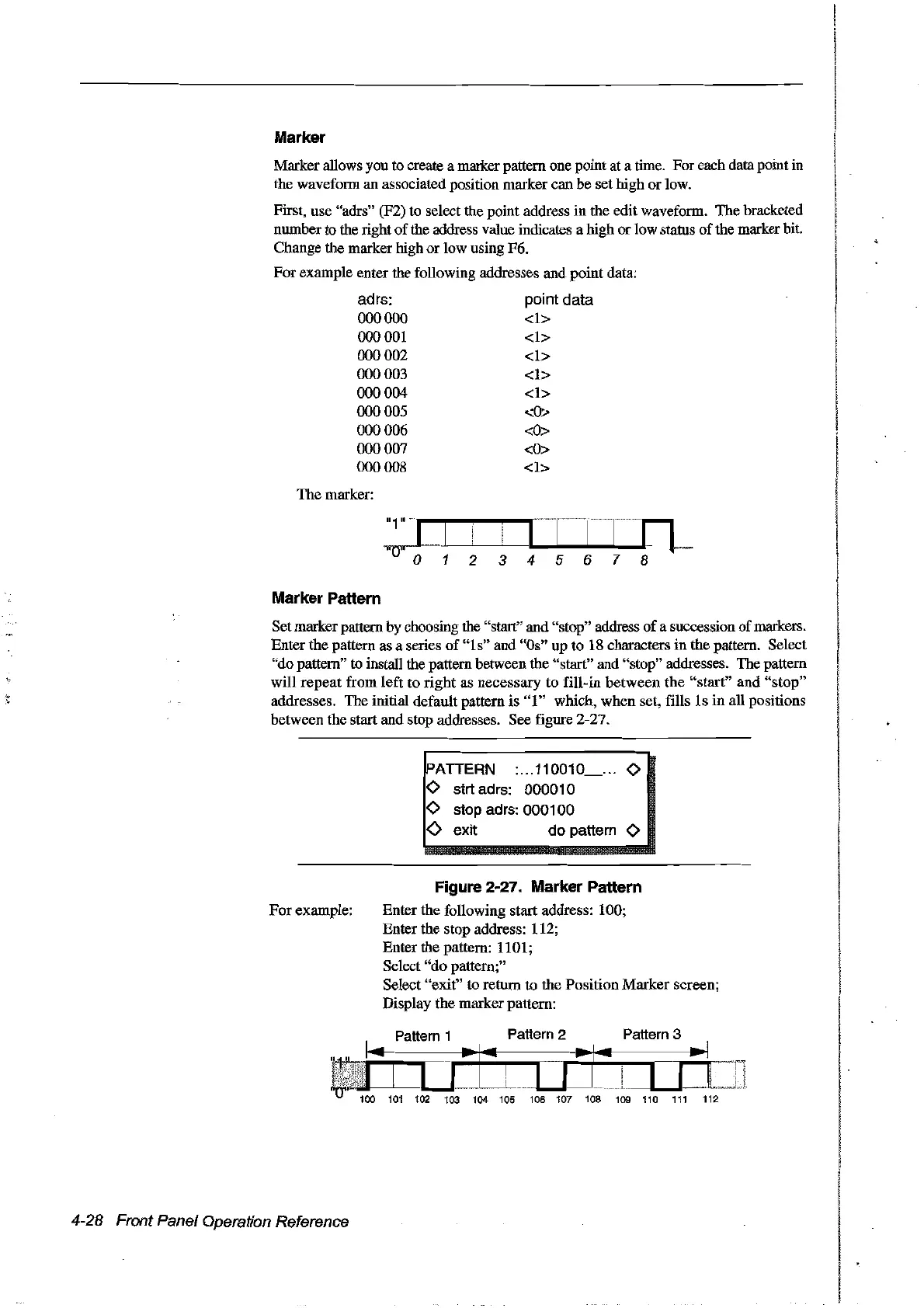
For example enter the following addresses and point data:
adrs:
000000
000001
000002
000003
000004
000005
000006
000007
000008
Themarker:
point data
<1>
<1>
<1>
<1>
<1>
<0::.-
<0>
<0>
<1>
Marker Pattern
Setmarker pattern by choosing the "start" and "stop" address
of
a succession
of
markers.
Enter the pattern as a series
of
"1
s" and "Os" up to 18 characters in the pattern. Select
"dopattern" to install the pattern between the "start" and "stop" addresses. The pattern
will repeat from left to right as necessary to fill-in between the
"start"
and "stop"
addresses.
The
initial default pattern is
"1"
which, when set, fills
ls
in
aU
positions
between the start and stop addresses. See figure 2-27.
PATTERN :...110010
<>
<>
strt adrs: 000010
<>
stop adrs: 000100
<>
exit do pattern
<>
For
example:
4-28 Front Panel Operation Reference
Figure 2-27. Marker Pattern
Enter the following start address: 100;
Enter the stop address: 112;
Enter the pattern: 1101;
Select
"do
pattern;"
Select "exit" to return to the Position Marker screen;
Display the marker pattern:
Pattern
3
Artisan Technology Group - Quality Instrumentation ... Guaranteed | (888) 88-SOURCE | www.artisantg.com



 To Next Page