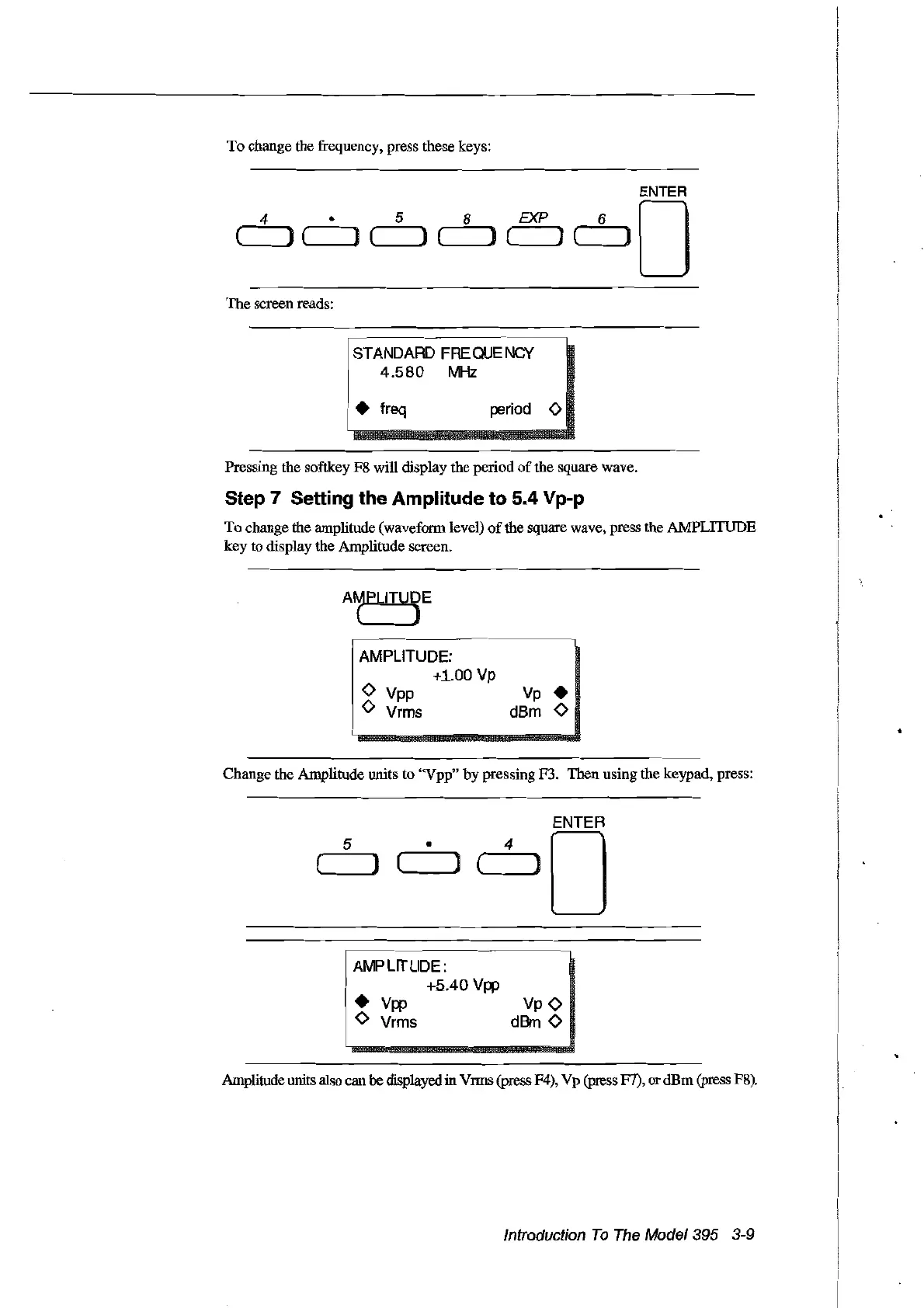
To
change the frequency, press these keys:
ENTER
4·
5 8 EXP
60
( )('----Jl]e Je
le
Je )
The screen reads:
rSTANDARD FREQUE
Nev
.
1
4.580
MHz
i • freq
period
0
Pressing the softkey F8 will display the period
of
the square wave.
Step 7 Setting the Amplitude
to
5.4 Vp-p
To
change the amplitude (wavefonn level)
of
the square wave, press the AMPLITUDE
key to display the Amplitude screen.
Change the Amplitude units to "Vpp"
by
pressing F3. Then using the keypad, press:
ENTER
5
•
4
0
(
)
( )
( )
~m~m_~m~
••
_m_.
__
m
• AMPLITUDE:
1
+5.40VW
•
Vw
VpO
! 0 Vrms
dBrn
0
Amplitude units
also
cau
he
displayedin
VlU1S
(press F4), Vp (press F7), ordBm (press
FS).
Introduction
To
The
Model395 3-9
Artisan Technology Group - Quality Instrumentation ... Guaranteed | (888) 88-SOURCE | www.artisantg.com



 To Next Page