EasyManua.ls Logo

Fluke Wavetek-Datron 395 - Page 46

Fluke Wavetek-Datron 395
285 pages
Print Icon
To Next Page IconTo Next Page
To Previous Page IconTo Previous Page
Loading...
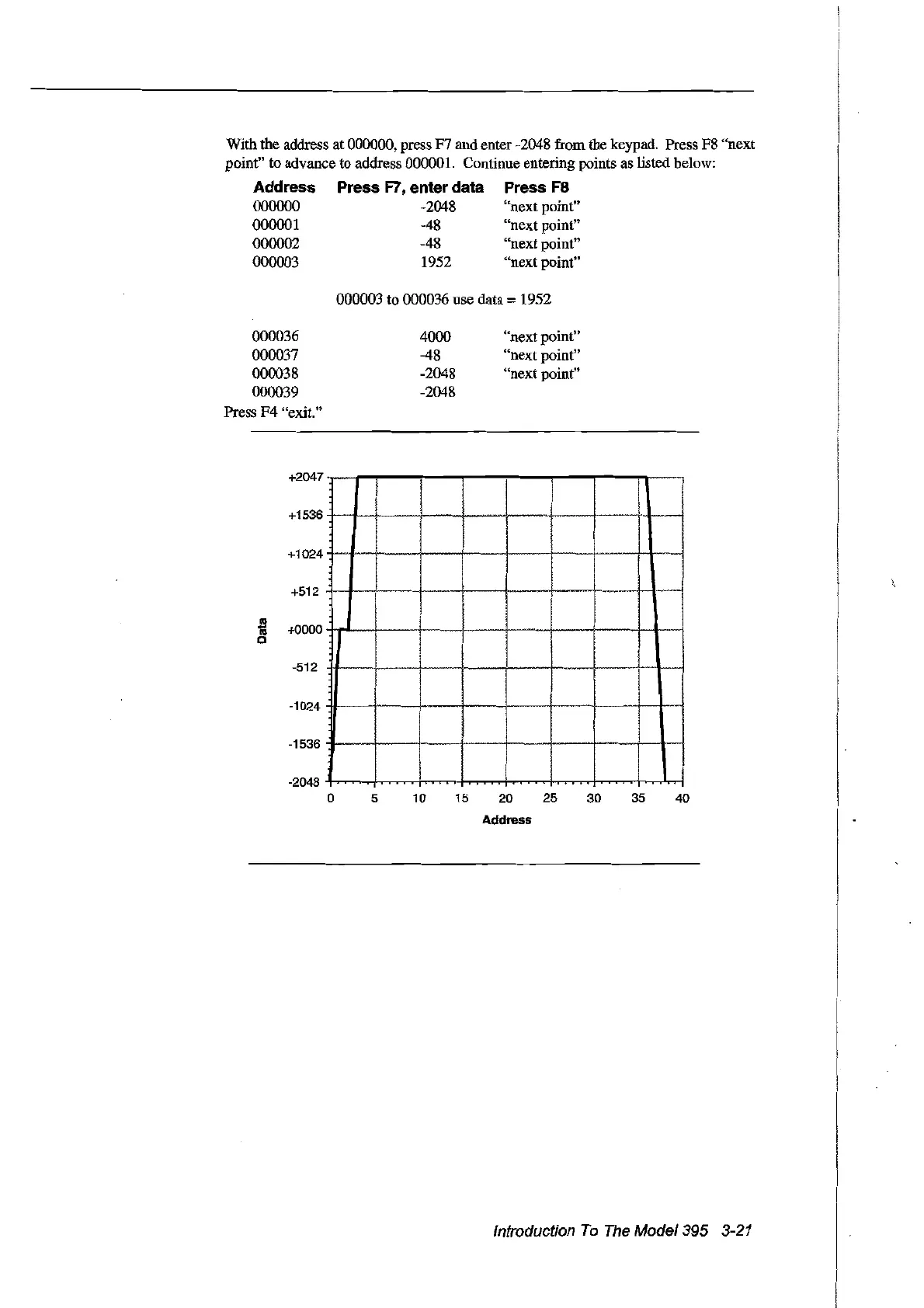
With the address at 000000, press F7 and enter -2048 frOID the keypad. Press F8 "next
point" to advance to address 000001. Continue entering points as listed below:
Address Press
F7,
enter data Press
F8
000000 -2048 "next point"
000001 -48 "next point"
000002 -48 "next point"
000003 1952 "next point"
000003 to 000036 use
data =1952
000036
000037
000038
000039
Press F4 "exit."
4000
-48
-2048
-2048
"next point"
"next point"
"next point"
+2047
+1536
+1024
+512
as
'Iii
+0000
0
-512
-1024
-1536
-2048
0
5
10 15
20
25
30
35 40
Address
Introduction
To
The
Model395
3-21
Artisan Technology Group - Quality Instrumentation ... Guaranteed | (888) 88-SOURCE | www.artisantg.com

Table of Contents

Related product manuals