9100c
4-26 M1207026
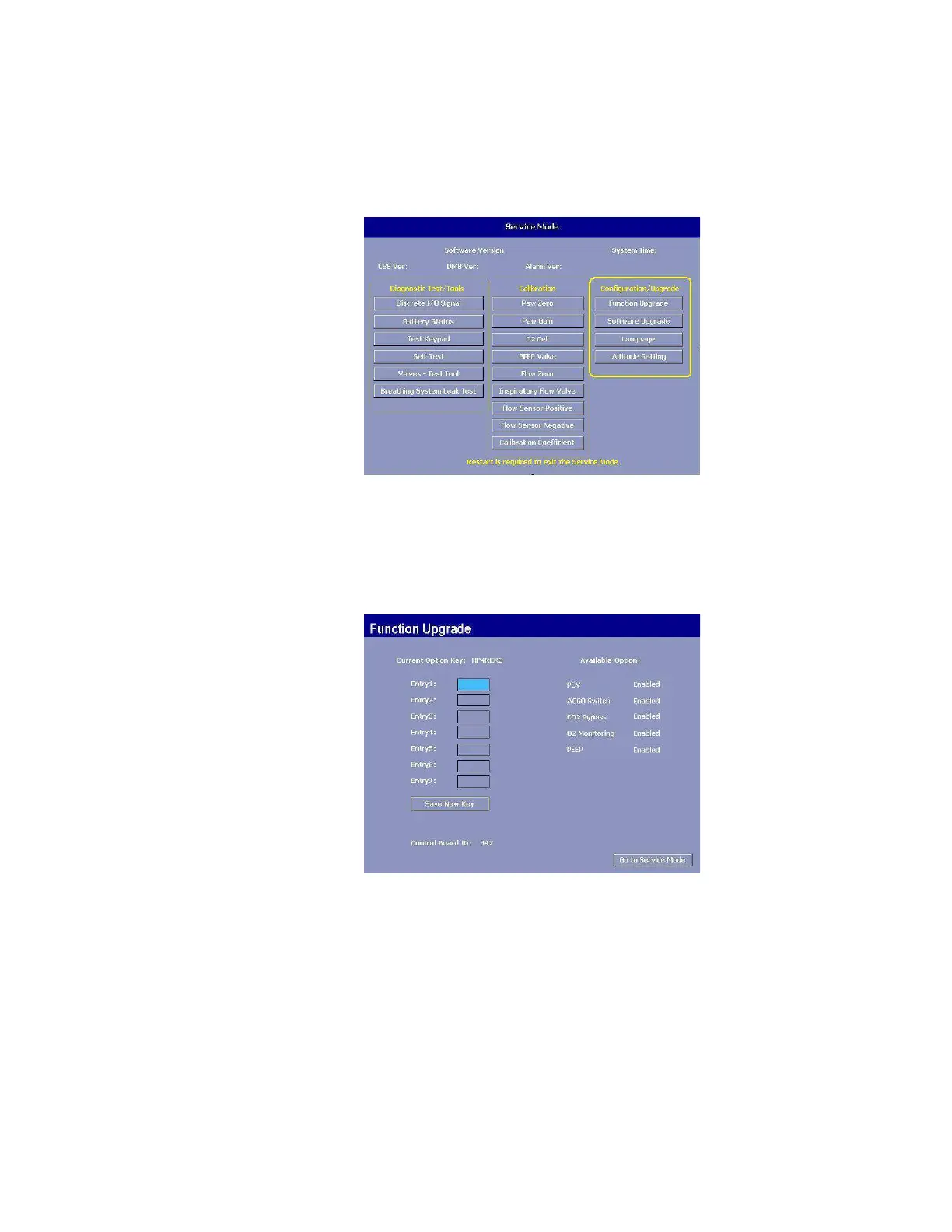
4.6 Configuration/Upgrade
The Configuration/Upgrade menu includes the Function Upgrade,
Software Upgrade and Languages selection.
4.6.1 Function
Upgrade
The Function Upgrade menu shows which features are currently
available in the ventilator’s software.
The ventilator can be upgraded to include additional features by
entering the upgrade “Key Code” that the customer has purchased.
Remarks Select each “digit” in each Entry field and rotate the control knob to
select the corresponding digit in the Key Code.
When you have entered all the digits, select “Save New Key”.
After verifying the Key Code match to the Control Board ID, the menu
will display the newly installed features.
Note The “Control Board ID” here refers to the Display Monitor Board of the
9100c system.
If the ventilator “Key Code” is changed, the new code should be
recorded on the display module side panel label.
M1207027 004 MANUAL−DOC, Technical Reference Manual, Technical Reference Manual for 9100c, English−default
Reproduced from the electronic master in MATRIX



 To Next Page