9100c
9-34 M1207026
9.16.2 Display
Monitor Board
CAUTION The circuit boards are electrostatic sensitive. Use an anti-
static workstation and wear a wrist grounding strap when
handling a circuit board
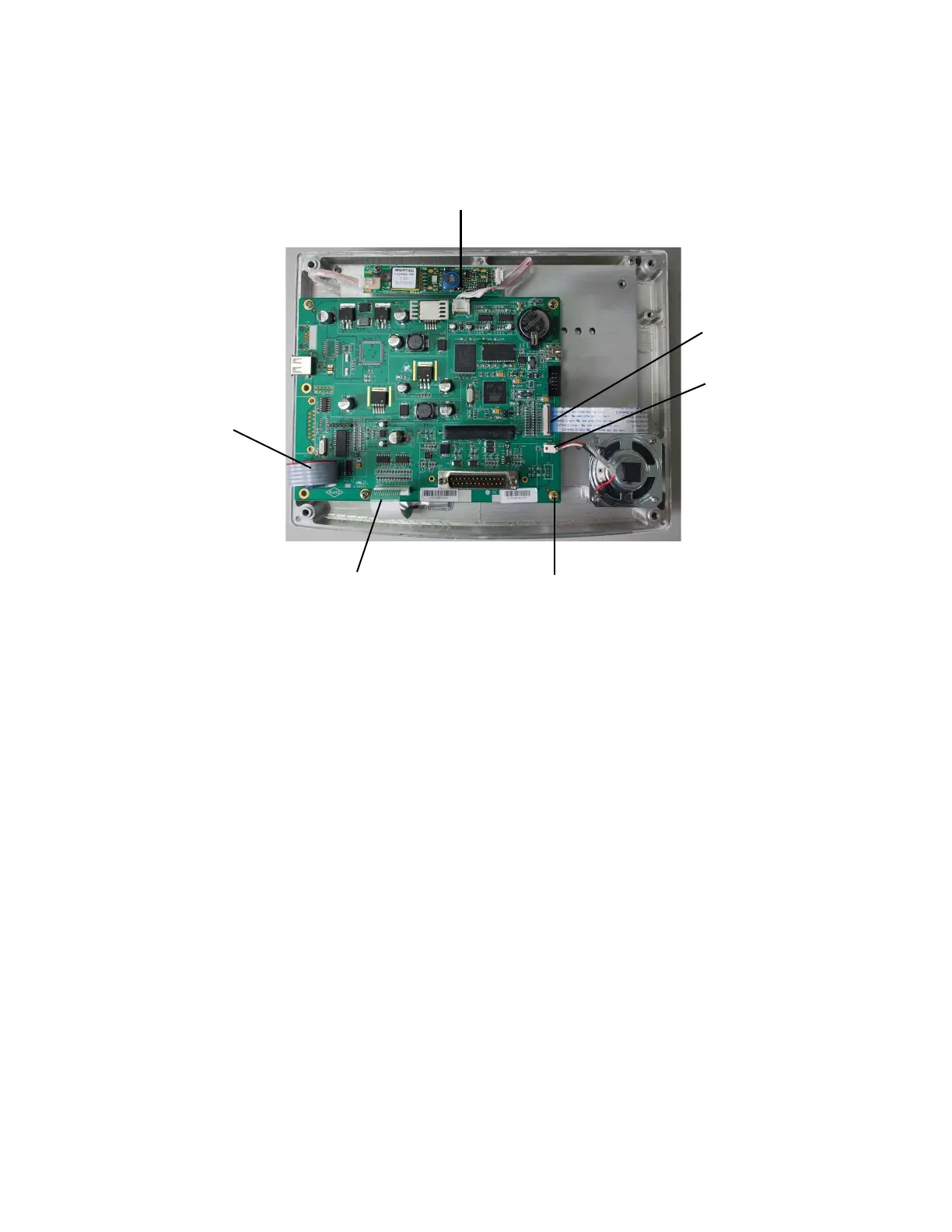
To replace the Display
Monitor Board
1. Disconnect the remaining cables at the four edges of the display
monitor board.
•(A) Two-wire harness to speaker
•(B) Flex cable to LCD display (refer to Note)
•(C) Five-wire harness to back light inverter
•(D) Ribbon cable to rotary encoder
•(E) Flex cable to front panel keyboard (refer to Note)
2. Remove the five screws (F) that hold the display monitor board to
the front enclosure.
3. Carefully lift the display monitor board from the front enclosure.
Guide the cables through the slotted openings at the four edges
of the display monitor board.
4. Reassemble in reverse order.
5. Refer to Section 8.4 for installing software and attaching the
display monitor configuration label.
Note The flex cable (B) for the LCD display inserts into a ZIF (zero
insertion force) connector on the DMB.
M1207027 004 MANUAL−DOC, Technical Reference Manual, Technical Reference Manual for 9100c, English−default
Reproduced from the electronic master in MATRIX



 To Next Page