6 Installation and Maintenance
M1207026 6-7
6.4 Adjust drive gas regulator
1. Set the system switch to Off.
2. Disconnect all pipeline supplies.
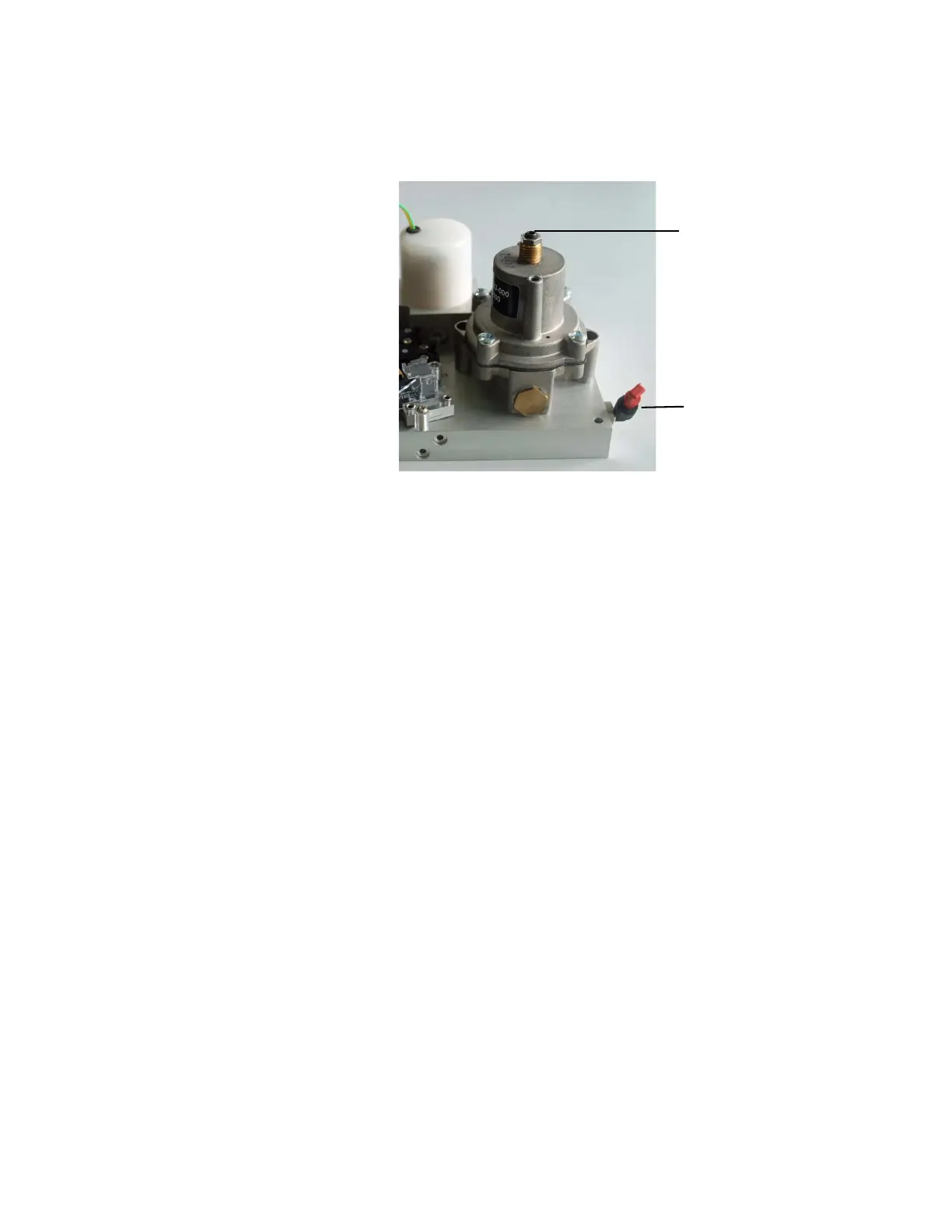
3. Remove the plug on the test fitting, and attach pressure test
device to the test fitting.
4. Remove the bellows assembly and exhalation valve.
5. Connect the pipeline supplies.
6. Set the system switch to On.
7. Enter the Service Mode. From the “Diagnostic Tests/Tools”
menu, select “Valve - Test Tool”.
8. Select “Set Inspiratory FLow Valve” and activate a flow of 15
L/min.
9. Adjust regulator until pressure test device reads 172 kPa (25 psi).
10. Set the system switch to Standby when regulator is adjusted.
11. Reassemble exhalation valve and bellows assembly when
adjustment complete.
Remarks The drive gas regulator should provide a constant gas input pressure
of 172 kPa (25 psi).
You can verify this pressure by attaching a pressure test device to the
regulator pressure port (shown below) and adjusting the regulator to
172 ±1.72 kPa (25 ±0.25 psi).
Adjustment Screw
Test Fitting
M1207027 004 MANUAL−DOC, Technical Reference Manual, Technical Reference Manual for 9100c, English−default
Reproduced from the electronic master in MATRIX



 To Next Page