3-104
Chapter 3 Settings and Measurement
Contents General Description
Checks and Preparation
Settings and Measurement
Example of Use Specification
Setting Selections available
Data search CH CH1 to 200, Logic, Pulse, Alarm, CALC
* Logic and Pulse are displayed only if the Logic Pulse function is On in the
AMP settings.
*CALC is displayed only if the Calculation function is On in the AMP settings.
CH1 to CH200 CH1-200
Logic Logic1-4
Pulse Pulse1-4
Alarm Alarm1-4
CALC CALC1-20
Data search Mode CH1 to CH200
H,
L
Logic
H,
L
Pulse
H,
L
Alarm Both,
H,
L
CALC
H,
L
Level CH1 to CH200 Set numeric value
Pulse Set numeric value
CALC Set numeric value
Next Search Select and press the ENTER key to execute.
Prev. Search Select and press the ENTER key to execute.
Statistical
calculations
Execute Select and press the ENTER key to execute.
11-1. Move to First Data
Executing this option moves the currently selected cursor (A or B) to the start of the data.
11-2. Move to Last Data
Executing this option moves the currently selected cursor (A or B) to the end of the data.
11-3. Move to Center
Executing this option moves the currently selected cursor (A or B) to the center of the data.
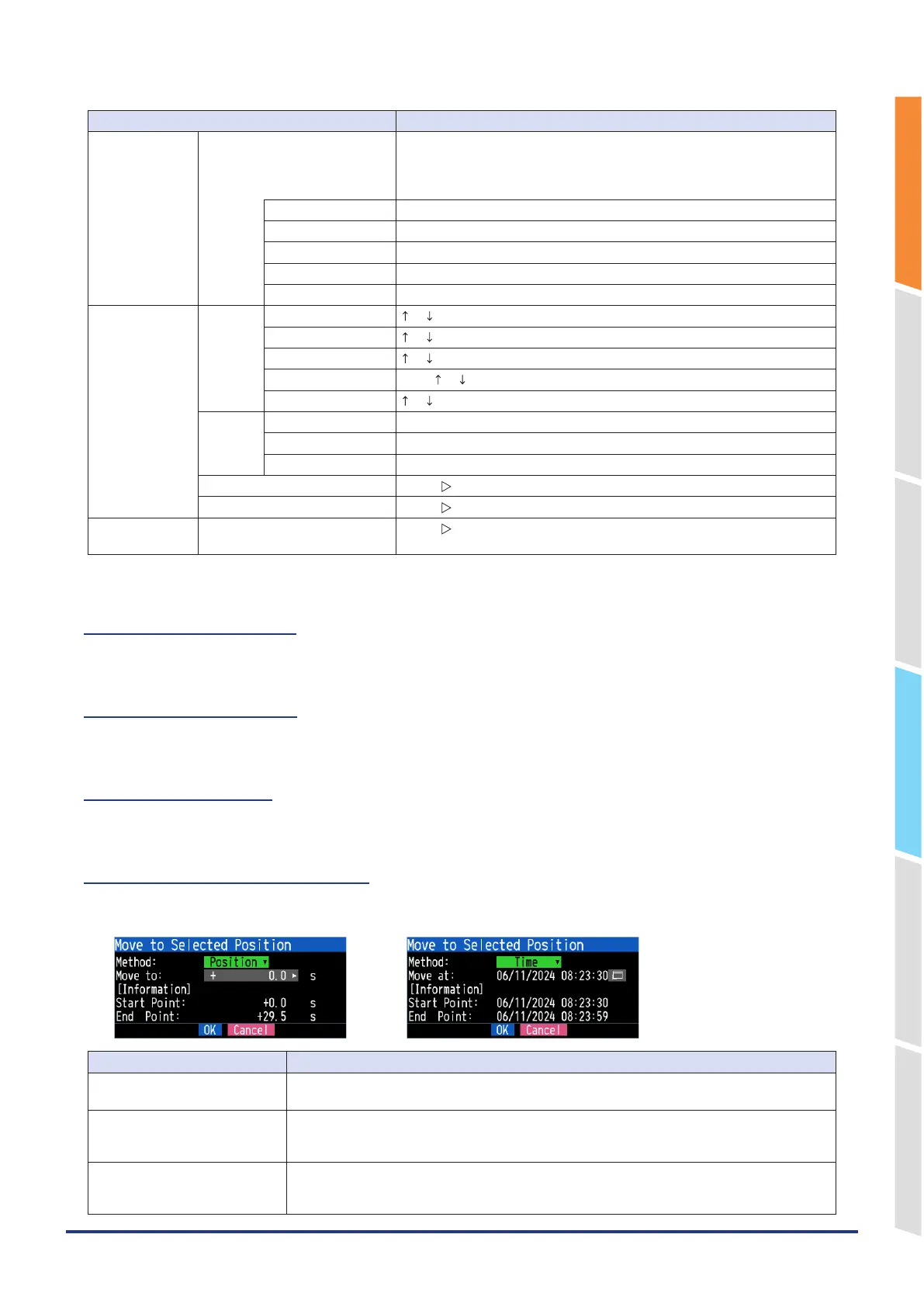
11- 4. Move to Selected Position
Sets a position (relative position in time) or time and moves the currently selected cursor (A or B) to this position or time.
<If the Method is Position> <If the Method is Time>
Setting Selections available
Method Sets the method for specifying the position to move the cursor.
Select Position or Time.
Move to Sets the position to move the cursor.
The cursor can be set from the capture start position assumed as the Start Point 0s up to the
endpoint value.
Move at Sets the date and time to move the cursor.
The cursor can be set from the capture start position assumed as the Start Point date/time up to
the endpoint value.















 To Next Page