3-71
Chapter 3 Settings and Measurement
Contents General Description
Checks and Preparation
Settings and Measurement
Example of Use Specification
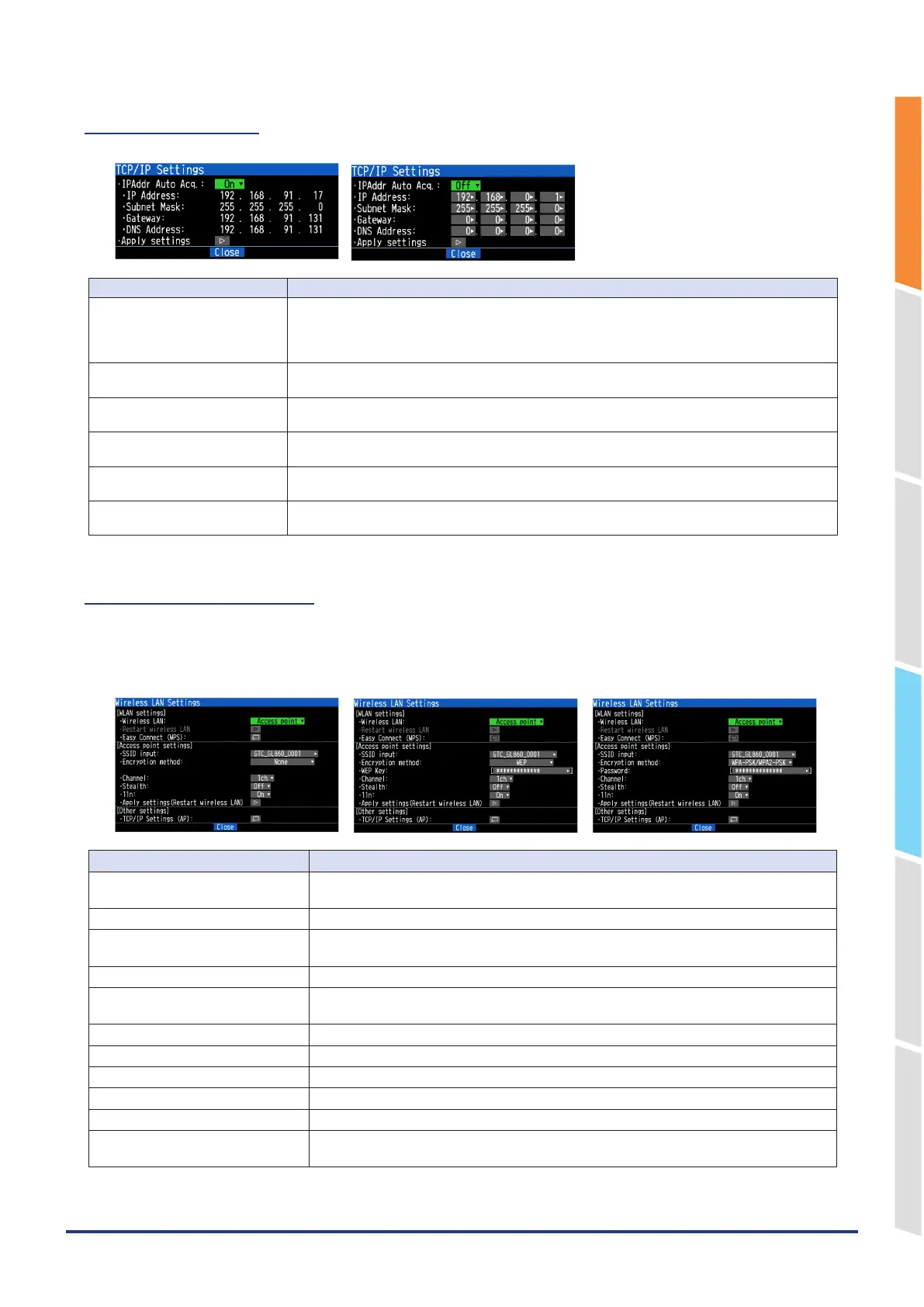
5-5. TCP-IP setting
IP address auto acquisition Use IP address auto acquisition Do not use
Selection item Description
IP address auto-acquisition Do not use, Use
Do not use: When you do not use “IP address auto acquisition”, select “Do not use” and set the
IP address, Subnet mask, Port number, etc.
Use: Select “Use” to use “IP address auto acquisition”.
IP Address Set the IP address when “Do not use DHCP” is set.
The acquired IP address when “Use DHCP” is set is displayed.
Subnet mask Set the Sub-net mask when “Do not use DHCP” is set.
The acquired Sub-net mask when “Use DHCP” is set is displayed.
Gateway Set the gateway address when “Do not use DHCP” is set.
The acquired gateway address when “Use DHCP” is set is displayed.
DNS Address Set the DNS server address when “Do not use DHCP” is set.
The acquired DNS server address when “Use DHCP” is set is displayed.
Apply Settings Restart the set TCP-IP to reflect the settings.
Stay connected while the wireless LAN is disconnected.
5-6. Access point setting
The access point setting is a setting when the GL860 operates as a base unit.
Wireless connection with a PC is possible using the GL860 as a base unit.
When selecting the wireless LAN as a station and then restarting the wireless LAN, the following screen is displayed.
<Encryption Method: None> <Encryption method: WEP> <Encryption method: WPA-PSK/WPA2-PSK>
Selection item Description
Wireless LAN Switch between Off, Station and Access points.
Select the setting you want to change and execute "Wireless LAN restart".
AUTO SETTING (WPS) Execute the auto-connect using WPS. For details, refer to "How to use WPS".
SSID input Set the SSID (access point identification name) of the GL860.
Up to 32 characters of the alphanumeric characters and symbols can be entered.
Encryption method Make the settings of None, WEP, WPA-PSK/WPA2-PSK encryption.
WEP key When you set encryption, it is displayed, so set the key.
Set the WEP key with 10 digits for WEP64 and 26 digits for WEP128.
Password Set a password with 8 to 63 alphanumeric characters.
Stealth Set the SSID concealment mode.
Channel Perform 1ch to 13ch settings.
11n Select whether or not to use the wireless standard 11n.
Apply settings (Restart Wireless LAN) Reflects the encryption method, WEP key and password settings.
TCP-IP settings Make TCP-IP settings.
After setting, reflect the settings and restart to complete.















 To Next Page