3-6
Chapter 3 Settings and Measurement
Contents General Description
Checks and Preparation
Settings and Measurement
Example of Use Specification
11. Quick settings
You can change the settings for dividing the waveform display.
Use the " "
keys to activate the Quick setting and the " " keys to change values.
For details, refer to "12. Quick setting" in "3.4 Setting Menus".
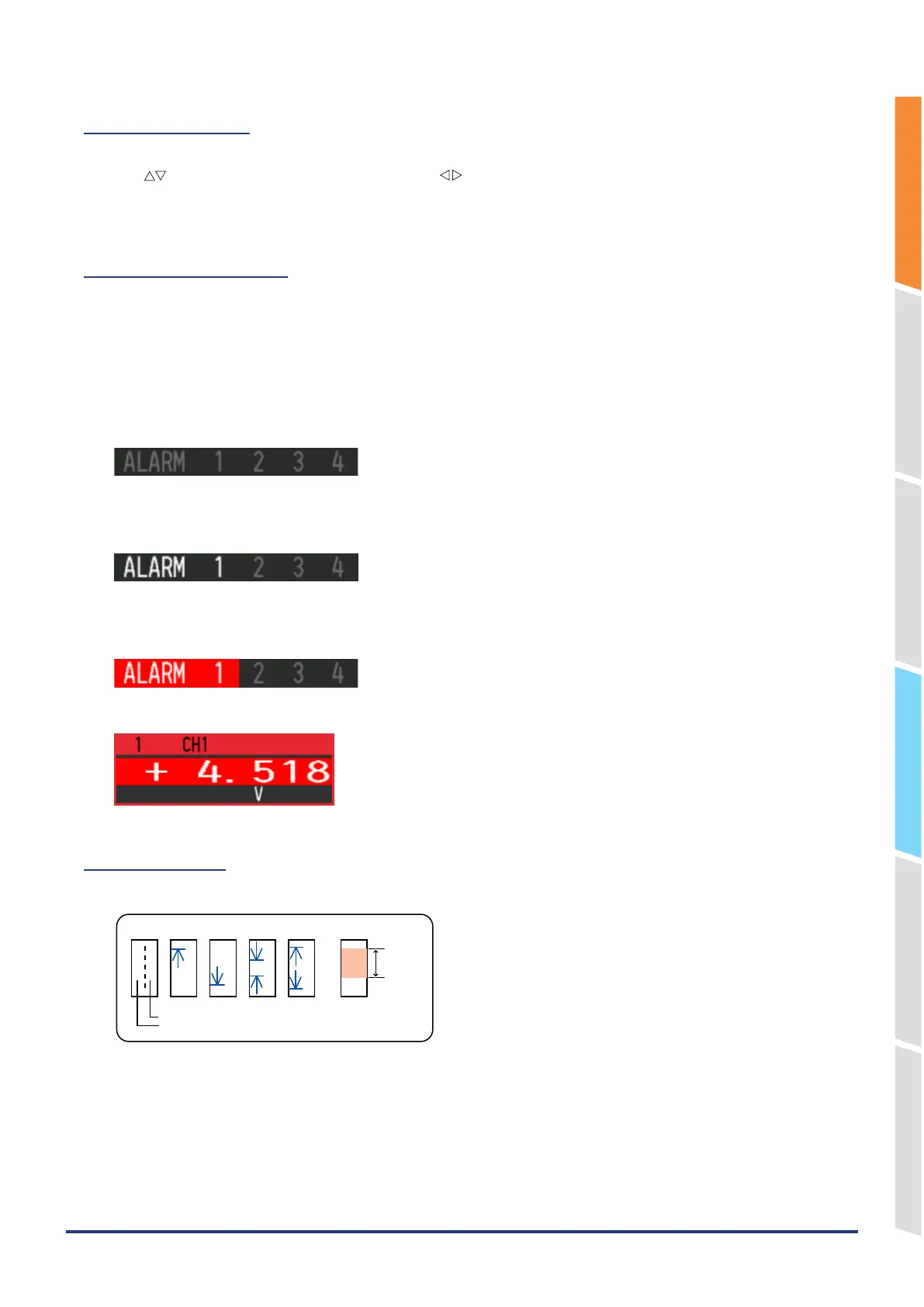
12. Alarm display area
Displays the alarm output terminal status.
The number with which an alarm has occurred is displayed in red. The channel with the alarm cause has a red digital
display area.
Alarm output numbers not set to alarm are grayed out. Also, if all the alarm output numbers are not set to alarm, the
entire alarm display will be grayed out.
<When all alarm output numbers are not set>
All alarms are grayed out.
<When only alarm output number 1 is set>
Only the set alarm output numbers are displayed brightly.
<Alarm generated>
The alarm output number for which an alarm is occurring is displayed in red.
The digital display of the CH that caused the alarm also turns red.
13. Pen display
Displays each channel signal position, trigger position, and alarm range.
Trigger position
Alarm range
Stop position
Start position
Rising Falling Win In Win Out















 To Next Page