3-19
Chapter 3 Settings and Measurement
Contents General Description
Checks and Preparation
Settings and Measurement
Example of Use Specification
3.3 Operation Modes
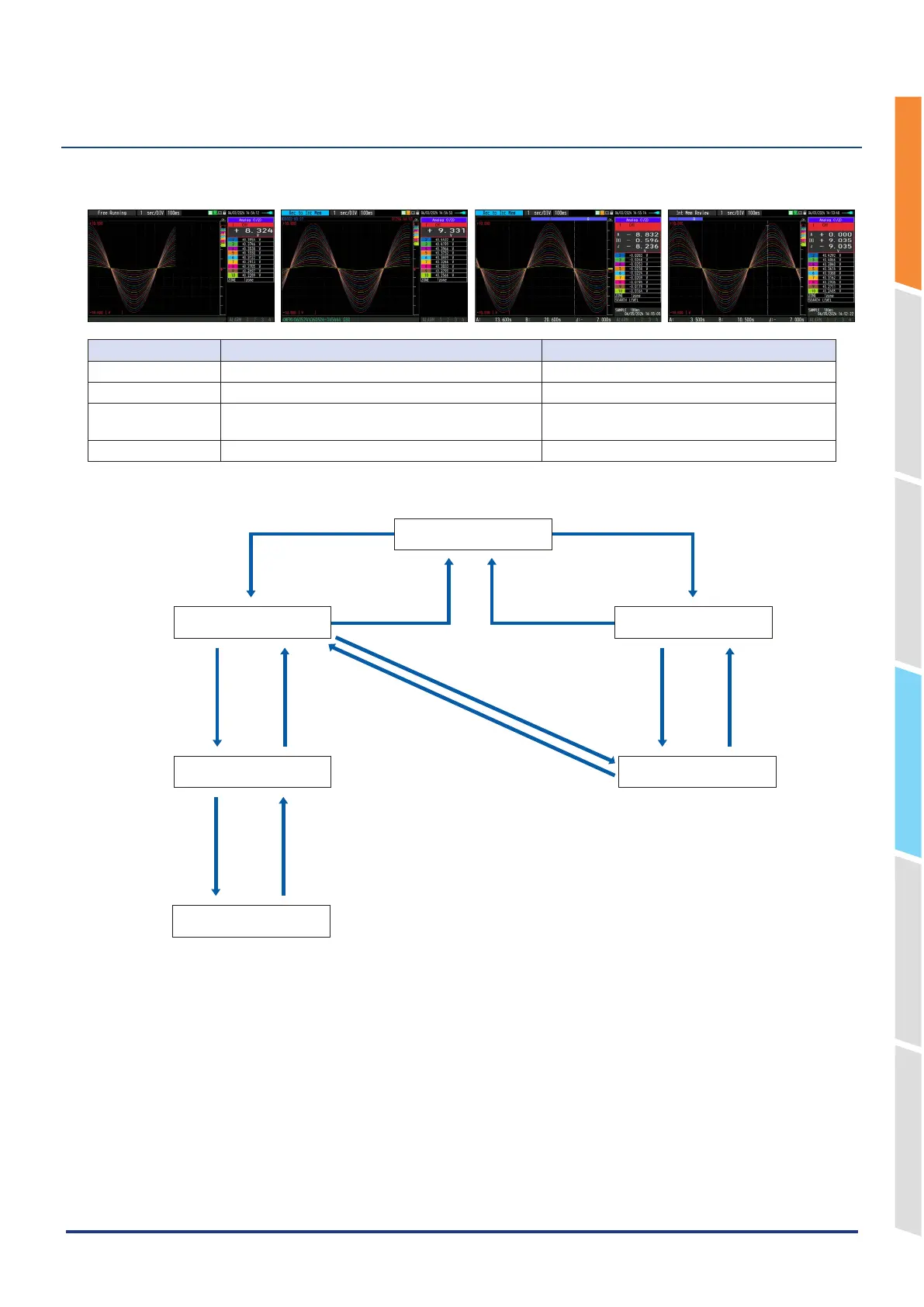
You can check the system operation status in the status message display.
< Free Running > < Capturing > <Replaying while capturing data> < Replaying >
Operation Description Simple message display
Free Running Startup status, or data is not being captured. Free Running
Capturing The data is being captured. While capturing to internal memory or SD CARD
Replaying while
capturing data
Replaying the data during capture and displaying the
current waveform.
While capturing to internal memory or SD CARD
Replaying Captured data is being replayed. While capturing to internal memory or SD CARD
Operation status transition
[START/STOP] key
Free Running
Replaying
Capturing
Replay while capturing
[QUIT] key
[START/STOP] key
[REVIEW] key
[REVIEW] key
[DISPLAY] key [DISPLAY] key
[DISPLAY] key
Alarm History display
* Only when the Alarm History is
set to ON
[DISPLAY] key
[QUIT] key or
[REVIEW] key
2-screen replaying display
[DISPLAY] key















 To Next Page