4-15
Chapter 4 Example of Use
Contents General Description
Checks and Preparation
Settings and Measurement
Example of Use Specification
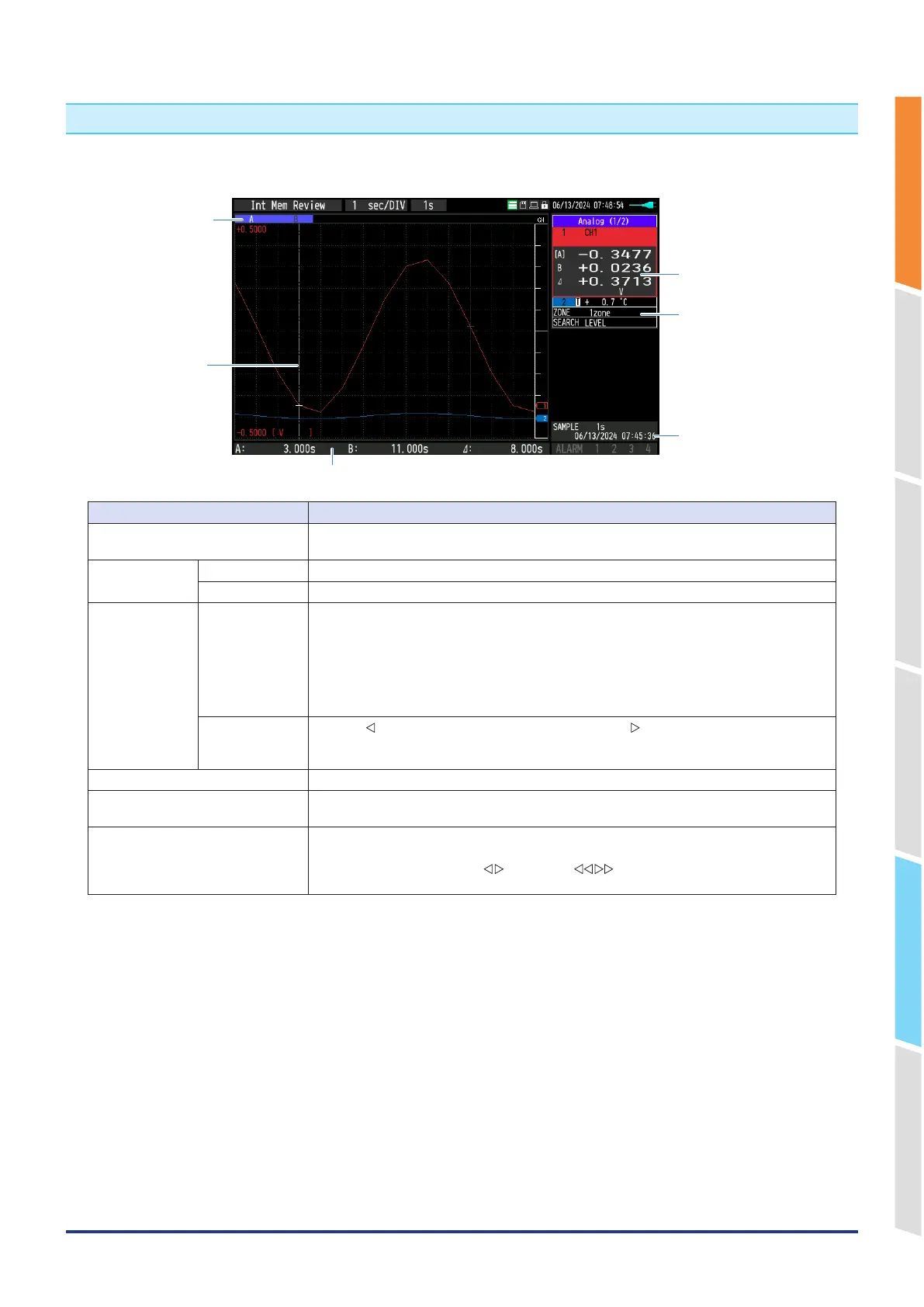
2. Replay screen
The data replay screen is described here.
5. Time display (relative)
4. Time display (absolute)
3. Quick settings
2. Level display
6. Cursor
1. Scrollbar
Name Description
1. Scrollbar The position and width of the entire waveform range are displayed on the screen.
The position of the A/B cursors is also displayed.
2. Level display Selected CH The level value of the A/B cursors and cursor difference are displayed.
Non-selected CH The level value of the currently selected cursor is displayed.
3. Quick settings ZONE The waveform display can be switched between 1, 2, 5, and 10 divisions.
1 division: Displays all 10ch scales.
2 division: Divides the screen into 2 and displays 1, 3, 5, 7, 9ch and 2, 4, 6, 8, 10ch
respectively.
5 division: Divides the screen into 5 and displays 1/6ch, 2/7ch, 3/8ch, 4/9ch and 5/10ch
respectively.
10 division: Divides the screen into 10 and displays each channel individually.
SEARCH Use the "
" key to search the previous one, or use the " " key to search the next one.
Set the search settings in "3.4 Description of the setting menu", "(11) Data replay menu" and
"(11)-6 Data search" in the Replay menu.
4. Time display (absolute) The time at the position of the selection cursor is displayed. (Unit: 1 second)
5. Time display (relative) The position of the selection cursor (relative time from the trigger point and differential time
of the cursor) is displayed.
6. Cursor The cursor is displayed.
Cursor A/B selection can be switched by pressing the “CURSOR” key or “FUNC” key.
The cursor is moved with the " " key or the " " key (high-speed movement).
You can check any level value or time with the cursor.















 To Next Page