2-29
CHAPTER 2 Checks and Preparation
Contents General Description
Checks and Preparation
Settings and Measurement
Example of Use Specification
2.12 Using the Battery Pack (B-573/B-569: Option)
•
The B-573/B-569 option is the only battery type that can be used with the GL860.
•
Refer to "5.3 Accessories/Optional Accessories" for information on the battery run time.
•
The operating temperature ranges of the GL860 with a battery pack mounted are as follows:
Running on battery: 0 to 40°C
Battery being charged: 15 to 35°C
Mounting the Battery Pack
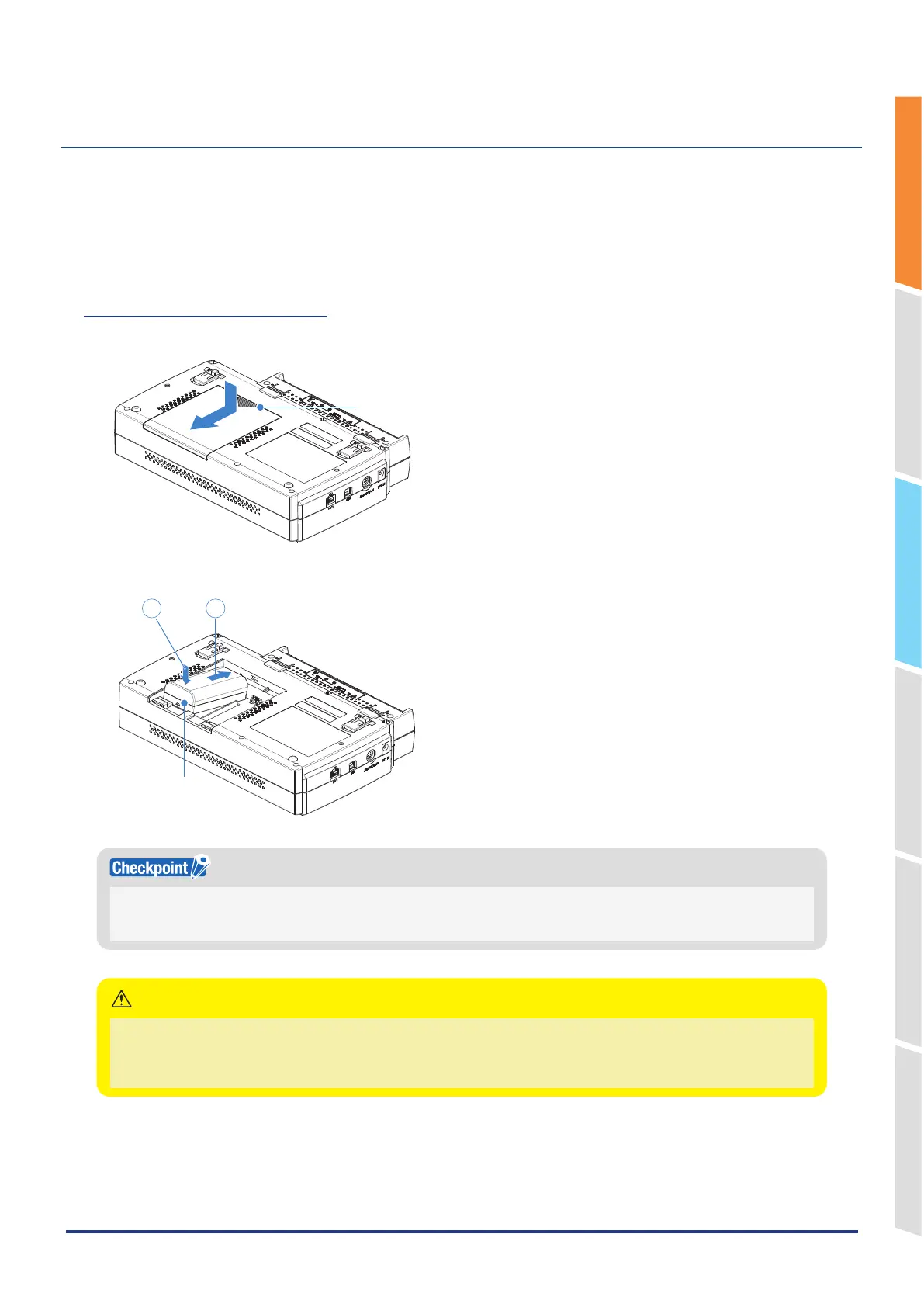
1. While lightly pushing the grip of the battery cover, slide the cover in the direction indicated by the arrow.
Grip
2. Attach the battery pack (B-573).
Battery pack
12
• Either one or two battery packs can be attached.
• To connect one pack, connect to either one of the connectors.
• Attaching two battery packs allows longer operational time.
• When attaching two battery packs, make sure the battery levels are equivalent.
• Do not use a new battery with an old battery at the same time.
• When attaching two battery packs, make sure the remaining amount are same.
• If you are not sure about the amount, charge each battery and then attach full-charged two battery packs.
CAUTION















 To Next Page