3-9
Chapter 3 Settings and Measurement
Contents General Description
Checks and Preparation
Settings and Measurement
Example of Use Specification
3.2
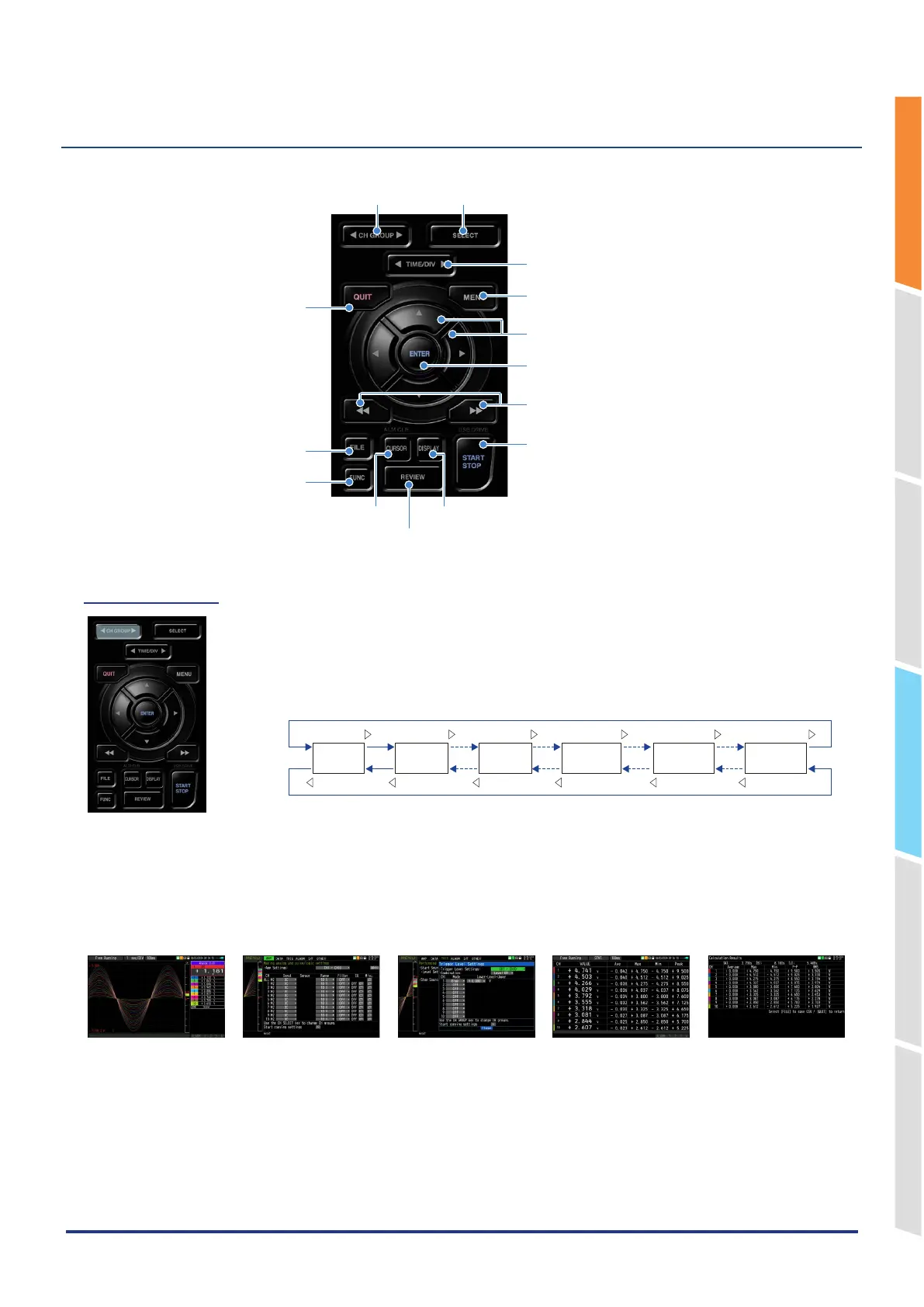
Key Operations
This section describes key operations.
1. CH GROUP 2. SELECT
3. TIME/DIV
4. MENU
6. Direction Keys
7. E N T ER
8. FAST REWIND/FORWARD key (KEY LOCK)
9. START/STOP
(
USB DRIVE
)
5. QUIT
13. FILE
14. FUNC
11. DISPLAY
10. REVIEW
12. CURSOR (ALARM CLEAR)
(1) CH GROUP
Press this key to switch to the next group consisting of 10 channels.
Press the ◁ key to switch to the group consisting of the next 10 channels with a smaller
number.
Press the ▷ key to switch to the group consisting of the next 10 channels with a larger
number.
Terminal unit
1 to 10
Terminal unit
11 to 20
Terminal unit
101 to 200
Logic
・
Pulse
Calculation
1 to 10
Calculation
11 to 20
The items that can be switched in this key are as follows.
• Switch channels of the digital display area
• Switch channels of the AMP settings
• Switch channels of the trigger/alarm level settings
• Switch channels of the calculation display
Digital + Waveform screen
AMP settings Level settings
Digital + Calculation
Display screen
Statistical calculation
between cursors
If all channels in the relevant channel group are set to off, channel group selection will be skipped.
*The first channel group in “Analog” can always be selected.
For the [AMP] settings menu, channel groups are unconditionally selectable.
Set channel groups to enable/disable in the [AMP] settings menu.
For details on the [AMP] setting menu, refer to “1. AMP settings” in “3.4 Setting Menus”.















 To Next Page