Introduction 1
Keysight N1913/1914A User’s Guide 35
Softkeys labels that are grayed out cannot be selected.
6 This displays the measurement units, either dBm or Watts (W).
7 This displays the number of pages in the current menu. For example, 1 of 2
indicates that there are two pages in the menu and the first page is currently
displayed. Pressing the softkey displays the next page, indicated by 2 of 2
(press the softkey to display the previous menu page).
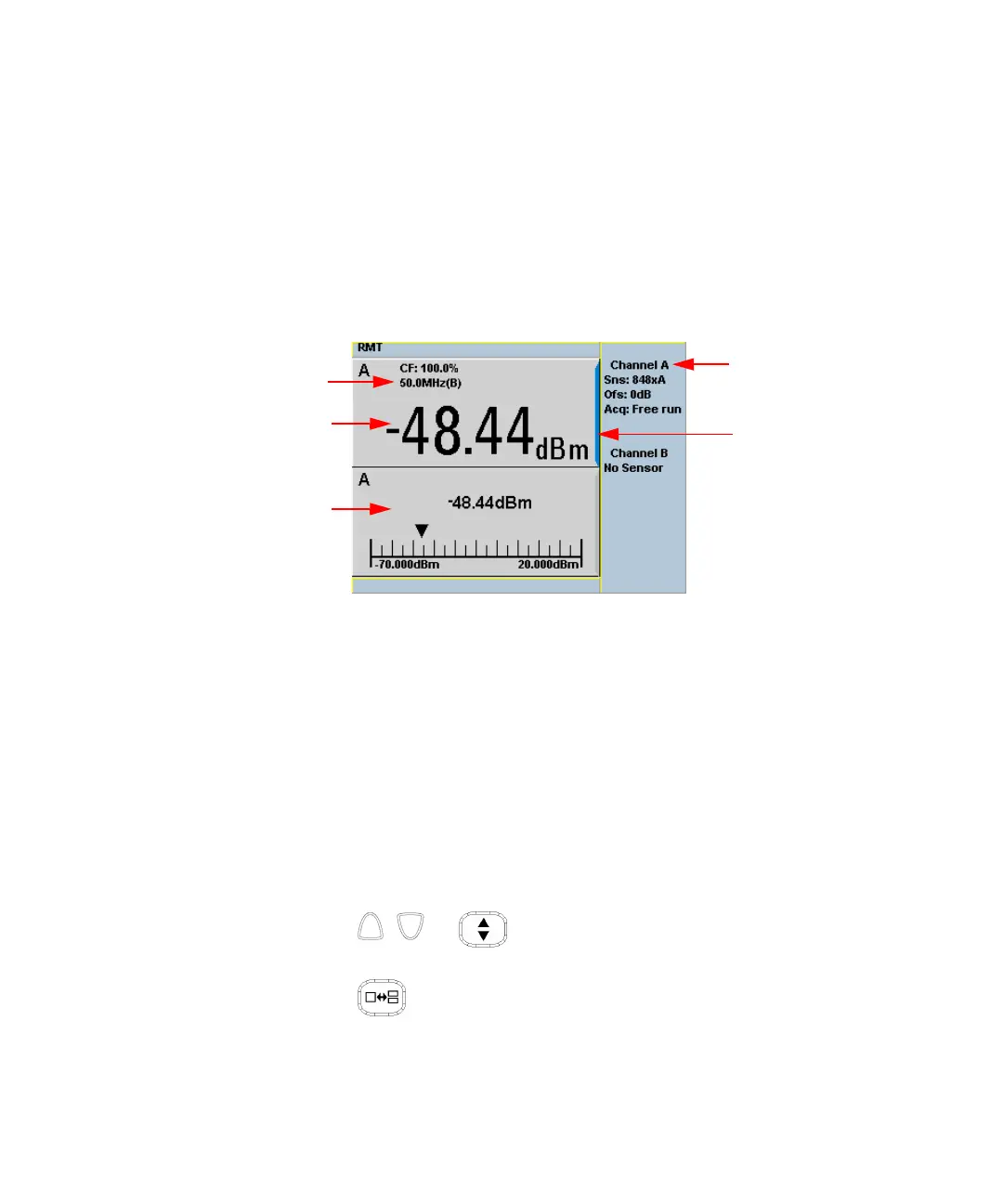
Figure 1-2 Single numeric and analog display
Figure 1-2 shows the default display mode of two measurement windows.
8 The channel measurement frequency.
9 The upper window is configured to show a single numeric display.
10 The lower window is configured to show an analog meter which displays the
measurement result and the meter scaling.
11 This displays the connected sensor, the offset value, and the acquisition mode
on the channel. On dual channel models, it shows for both channels.
12 The blue highlight on the right hand side of the window shows it is the
currently selected measurement display line.
Using the , , or keys, you can change the measurement window
selection.
Using the key on numeric measurement results window, you can
choose either two rectangular windows, a single enlarged window, or a full
screen display. The display style is applied to the currently selected window or
measurement line.



 To Next Page