Using PageScope Web Connection
12
IC-206 12-81
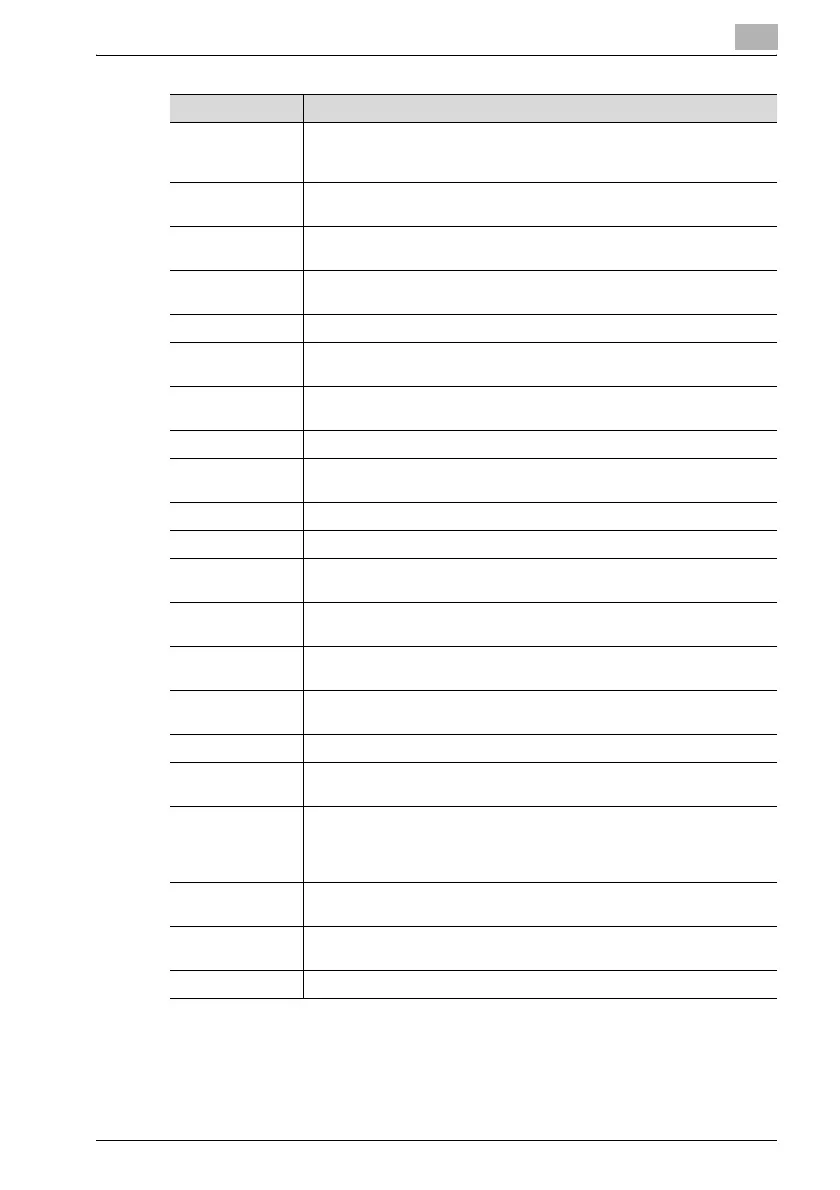
Item Description
Enable POP before
SMTP
Select whether or not POP before SMTP is used. In order to perform user
authentication with POP before SMTP, some settings must be specified so
that the mail server can be accessed correctly with POP.
SMTP Server Ad-
dress
Specify the IP address or host name for the SMTP server. (maximum 64
characters)
Default Subject for
E-mail Attachment
Specify the default subject used when sending scan data attached to an
e-mail message. (maximum 20 characters)
Sender name Specify the sender name used when sending scan data attached to an e-
mail message. (maximum 20 characters)
E-Mail Address Specify the e-mail address of the sender. (maximum 64 characters)
Port Number Specify the port number (between 1 and 65535) of the SMTP server. Nor-
mally, port number 25 is used.
SMTP Server
Timeout
Specify the amount of time until communication with the SMTP server
times out (between 30 and 300 seconds).
Text Insert Select to insert the body text of the e-mail message.
Basic Mode/Ad-
vanced Mode
Select the e-mail mode (basic mode or advanced mode) to be used for
sending documents as Internet faxes.
Max. TX Size Specify the maximum size for transmissions with advanced mode.
Max. Resolution Specify the maximum resolution for transmissions with advanced mode.
Coding Mode Specify the maximum compression encoding method for scan data to be
sent with advanced mode.
POP3 Server Ad-
dress
Specify the IP address or host name for the POP3 server. (maximum 64
characters)
Account Name Specify the account name used to log on to the POP3 server. (maximum
64 characters)
Password Specify the password used to log on to the POP3 server. (maximum 32
characters)
Auto Reception Select whether or not the Auto Reception function is used.
INTERVAL Specify the time interval (between 1 and 60 minutes) for checking for new
e-mail messages during automatic reception.
Reply Address Specify the e-mail address where a reply is sent to error messages. If an
error occurs, a reply to the error message is sent to the e-mail address
specified here. Normally, the e-mail address of the administrator is speci-
fied. (maximum 64 characters)
Port Number Specify the port number (between 1 and 65535) of the POP3 server. Nor-
mally, port number 110 is used.
POP3 Server
Timeout
Specify the amount of time (between 30 and 300 seconds) until the con-
nection with the POP3 server times out.
Header Print Select whether or not the header (title or sender) is printed.







 To Next Page