6 BASIC OPERATION
50
6.2.4 GNSS mode (SER01)
1. Setting
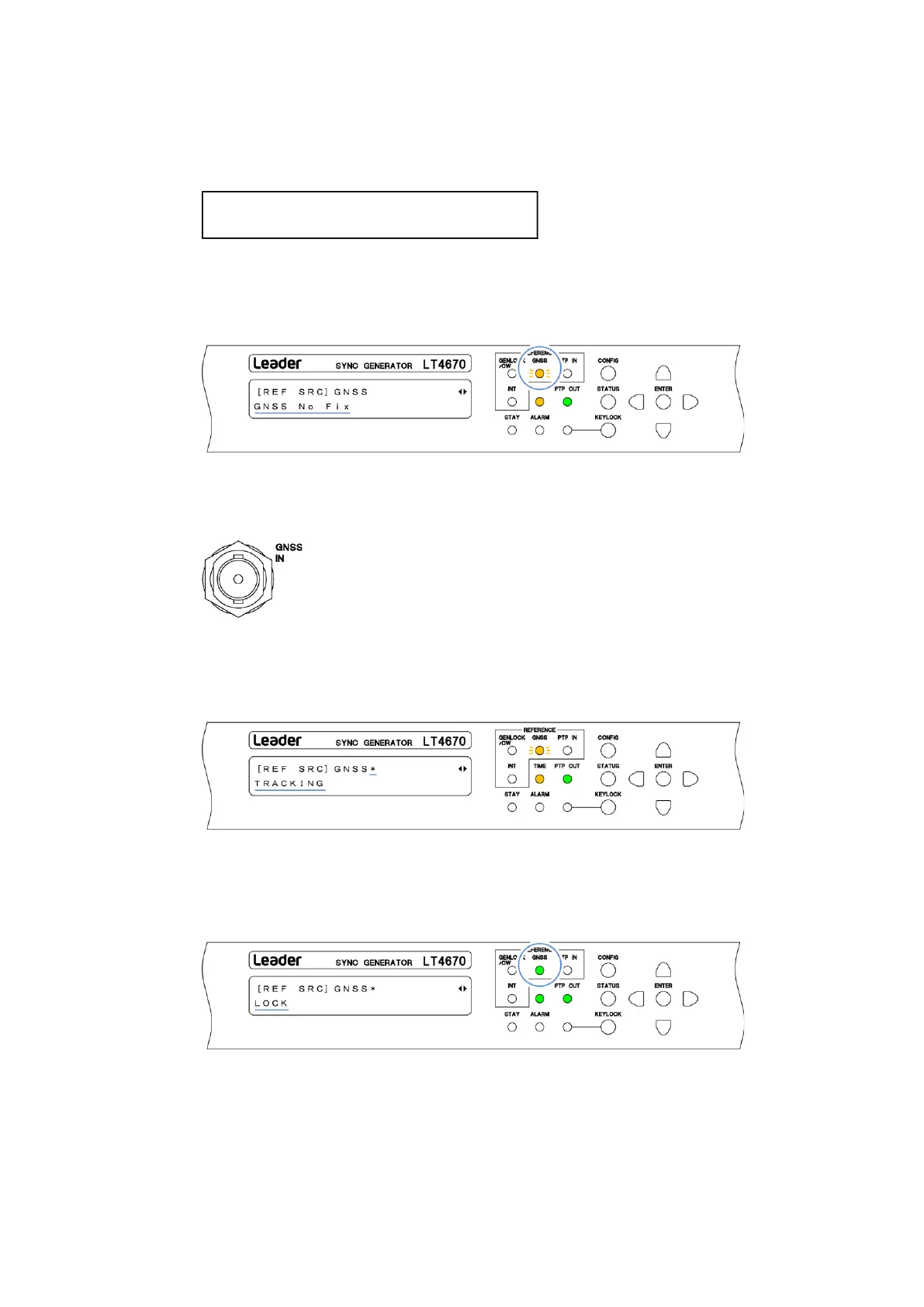
On the REFERENCE CONFIG menu, set REFERENCE SOURCE to GNSS.
When you set REFERENCE SOURCE to GNSS, GNSS on the front panel blinks in orange, and
under "STATUS > INFORMATION > REF SRC", "GNSS No. Fix" appears. From now on, this
screen is used for explanation.
2. Input of a reference signal
Apply a GNSS signal to the GNSS IN connector on the rear panel.
When you apply the signal, an "*" is attached after "GNSS". In addition, the message
changes to "ADJUST FREQ TO GNSS" > "ADJUST PHASE TO GNSS" > "TRACKING" in this
order, and the reference signal is introduced. Wait in this state.
3. Lock
When the instrument is locked with the reference signal, GNSS on the front panel lights in
green, and the message changes to "LOCK". Use the instrument in this state.



 To Next Page