6 BASIC OPERATION
53
3. Lock
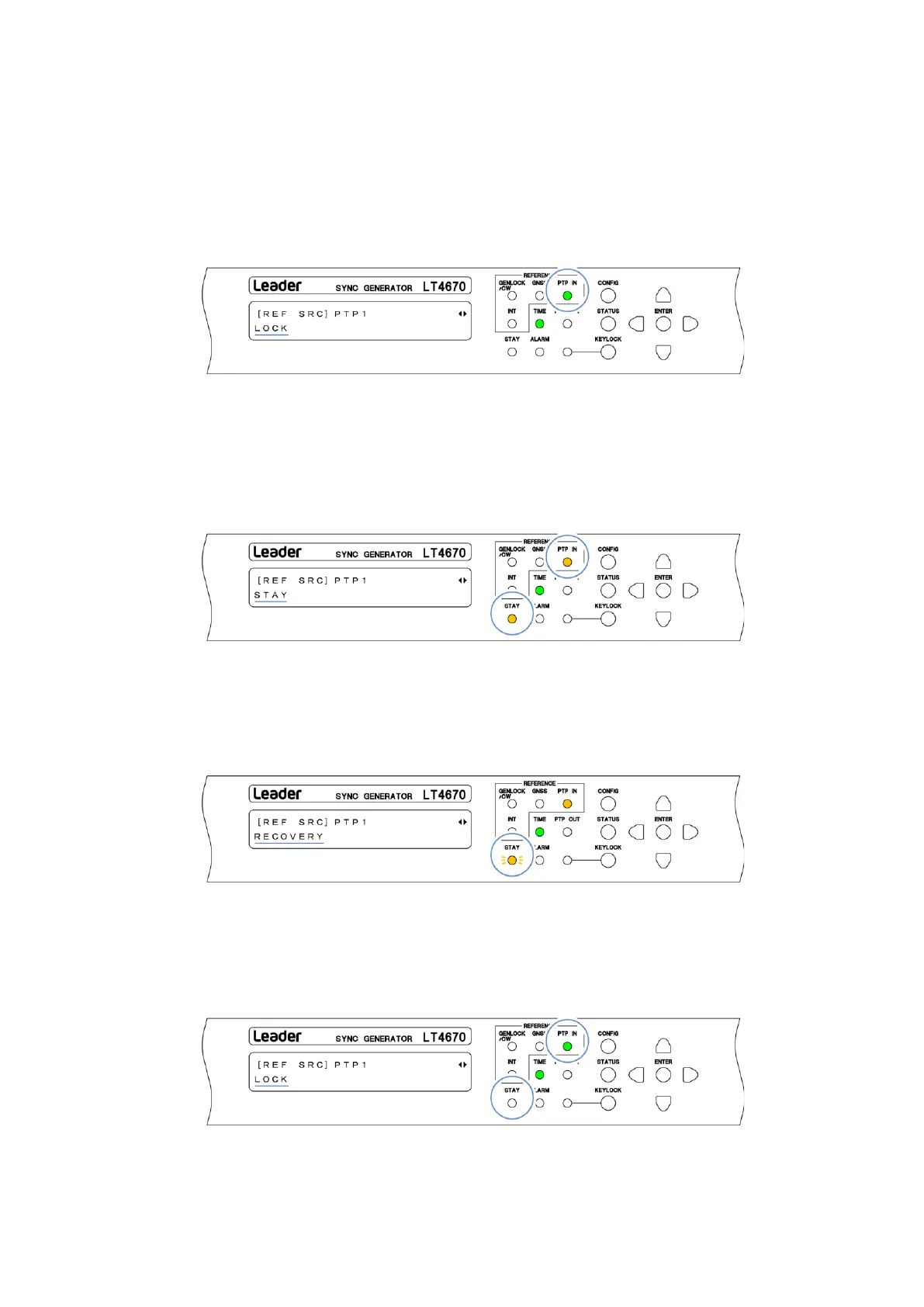
When the instrument is locked with the reference signal, PTP IN on the front panel lights in
green, and the message changes to "LOCK". Use the instrument in this state.
When REFERENCE SOURCE is set to PTP1/2, the instrument automatically selects the
reference signal. "LOCK" is displayed for the reference signal, and "PASSIVE" is displayed for
the other signal.
4. An error occurs in the reference signal
If an error occurs in the reference signal, the frequency that was in use immediately before
the error occurred is maintained (stay-in-sync function).
When stay-in-sync becomes active, PTP IN and STAY light in orange, and the message
changes to "STAY". In this case, check the reference signal.
5. The reference signal is restored
When the reference signal is restored, STAY on the front panel blinks in orange, and the
message changes to "PTP ADJUST FREQ" > "PTP ADJUST PHASE" > "RECOVERY" in this
order. Wait in this state.
6. Relock
When the instrument is relocked with the reference signal, PTP IN on the front panel lights
in green and STAY turns off. In addition, the message changes to "LOCK". Use the
instrument in this state.


 To Next Page
 Loading...

