150 X75HD/X75SD Installation and Operation Manual
Chapter 8: Video Configuration
Typical Applications
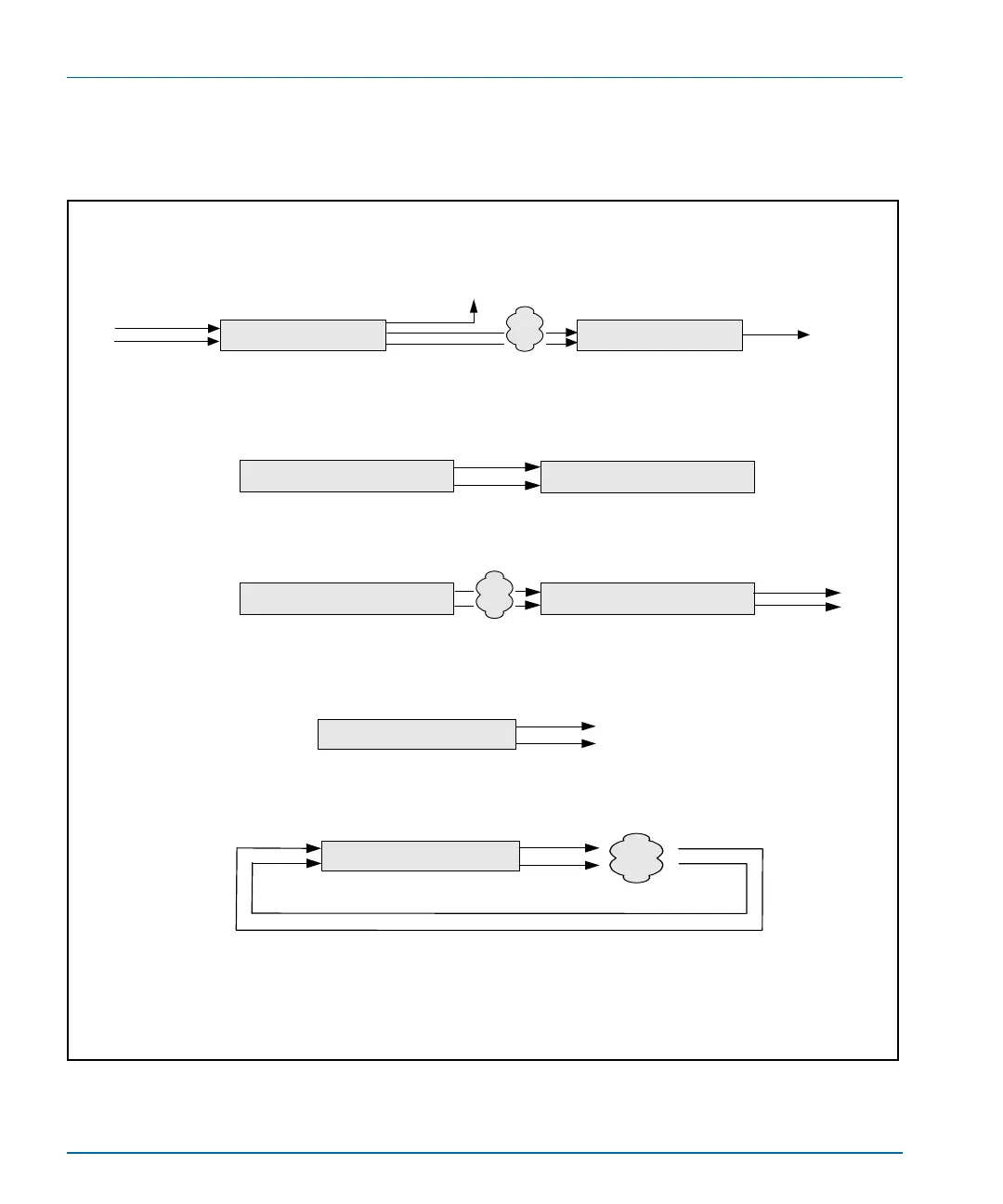
Figure 8-3 illustrates three typical applications for the timing tool.
Figure 8-3. X75OPT-V2A Applications
X7 5
Unknown signal
X75
V2A transmitter
V2A receiver
ggg
X75
Record/ playback transport
Record/ playback transport X75
V2A transmitter
V2A receiver
Step 2: Check relative video to audio timing at an X 75
Step1: Record V2A signal on a file server or tape transport
X75
V2A transmitter
Step1: Send the V2A signal into a transmission system.
X75
V2A receiver/transmitter
Step2: Loop back into the X75 and check the relative video-to-audio timing.
Application #1
Application #2
Step 1: Use current method to adjust for any
video-to-audio timing issues
Step 2: X75 determines whether there have been any
changes to the relative video-to-audio timing and can be
set to correct for those changes.
Application #3
In loop back, HD to HD can be measured, and SD1 to SD2 (or SD2 to SD1)
can be measured.
Analog composite to analog composite, and analog component to analog
component cannot be measured.


 To Next Page